



What are Provisioning Keys

Provisioning Keys are special credentials that give you API access to manage your AI Router API keys programmatically. Provisioning Keys allow you to:
  • Create new Router API keys programmatically
  • List and retrieve Router API keys
  • Update Router API key settings (name, active status)
  • Delete Router API keys
Provisioning Keys can only manage Router API keys, not workspace-level keys or other provisioning keys. Attempting to access workspace keys will result in a 403 Forbidden error.

Creating a Provisioning Key

  1. Navigate to the Provisioning Keys page in the AI Router.
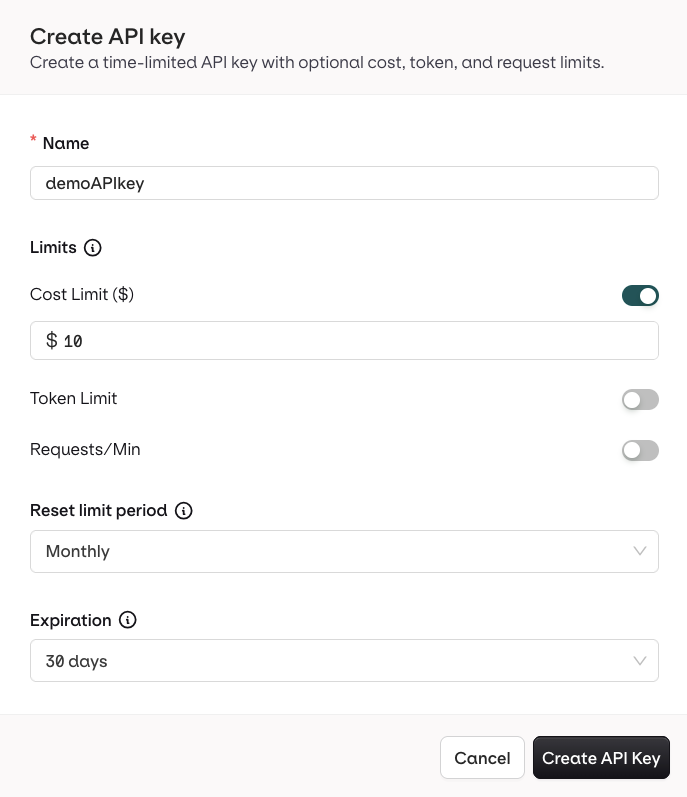
  2. Choose Create Provisioning Key, the following modal opens:

Enter here details for your Provisioning Key

  • choose a unique Name for the key.

Manage Provisioning Keys

Provisioning Keys can be created, viewed, and managed from the dedicated AI Router page to ensure secure access.

Manage your Provisioning keys Here

  • To disable a Provisioning Key, use the Toggle, it can be re-enabled at any time.
  • To delete a Provisioning Key, use the ... button, and choose Delete to revoke a Provisioning Key.
Important: Revoking a Provisioning Key is permanent and cannot be undone. Ensure the key is not being used by any automation or infrastructure-as-code systems before revoking it. Revoking a provisioning key will not affect API keys that were created by it.

Using Provisioning Keys via API

Provisioning Keys can be used to programmatically manage your Router API keys through the provisioning API.

Authentication

Include your Provisioning Key in the Authorization header as a Bearer token:
Authorization: Bearer $PROVISIONING_KEY

Available Endpoints

MethodEndpointDescription
GET/v2/api-keys?source=routerList all Router API keys
POST/v2/api-keysCreate a new Router API key
GET/v2/api-keys/{id}Get a specific Router API key
PATCH/v2/api-keys/{id}Update Router API key (name, active status)
DELETE/v2/api-keys/{id}Delete a Router API key

Creating a Router API Key

curl --request POST \
  --url https://api.orq.ai/v2/api-keys \
  --header "Authorization: Bearer $PROVISIONING_KEY" \
  --header 'Content-Type: application/json' \
  --data '{
    "name": "Production Key",
    "source": "router"
  }'
Response:
{
  "id": "01KFFJ0KX322R3EFXAPFHG7MJB",
  "name": "Production Key",
  "workspace_id": "12345678-1234-1234-1234-1234567890ab",
  "active": true,
  "is_legacy": false,
  "source": "router",
  "created": "2026-01-21T05:56:35.363Z",
  "updated": "2026-01-21T05:56:35.363Z",
  "_id": "01KFFJ0KX5EKZ15FP55PZBVA6D",
  "token": "sk-orq-EXAMPLE_TOKEN_REDACTED_FOR_DOCS"
}

Listing Router API Keys

curl --request GET \
  --url "https://api.orq.ai/v2/api-keys?source=router" \
  --header "Authorization: Bearer $PROVISIONING_KEY"
Response:
[
  {
    "_id": "01KFFJ0KX5EKZ15FP55PZBVA6D",
    "id": "01KFFJ0KX322R3EFXAPFHG7MJB",
    "name": "Production Key",
    "workspace_id": "12345678-1234-1234-1234-1234567890ab",
    "created_by_id": null,
    "updated_by_id": null,
    "active": true,
    "is_legacy": false,
    "source": "router",
    "created": "2026-01-21T05:56:35.363Z",
    "updated": "2026-01-21T05:56:35.363Z",
    "consumption": 0
  }
]

Updating a Router API Key

curl --request PATCH \
  --url https://api.orq.ai/v2/api-keys/01KFFJ0KX322R3EFXAPFHG7MJB \
  --header "Authorization: Bearer $PROVISIONING_KEY" \
  --header 'Content-Type: application/json' \
  --data '{
    "name": "Production Key Updated",
    "active": true
  }'

Deleting a Router API Key

curl --request DELETE \
  --url https://api.orq.ai/v2/api-keys/01KFFJ0KX322R3EFXAPFHG7MJB \
  --header "Authorization: Bearer $PROVISIONING_KEY"

Key Restrictions

Provisioning Keys have important limitations to maintain security:
  • Router keys only - Can only create, list, update, and delete Router API keys. Cannot access workspace-level keys.
  • No API calls - Provisioning Keys cannot make /chat/completions calls or other model invocation endpoints. They are restricted to key management only.
  • Cannot create provisioning keys - A provisioning key cannot create other provisioning keys.
  • No budget or expiration - Provisioning Keys do not support credit limits, budget caps, or expiration dates.
  • No workspace keys - Provisioning Keys cannot access, list, or manage workspace-level API keys. You must use the UI for workspace key management.