

Observability
Instrument your code with OpenTelemetry to capture traces, logs, and metrics for every LLM call, agent step, and tool use.
Observability
Getting Started
Deepset Haystack is a powerful framework for building RAG (Retrieval-Augmented Generation) pipelines and document search systems. Tracing Haystack with Orq.ai provides comprehensive insights into pipeline performance, component interactions, retrieval effectiveness, and answer generation quality to optimize your search and QA applications.Prerequisites
Before you begin, ensure you have:- An Orq.ai account and API Key
- Haystack 3.x installed in your project (
haystack-ai) - Python 3.8+
- API keys for your chosen LLM and embedding providers
Install Dependencies
# Core Haystack and OpenTelemetry packages
pip install haystack-ai opentelemetry-sdk opentelemetry-exporter-otlp

# OpenLLMetry (Traceloop) instrumentation SDK
pip install traceloop-sdk

# LLM and embedding providers
pip install openai anthropic cohere

# Optional: Document processing and vector stores
pip install chroma-haystack pinecone-haystack weaviate-haystack
pip install pypdf python-docx
Configure Orq.ai
Set up your environment variables to connect to Orq.ai’s OpenTelemetry collector: Unix/Linux/macOS:export OTEL_EXPORTER_OTLP_ENDPOINT="https://my.orq.ai/v2/otel"
export OTEL_EXPORTER_OTLP_HEADERS="Authorization=Bearer <ORQ_API_KEY>"
export OTEL_RESOURCE_ATTRIBUTES="service.name=haystack-app,service.version=1.0.0"
export OPENAI_API_KEY="<YOUR_OPENAI_API_KEY>"
export COHERE_API_KEY="<YOUR_COHERE_API_KEY>"
$env:OTEL_EXPORTER_OTLP_ENDPOINT = "https://my.orq.ai/v2/otel"
$env:OTEL_EXPORTER_OTLP_HEADERS = "Authorization=Bearer <ORQ_API_KEY>"
$env:OTEL_RESOURCE_ATTRIBUTES = "service.name=haystack-app,service.version=1.0.0"
$env:OPENAI_API_KEY = "<YOUR_OPENAI_API_KEY>"
$env:COHERE_API_KEY = "<YOUR_COHERE_API_KEY>"
OTEL_EXPORTER_OTLP_ENDPOINT=https://my.orq.ai/v2/otel
OTEL_EXPORTER_OTLP_HEADERS=Authorization=Bearer <ORQ_API_KEY>
OTEL_RESOURCE_ATTRIBUTES=service.name=haystack-app,service.version=1.0.0
OPENAI_API_KEY=<YOUR_OPENAI_API_KEY>
COHERE_API_KEY=<YOUR_COHERE_API_KEY>
Integrations
Choose your preferred OpenTelemetry framework for collecting traces, we’ll be using OpenLLMetry (Traceloop).import os
from traceloop.sdk import Traceloop
from traceloop.sdk.decorators import workflow, task
from haystack import Document, Pipeline
from haystack.components.builders import ChatPromptBuilder
from haystack.components.embedders import OpenAIDocumentEmbedder, OpenAITextEmbedder
from haystack.components.generators.chat import OpenAIChatGenerator
from haystack.components.retrievers.in_memory import InMemoryEmbeddingRetriever
from haystack.components.writers import DocumentWriter
from haystack.dataclasses import ChatMessage
from haystack.document_stores.in_memory import InMemoryDocumentStore
Traceloop.init(
app_name="haystack-app",
api_endpoint="https://my.orq.ai/v2/otel",
headers={"Authorization": f"Bearer {os.environ['ORQ_API_KEY']}"}
)
PROMPT_TEMPLATE = """Based on the following context, answer the question.
Context:
{% for doc in documents %}{{ doc.content }}
{% endfor %}
Question: {{ query }}
Answer:"""
@workflow(name="haystack-rag-pipeline")
def create_rag_system():
document_store = InMemoryDocumentStore()
documents = [
Document(content="Renewable energy sources include solar, wind, hydroelectric, and geothermal power. These sources are sustainable and have minimal environmental impact."),
Document(content="Solar panels convert sunlight into electricity using photovoltaic cells. They are becoming increasingly cost-effective and efficient."),
Document(content="Wind turbines generate electricity by converting wind energy into mechanical energy. Wind farms are common in areas with consistent wind patterns.")
]
# Index the documents: embed them, then write them to the store.
embedded = OpenAIDocumentEmbedder().run(documents=documents)
DocumentWriter(document_store).run(documents=embedded["documents"])
query_pipeline = Pipeline()
query_pipeline.add_component("text_embedder", OpenAITextEmbedder())
query_pipeline.add_component("retriever", InMemoryEmbeddingRetriever(document_store))
query_pipeline.add_component(
"prompt_builder",
ChatPromptBuilder(
template=[ChatMessage.from_user(PROMPT_TEMPLATE)],
required_variables=["query"],
),
)
query_pipeline.add_component("generator", OpenAIChatGenerator(model="gpt-5.6-sol"))
query_pipeline.connect("text_embedder.embedding", "retriever.query_embedding")
query_pipeline.connect("retriever.documents", "prompt_builder.documents")
query_pipeline.connect("prompt_builder.prompt", "generator.messages")
return query_pipeline
@task(name="execute-query")
def execute_query(pipeline: Pipeline, question: str):
return pipeline.run({
"text_embedder": {"text": question},
"prompt_builder": {"query": question},
})
# Create and use RAG system
rag_pipeline = create_rag_system()
result = execute_query(rag_pipeline, "What are the advantages of solar energy?")
print(result["generator"]["replies"][0].text)
Examples
Advanced Pipeline with Custom Componentsfrom traceloop.sdk import Traceloop
from traceloop.sdk.decorators import workflow, task
from haystack import Pipeline, Document, component
from haystack.components.builders import ChatPromptBuilder
from haystack.components.generators.chat import OpenAIChatGenerator
from haystack.components.retrievers.in_memory import InMemoryBM25Retriever
from haystack.dataclasses import ChatMessage
from haystack.document_stores.in_memory import InMemoryDocumentStore
from typing import List, Dict, Any
import os
import re
Traceloop.init(
app_name="haystack-app",
api_endpoint="https://my.orq.ai/v2/otel",
headers={"Authorization": f"Bearer {os.environ['ORQ_API_KEY']}"}
)
PROMPT_TEMPLATE = """Based on the provided context, answer the question accurately and comprehensively.
Context Documents:
{% for doc in documents %}{{ doc.content }}
{% endfor %}
Enhanced Query: {{ enhanced_query }}
Please provide a detailed response:"""
@component
class QueryAnalyzer:
"""Custom component to analyze and enhance queries"""
@component.output_types(enhanced_query=str, query_type=str, entities=List[str])
def run(self, query: str) -> Dict[str, Any]:
# Simple query analysis
query_lower = query.lower()
# Determine query type
if any(word in query_lower for word in ["what", "define", "explain"]):
query_type = "definition"
elif any(word in query_lower for word in ["how", "process", "steps"]):
query_type = "process"
elif any(word in query_lower for word in ["compare", "difference", "versus"]):
query_type = "comparison"
else:
query_type = "general"
# Extract potential entities (simple approach)
entities = re.findall(r'\b[A-Z][a-z]+(?:\s+[A-Z][a-z]+)*\b', query)
# Enhance query based on type
if query_type == "definition":
enhanced_query = f"Provide a comprehensive definition and explanation of: {query}"
elif query_type == "process":
enhanced_query = f"Describe the process and steps involved in: {query}"
elif query_type == "comparison":
enhanced_query = f"Compare and contrast the following: {query}"
else:
enhanced_query = query
return {
"enhanced_query": enhanced_query,
"query_type": query_type,
"entities": entities
}
@component
class AnswerPostProcessor:
"""Custom component to post-process generated answers"""
@component.output_types(processed_answer=str, confidence_score=float)
def run(self, replies: List[ChatMessage], query_type: str) -> Dict[str, Any]:
# OpenAIChatGenerator returns ChatMessage objects; read the text off the first.
processed_answer = (replies[0].text if replies else "").strip()
# Add structure based on query type
if query_type == "definition" and not processed_answer.startswith("Definition:"):
processed_answer = f"Definition: {processed_answer}"
elif query_type == "process" and "steps" not in processed_answer.lower():
processed_answer = f"Process Overview: {processed_answer}"
# Simple confidence scoring (in real implementation, this would be more sophisticated)
confidence_score = 0.8 if len(processed_answer) > 100 else 0.6
return {
"processed_answer": processed_answer,
"confidence_score": confidence_score
}
@workflow(name="haystack-rag-pipeline")
def advanced_custom_pipeline():
# Setup document store with diverse content
document_store = InMemoryDocumentStore()
documents = [
Document(content="Photosynthesis is the process by which plants use sunlight, water, and carbon dioxide to produce glucose and oxygen. This process occurs in chloroplasts and involves light-dependent and light-independent reactions."),
Document(content="Machine learning is a method of data analysis that automates analytical model building. It uses algorithms that iteratively learn from data, allowing computers to find insights without being explicitly programmed."),
Document(content="The water cycle describes how water moves through Earth's atmosphere, land, and oceans. It includes processes like evaporation, condensation, precipitation, and collection."),
Document(content="Renewable energy sources include solar power, wind power, hydroelectric power, and geothermal energy. These sources are sustainable and have lower environmental impact compared to fossil fuels.")
]
document_store.write_documents(documents)
# Build advanced pipeline with custom components
pipeline = Pipeline()
# Add components
pipeline.add_component("query_analyzer", QueryAnalyzer())
pipeline.add_component("retriever", InMemoryBM25Retriever(document_store, top_k=2))
pipeline.add_component(
"prompt_builder",
ChatPromptBuilder(
template=[ChatMessage.from_user(PROMPT_TEMPLATE)],
required_variables=["enhanced_query"],
),
)
pipeline.add_component("generator", OpenAIChatGenerator(
model="gpt-5.6-sol",
generation_kwargs={"temperature": 0.2, "max_tokens": 250}
))
pipeline.add_component("post_processor", AnswerPostProcessor())
# Connect components
pipeline.connect("query_analyzer.enhanced_query", "retriever.query")
pipeline.connect("query_analyzer.enhanced_query", "prompt_builder.enhanced_query")
pipeline.connect("retriever.documents", "prompt_builder.documents")
pipeline.connect("prompt_builder.prompt", "generator.messages")
pipeline.connect("generator.replies", "post_processor.replies")
pipeline.connect("query_analyzer.query_type", "post_processor.query_type")
# Test with various query types
test_queries = [
"What is photosynthesis?",
"How does the water cycle work?",
"Compare renewable energy and fossil fuels",
"Explain machine learning algorithms"
]
results = []
for query in test_queries:
# include_outputs_from keeps the analyzer's outputs in the result;
# by default a pipeline only returns sockets nothing else consumed.
result = pipeline.run(
{"query_analyzer": {"query": query}},
include_outputs_from={"query_analyzer"},
)
results.append({
"original_query": query,
"query_type": result["query_analyzer"]["query_type"],
"entities": result["query_analyzer"]["entities"],
"final_answer": result["post_processor"]["processed_answer"],
"confidence": result["post_processor"]["confidence_score"]
})
return results
custom_results = advanced_custom_pipeline()
for result in custom_results:
print(f"Query: {result['original_query']}")
print(f"Type: {result['query_type']}")
print(f"Entities: {result['entities']}")
print(f"Answer: {result['final_answer'][:150]}...")
print(f"Confidence: {result['confidence']:.2f}\n")
View Traces
To view Traces, head to the Traces tab in the Orq.ai studio.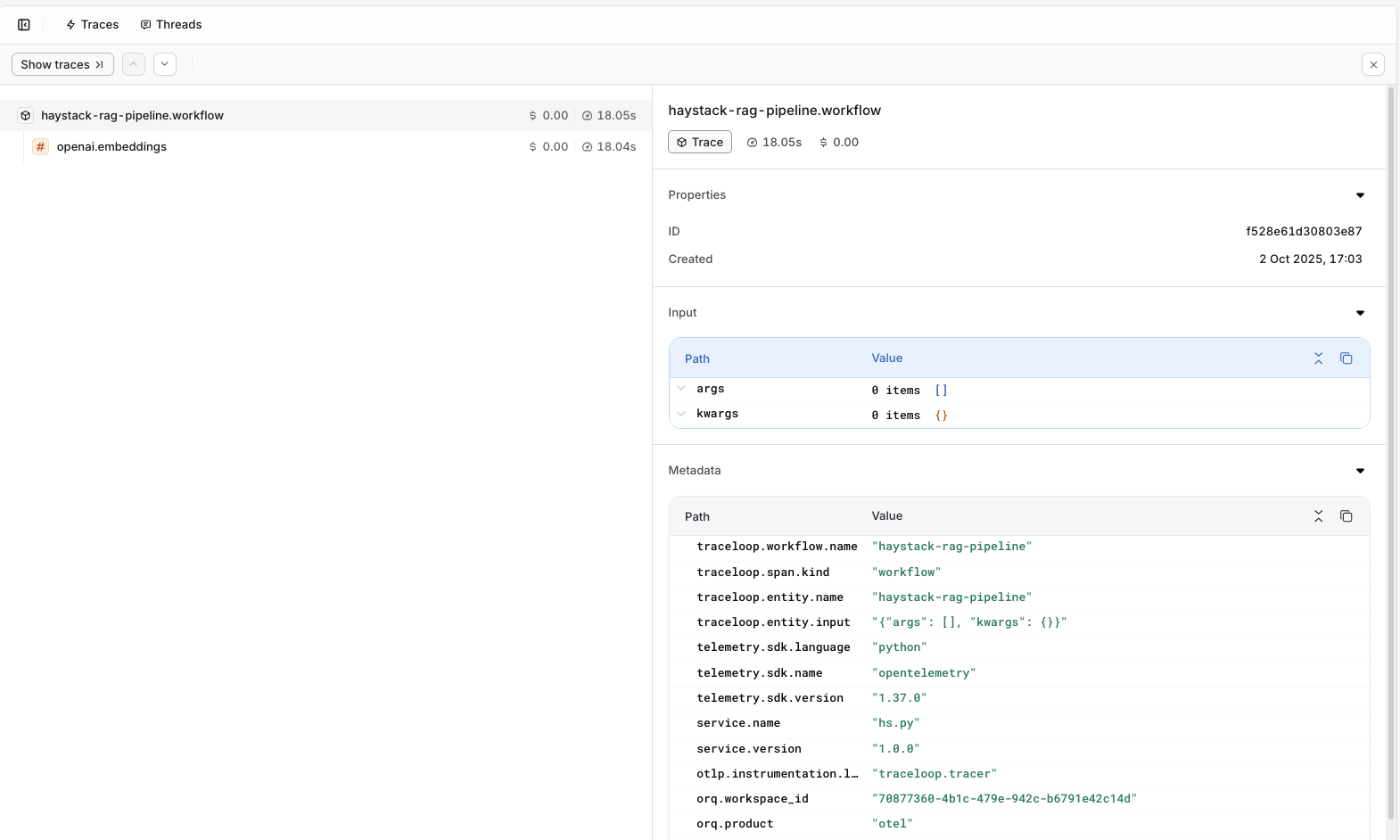
Evaluations & Experiments
Once your agents are running, use Evaluatorq to score outputs across a dataset and Experiments to compare configurations side-by-side.Run Evaluations with Evaluatorq
Run parallel evaluations across your agents and compare results.
Run Experiments via the API
Compare agent configurations and view results in the AI Studio.