

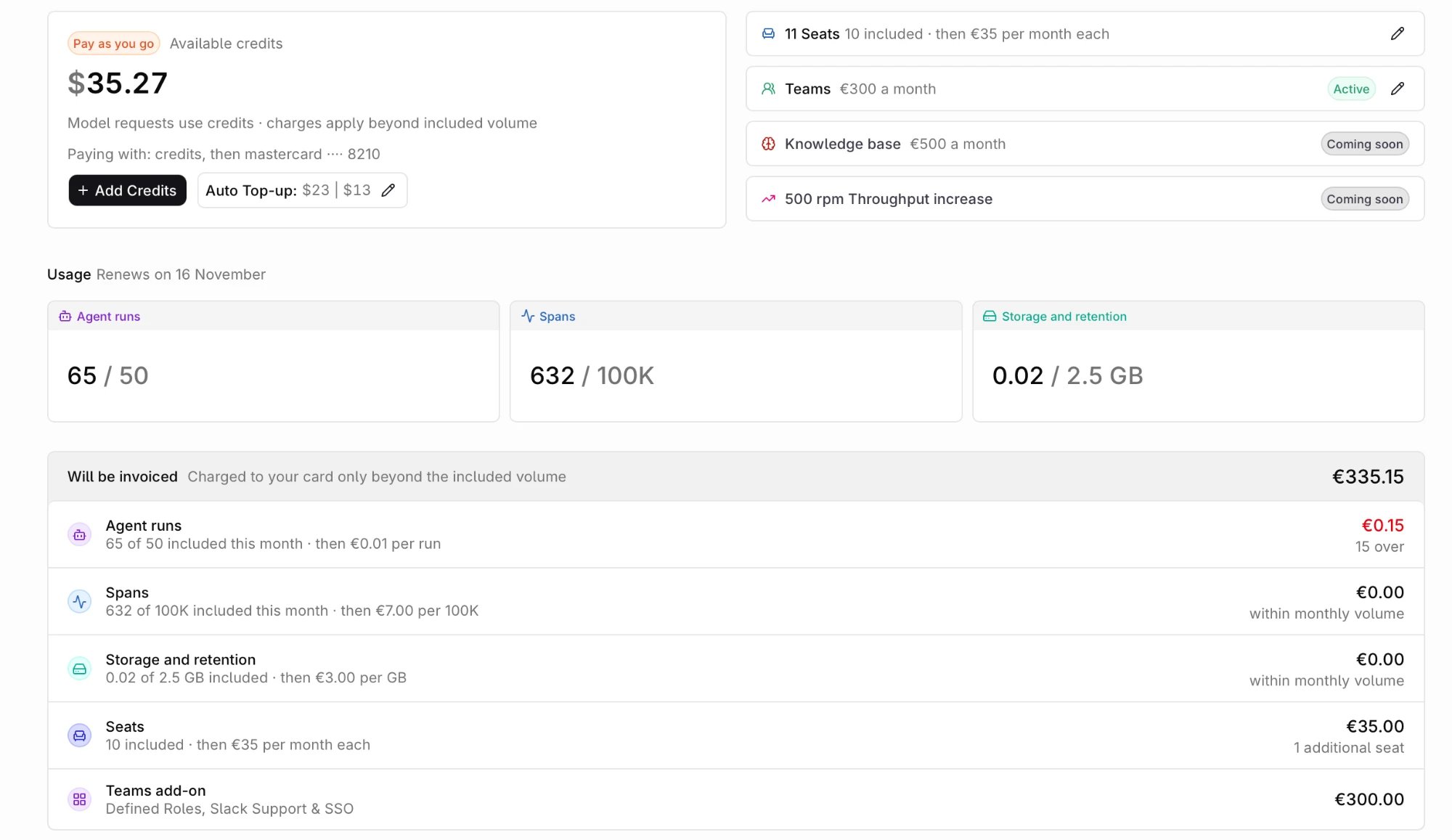
The Billing page on Pay as you go: credit balance, seats and add-ons, usage against the plan, and what will be invoiced beyond the included volume.
What credits and invoices cover
Usage
The Usage tiles read Agent runs, Spans, and Storage and retention against the plan allowance, and the header carries the renewal date. The breakdown below repeats each meter with what is left.Available credits
The plan card carries the balance and an Add credits button. On Pay as you go it is captioned Available credits and adds the auto top-up control. The balance is shared across every project in the organization and is consumed as requests go through the AI Gateway, at each model’s token pricing.Credits cover model requests only. Spans, storage, and agent runs beyond the plan’s included volume are metered and invoiced monthly to the card, not drawn from credits. See AI Gateway pricing for model and tracing rates.
Add Credits
1
Select Add Credits
Open the plan card and select Add Credits.
2
Enter an amount
The minimum purchase is $10. The sheet shows the amount, a service fee, any tax, and the total before payment.
3
Add a Tax ID (optional)
Expand Edit Tax ID, choose the country and tax ID type, and enter the number for invoices.
4
Select a payment method
Choose a saved card or add a new one.
5
Enter name and billing address
Both are required for the payment processor.
6
Confirm the purchase
Credits are added to the balance immediately.
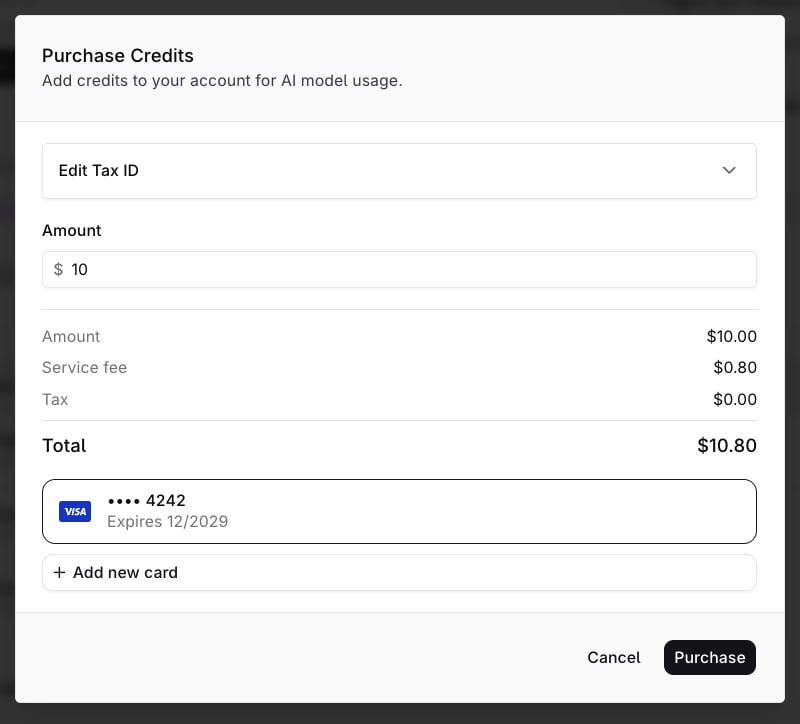
The Purchase Credits sheet: amount, service fee, tax, total, and the card to charge.
Payment method
The Payment Method panel lists the saved cards with their expiry and the Default badge, and + New card adds one.Auto top-up
Auto top-up buys credits when the balance falls below a threshold.- Enable Auto top-up.
- Set the Top-up threshold, for example $50.
- Set the Amount to add, for example $200.
- Select Save changes.
Free
Before a payment method is added, the plan card reads Free with No card on file, and the page offers Payment method and Explore plans. A Free workspace is Pay as you go without billing details: model requests are rate-limited instead of billed.- 50 requests a day, and 20 a minute. See Rate limits.
- 14-day retention for traces and logs. See Data retention.
- 3 Deployments, 3 Agents, 2 Knowledge Bases or Memory Stores, and 1 Webhook. See Quota limits.
- Model requests run on a provider key from a workspace integration. Credits, which work with any model, start with a payment method.
Seats and add-ons
The plan card shows the seat count beside the balance. Seats cap how many members the workspace can invite on and Pay as you go. Seats are added and removed in the Manage your seats dialog, confirmed with Add N seats or Remove N seats. Changes apply immediately and land on the next invoice.Invite a member only when a free seat exists. See Members and Teams.
Invoice history
Every charge produces a row in Invoice history: date, time in the viewer’s local time zone, description, amount, and the invoice number with a download for the PDF.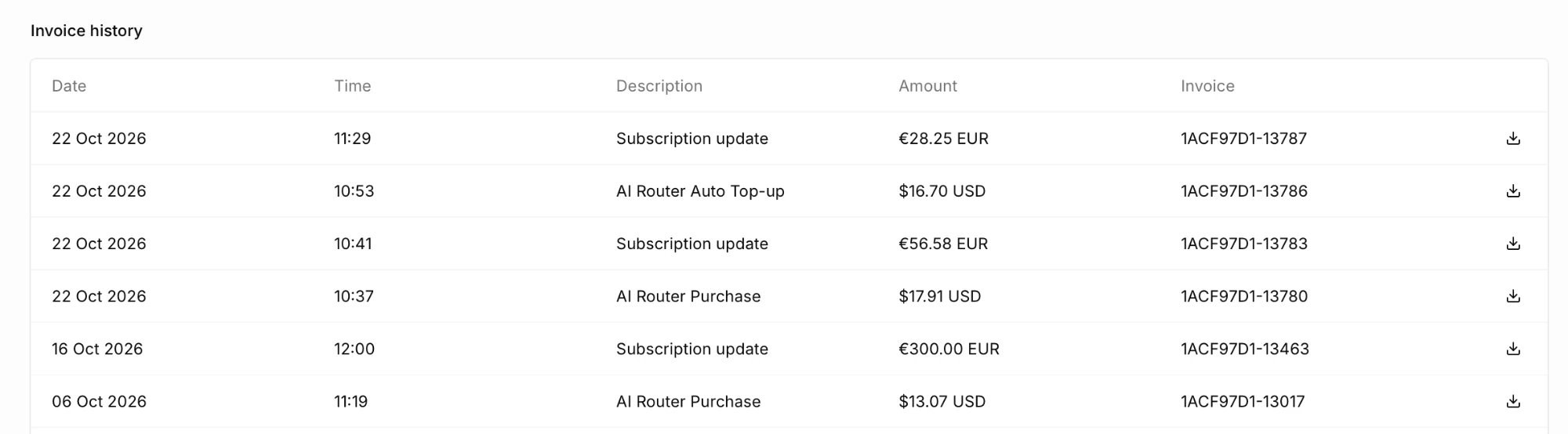
Invoice history: one row per charge, with the invoice number and PDF download in the Invoice column.
Sidebar plan usage
The footer of the sidebar carries a usage widget labelled with the workspace plan. Select the widget to expand it and read each meter against its plan allowance:
Explore plans in the top bar opens the pricing page and is hidden on Enterprise subscriptions.
Understanding Trace Storage Usage
Storage usage measures telemetry ingested during a billing cycle. It includes traces from Orq.ai requests and OpenTelemetry exporters. Each trace contains one or more spans. The trace total is the sum of each span:total_tokens and are not added again.
orq.storage_size attribute on the span replaces the formula.
Workspace storage usage also includes ingested OpenTelemetry logs, metered separately using their recorded raw byte size.
Conversation history and repeated content
When a Responses API request usesprevious_response_id, Orq.ai reconstructs the conversation context before calling the model. That context is included in the model span’s input tokens, so a later step bills the tokens the model processed.
The same input can appear in more than one attribute on the model span and again on an Agent span. The meter uses the model span’s token total for that call. It does not bill each stored copy as extra tokens.
Understanding Events
A single Deployment invoke contains multiple events, each event will incur costs reflected in your Billing and Plan Usage. To understand better the events held within your Deployments, lookup Analytics and explore the events embedded into each generation.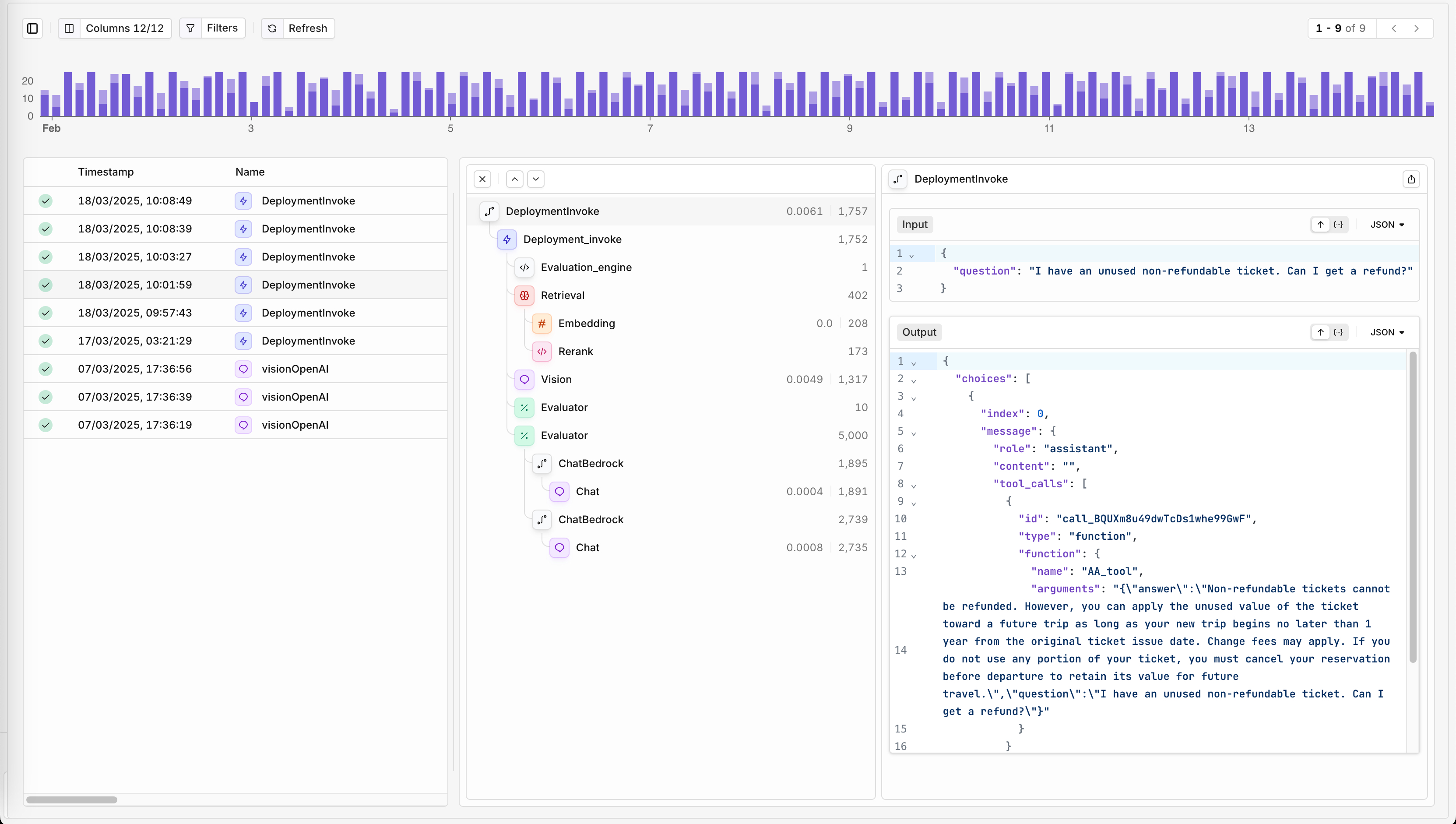
Each trace and event detail will hold usage and billing information.
Rate Limits
Our APIs are protected through Rate Limits on a per-account basis to ensure fair and efficient use of the API. This helps maintain optimal performance and prevent server overload, while also protecting against potential abuse and limiting costs effectively. When reaching rate limit, API calls are denied with a 429 Too Many Requests response.See Rate limits & quotas for how platform limits, budget limits, and provider limits interact.
To learn more about the Orq.ai Pricing options or to upgrade your plan, see Our Pricing Page.
BYOK and private models
A request routed through a provider integration key or to a private model draws no credits: the provider charges the account that owns the key for the model usage. A platform fee applies instead, as listed on Pricing: the first 1M BYOK requests each month are free, then 4%. Traces still record the call: the span carries the cost calculated at the model’s list price withBillable: No, and that cost stays out of the credit balance.
Rate limits apply to every request that reaches the gateway, BYOK included: a BYOK request counts toward the plan’s per-minute limit like any other request.