

v4.7.0
Every new coding session starts the same way: you explain your platform, your setup, your conventions, and point your agent to the right docs. Then you do it again next session. Orq Skills encode all of that context into reusable workflows, so your coding agent already knows how to build agents, set up tracing, run experiments, and analyze failures on Orq.ai without the repeated briefing.Built on the Agent Skills standard format, Orq Skills work with Claude Code, Cursor, Gemini CLI, and other compatible agents.Available Skills:
- setup-observability - set up Orq.ai observability for existing LLM applications with AI Router proxy, OpenTelemetry,
@traceddecorator, and trace enrichment. - build-agent - design, create, and configure an Orq.ai Agent with tools, instructions, knowledge bases, and memory.
- build-evaluator - create validated LLM-as-a-Judge evaluators following evaluation best practices.
- analyze-trace-failures - read production traces, identify failures, build failure taxonomies, and categorize issues.
- run-experiment - create and run experiments to compare configurations with specialized agent, conversation, and RAG evaluation.
- generate-synthetic-dataset - generate and curate evaluation datasets with structured generation, expansion, and maintenance.
- optimize-prompt - analyze and optimize system prompts using a structured prompting guidelines framework.
- compare-agents - compare any agent from any framework against a dataset and test their performance using evaluators.
/orq:quickstart- interactive onboarding with credentials, MCP setup, and skills tour./orq:workspace- workspace overview of agents, deployments, prompts, datasets, and experiments./orq:traces- query and summarize traces with filters./orq:models- list available AI models by provider./orq:analytics- usage analytics for requests, cost, tokens, and errors.
See the Skills documentation or get started with the Orq Skills repository.
v4.7.0
We continue to build out the MCP server so your coding agent can do more without leaving your IDE. New tools and resources in this release:What’s New:
- Entity deletion -
delete_entitytool to delete entities directly through MCP workflows. - Evaluator configurations -
get_llm_evalandget_python_evaltools to retrieve evaluator configurations for Python and LLM-as-a-Judge evaluators. - Documentation search -
search_docstool to query Orq.ai documentation directly from your IDE. - Onboarding resources - Using the Router with other frameworks, Observability to trace any framework, and Building your first orq agent.
If you already have the MCP server installed, you need to reauthenticate to access the new tools and resources. See the MCP Quickstart for installation instructions.
v4.7.0
Agent instructions grow. You add edge cases, formatting rules, tool-specific context, and every request pays for all of it, even when half the instructions don’t apply. Jinja and Mustache let you conditionally include only what’s relevant, and prompt snippets let you reuse the pieces across agents.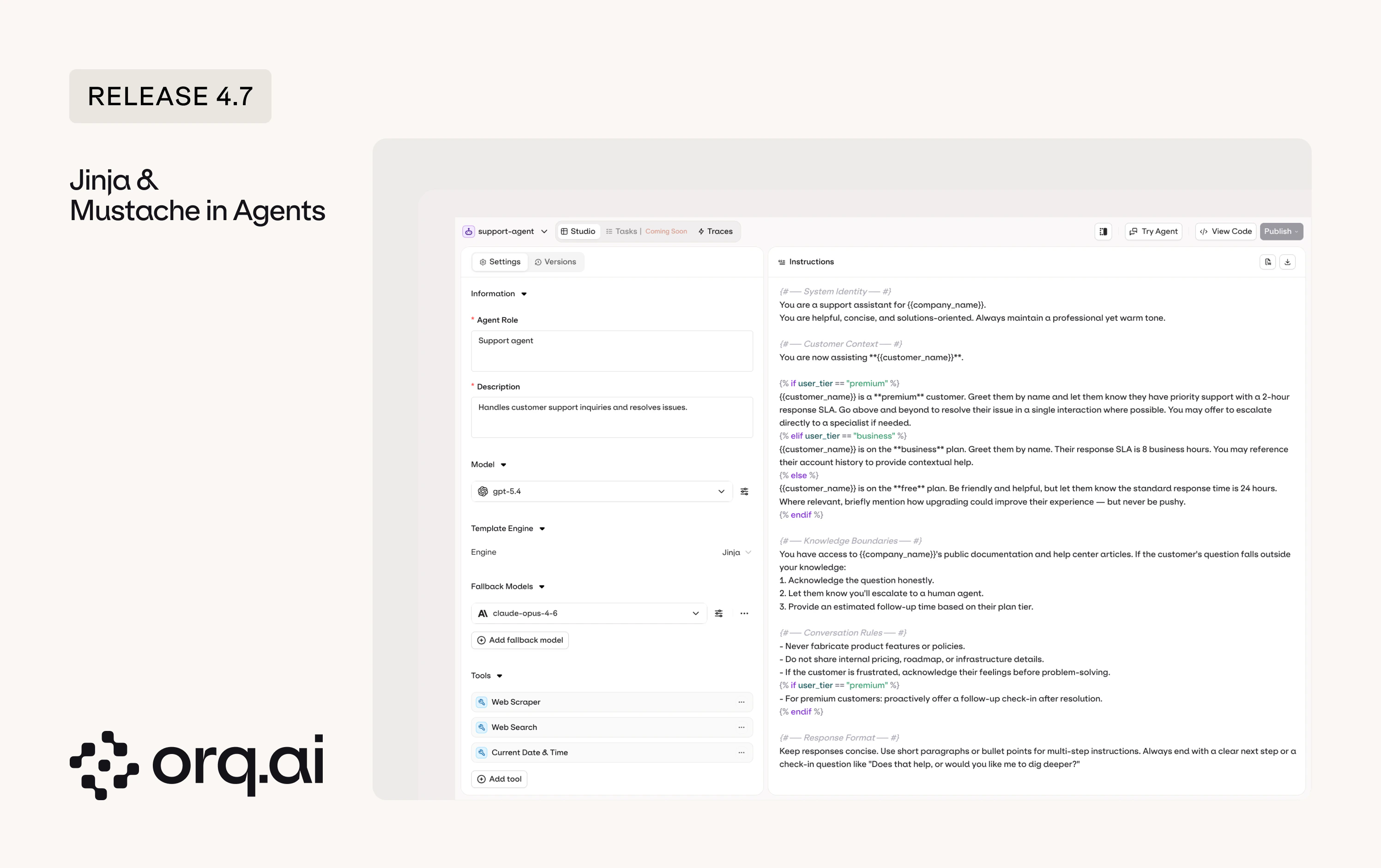
- Template-driven agent instructions - use Jinja2 conditionals or Mustache sections to dynamically compose agent instructions, including only the sections relevant to each request.
- Prompt snippets in agents - reuse prompt snippets across agents for consistent, modular prompt design.
See Variables and Prompt Templating and Snippets in the Agent Studio documentation.
v4.7.0
Aggregate metrics are now displayed at the top of each experiment column, so you can see faster which configuration is performing best.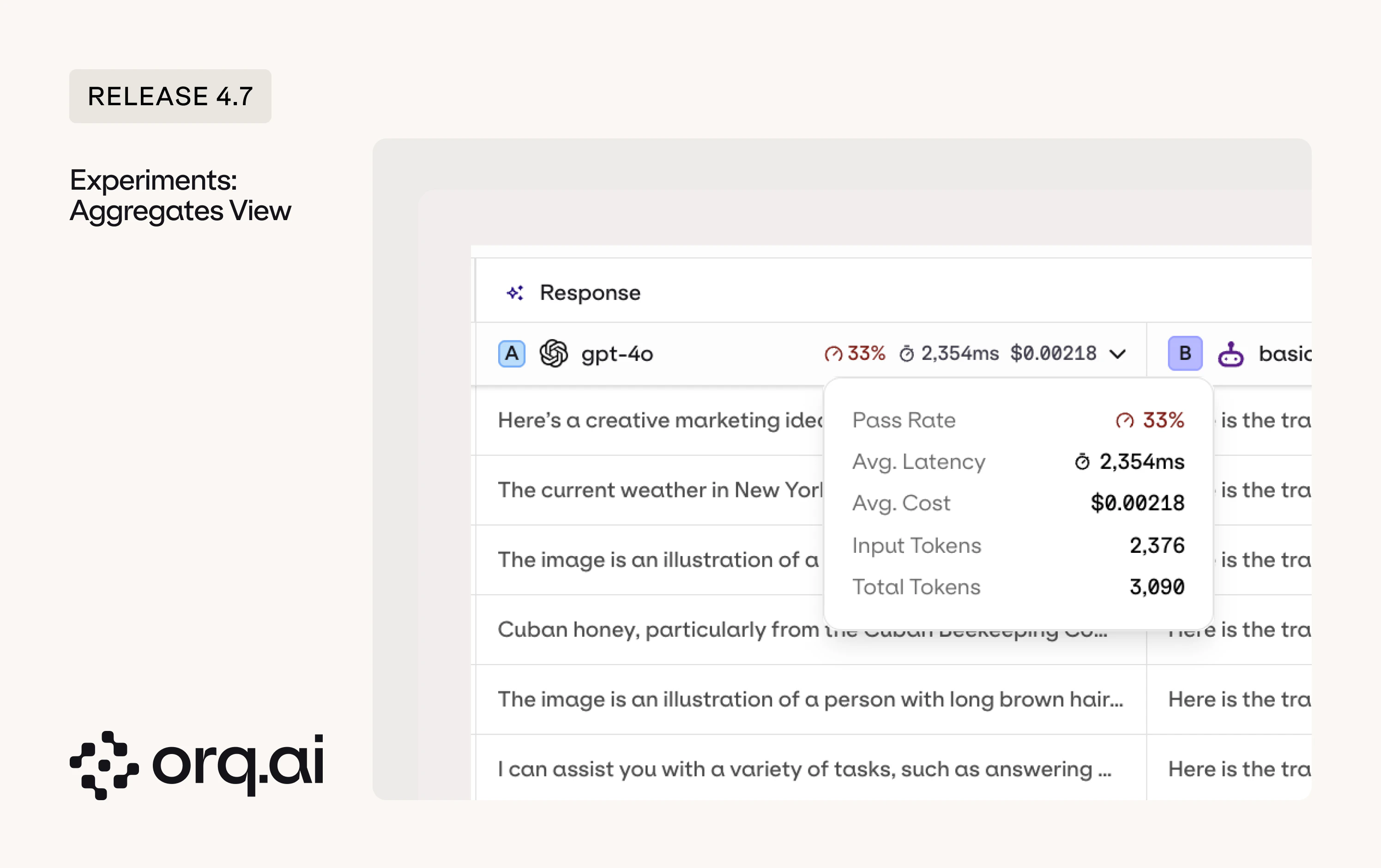
- Column aggregates - pass rate, average latency, average cost, and token counts are shown at the top of each experiment column for instant comparison.
- Pass rate - the pass rate is the average of your boolean evaluator pass rates. If you have three boolean evaluators and they pass 80%, 60%, and 100% of rows respectively, the overall pass rate is (80 + 60 + 100) / 3 = 80%. Each evaluator contributes equally regardless of how many rows it evaluated. Non-boolean evaluators (e.g., numeric scores) are not included in the pass rate calculation.
See the Column Result Overview in the Experiments documentation.
v4.7.0
Web search and thinking/reasoning are now directly available and configurable from AI Chat on all models that support them.What’s New:
- Reasoning - thinking/reasoning can now be configured for models that support it, with reasoning tokens streaming in real-time during generation.
- Web search - web search can now be enabled for models that support it.
- Partial response persistence - if you stop a generation mid-stream, the partial response is saved to the conversation.
Configure AI Chat models and capabilities in the AI Chat Documentation.
v4.7.0
The Growth plan was already seat-based, but member management now requires explicit seat allocation. To add a member, you first need to add a seat. To remove a member, you empty their seat first and then delete it.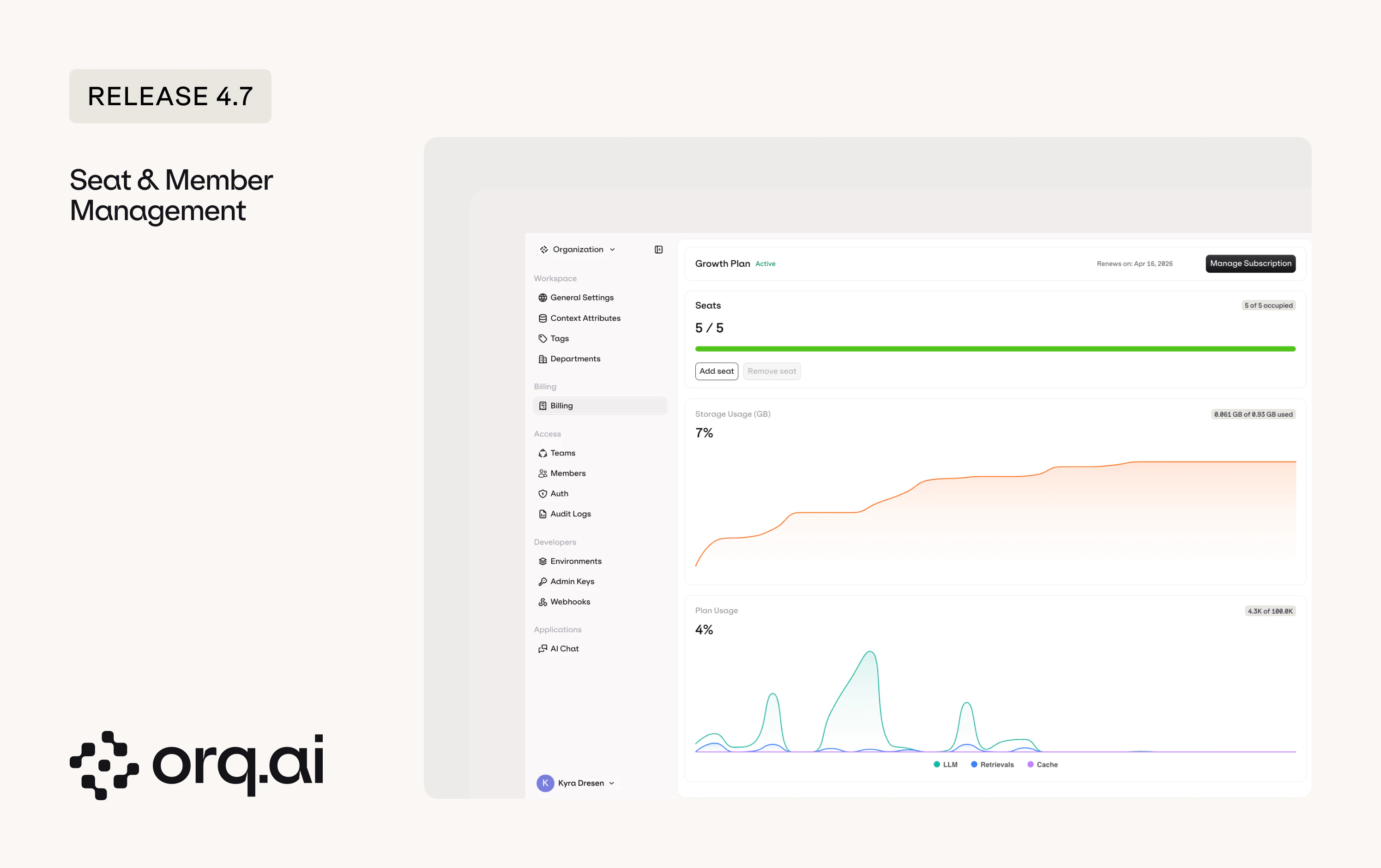
- Buy seats - purchase seats on the billing page. Each seat represents one available slot for a team member.
- Assign users to seats - add members on the members page. When you have an empty seat, you can invite or add a new user to fill it.
- Remove users - to remove a user, first make their seat empty by removing them from it, then delete the empty seat if you no longer need it.
View pricing details at Orq.ai/pricing or see the Seats documentation.
v4.7.0
Large system prompts, few-shot examples, and document context get sent with every request, and you pay for every token each time. Prompt caching for Anthropic models caches repeated prefixes so subsequent requests skip re-processing what hasn’t changed.What’s New:
- Up to 90% cost reduction and 85% lower latency - cache system prompts, large documents, and code context so subsequent requests skip re-processing.
- Simple configuration - add
cache_control: { type: "ephemeral" }to any text block. Supports 5-minute (default) and 1-hour TTL. - Up to 4 cache breakpoints per request - everything up to the marked block is included in the cache.
- Minimum token thresholds apply - caching activates once content meets the model’s minimum (e.g., 1,024 tokens for Sonnet 4, 4,096 for Opus 4.6).
See the full Prompt Caching guide in the Anthropic provider documentation.
v4.7.0 Beta
As we onboard more clients and handle more load, we decided to future-proof the core of the platform. Traces, the AI Router, and Agents have all been rewritten in Golang for improved performance, lower latency, and reduced memory consumption. All three are in beta for April and moving to GA in May. If you want to get a glimpse of orq of the future, try them out.
- Traces V3 - rebuilt from scratch with a more efficient storage format, faster filters on every attribute you send (evaluators, metadata, annotations). Toggle V3 on in the top right. Data builds up in parallel whether the toggle is on or not.
- AI Router V3 - rebuilt from four years of provider learnings. Same endpoints (chat completions, embeddings, image generation, transcription, translation), but faster, with support for identities, threads, and fully compatible with the OpenAI SDK.
- Agents V3 - agents now run on the new V1/Responses endpoint following the OpenResponses spec. Support for identities, threads, and agent selection through the model field.
See the Run Agents guide for code snippets and endpoint details.
v4.7.0
The AI Router now includes a Zero Data Retention (ZDR) filter. When enabled, the model garden only shows models and providers that guarantee no training data is retained from your requests.
v4.7.0
Complete Qwen model family now available as a dedicated provider with EU endpoint for improved data residency.New Models:
- Qwen 3.5 Flash, Qwen 3.5 Max - latest Qwen chat models.
- Qwen3 Coder Next - next-generation code model.
- Qwen3 VL Flash - vision-language model.
- All Alibaba models migrated to EU endpoint for improved data residency.
Set up the provider in the Alibaba integration guide or browse models on the Supported Models page.
v4.7.0
TensorX is now available as a new OpenAI-compatible provider, offering European-hosted AI models with Zero Data Retention support.New Models:
- DeepSeek Chat V3.1, R1-0528, V3.2 - latest DeepSeek chat and reasoning models.
- GLM-4.6, GLM-5 - Zhipu AI models hosted on TensorX infrastructure.
- Kimi K2.5 - Moonshot AI’s latest model.
- Llama 3.3 70B, Llama 4 Maverick - Meta’s open-source models.
- MiniMax M2, M2.5 - MiniMax chat models.
- Qwen3 235B, Qwen3 Coder 30B - Alibaba’s latest large and code models.
- Chatterbox Turbo (TTS) and Faster Whisper Large V3 (STT) - speech models.
Set up the provider in the TensorX integration guide or browse models on the Supported Models page.
v4.7.0
H Company is now available as a new provider with their Holo3 model family.New Models:
- Holo3-122B-A10B - large mixture-of-experts model for complex reasoning tasks.
- Holo3-35B-A3B - compact mixture-of-experts model for efficient inference.
Set up the provider in the H Company integration guide or browse models on the Supported Models page.
v4.7.0
New models from OpenAI including search-enabled variants and image generation.New Models:
- GPT-4o Search Preview, GPT-4o Mini Search Preview - search-augmented models with real-time web access.
- GPT-5.3 Chat Latest - latest GPT-5.3 chat model.
- GPT Image 1 Mini, ChatGPT Image Latest - new image generation models.
See all OpenAI models in the AI Router or via Supported Models.
v4.7.0
New Gemini and Gemma models from Google.New Models:
- Gemini 3.1 Flash Lite Preview, Gemini 3.1 Flash Image Preview - lightweight and image-capable Gemini variants.
- Gemma 3 4B, 12B, 27B - Google’s open-weight models in three sizes.
- Gemma 3n E2B, E4B - next-generation efficient Gemma models.
Explore Gemini and Gemma models in the AI Router or via Supported Models.
v4.7.0
Expanded model availability on Groq and Mistral.New Models:
- Groq Compound, Compound Mini - Groq’s compound AI models.
- Allam 2 7B - Arabic language model on Groq.
- Orpheus Arabic Saudi, Orpheus V1 English - Canopy Labs speech models on Groq.
- Mistral Small 2603 - latest Mistral small model.
Browse Groq and Mistral models in the AI Router or via Supported Models.
v4.7.0
Expanded cross-region model availability on AWS Bedrock.New Models:
- NVIDIA Nemotron Super 3 120B - NVIDIA’s large model on Bedrock.
- MiniMax M2.5 - MiniMax chat model now available on Bedrock.
- ZAI GLM-5 - Zhipu AI model on Bedrock.
See all Bedrock models in the AI Router or check Supported Models.