Online Guardrails in Live Deployments
You can now configure Guardrails after you have added them to your Library directly in Deployments > Settings for both input and output, giving you full control over Deployment responses- Guardrails: Block unacceptable inputs or outputs based on predefined criteria. If a guardrail is triggered, it can either retry the request or activate a fallback model, if configured.
What Are Guardrails?
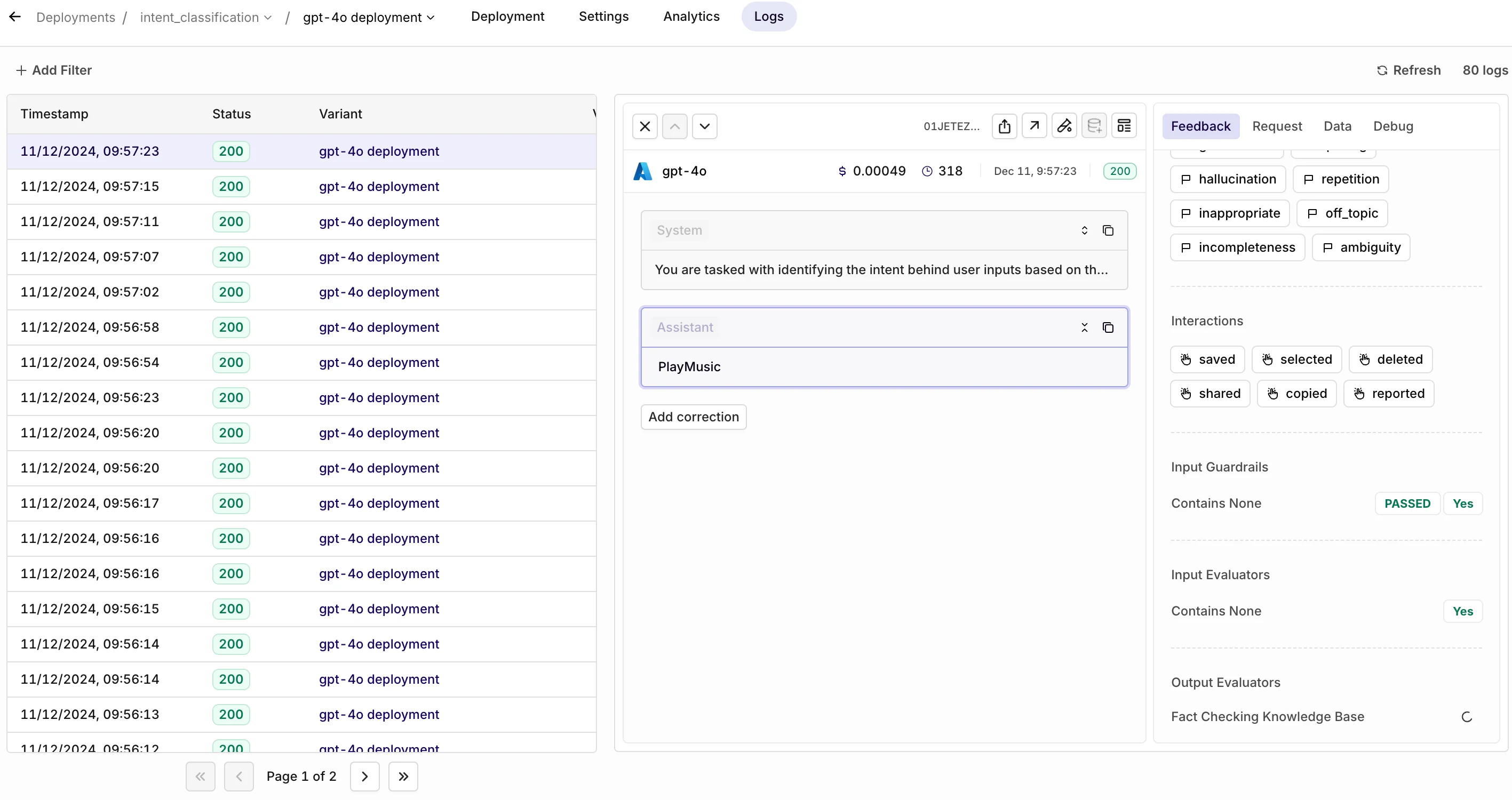
Guardrails enforce boundaries by setting thresholds to block inputs or outputs that fail to meet predefined criteria. When triggered, guardrails can stop processing or activate fallback mechanisms like retries or alternative models.- Threshold Configuration: Set customizable thresholds based on your specific use case to block inputs or outputs that fail to meet predefined criteria.
- Input and Output Guardrails: Apply rules to both incoming data and generated outputs, ensuring comprehensive quality control at every stage.
- Synchronous Operation: Guardrails run synchronously and do not introduce additional latency to your workflows.
- Fallback Mechanisms: When triggered, guardrails can stop processing or activate fallback options such as retries or alternative models to maintain continuity.
Why Are Evals and Guardrails Important?
With this release, you can gain full control over your AI applications, enhancing the reliability, safety, and quality of AI-generated outputs with evaluators and guardrails. While LLMs are incredibly powerful, they are also prone to errors such as incorrect information, biased content, or misaligned outputs—a risk famously illustrated by a chatbot that mistakenly agreed to sell a car for $1.The value of evaluators is twofold:- First, they address the inherent risks of LLMs by monitoring and ensuring output quality and safety.
- Second, they help teams overcome one of AI development’s biggest challenges: understanding how updates impact performance. Without clear insights, the development loop can break, turning iteration into guesswork rather than a structured engineering process. Evaluators help you understand whether an update is an improvement or a regression and quickly drill down into good / bad examples.
What Are Evaluators?
Evaluators assess and score outputs either against a reference or directly as they are generated by the model. They play a critical role in monitoring and improving AI quality, enabling you to evaluate performance continuously without disrupting operations. Evaluators come in several forms:Classic Evaluators: These rely on references and established metrics, such as cosine similarity or BLEU scores, to compare outputs to an expected result. They are ideal for structured, deterministic tasks like translation or summarization.- Example: Use cosine similarity to measure how closely an LLM-generated summary matches the reference text.
- Example: Evaluate whether a chatbot’s response aligns with the intended tone and emotional context without comparing it to a specific reference.
Designed to evaluate retrieval-augmented generation (RAG) workflows, these evaluators measure context relevance, faithfulness, recall, and robustness. They ensure responses derived from external knowledge bases are accurate and focused.
- Example: Verify that a chatbot retrieving insurance policy details provides relevant and accurate information while excluding unrelated content.
Rule-based tools for assessing measurable aspects of text, such as formatting, length, or keyword presence. These provide binary, deterministic results for compliance and validation.
- Example: Check if a response includes “return policy” or stays within a 200-character limit for customer service use cases.
Allow external API calls to evaluate outputs using custom or third-party systems, enabling tailored checks for domain-specific requirements.
- Example: Call a compliance-check API to validate that AI-generated responses meet industry-specific guidelines.
Validate JSON outputs against predefined schemas, ensuring all required fields, correct data types, and structures are present.
- Example: Confirm a JSON file for user registration includes fields like “username,” “age,” and “email” in the correct format.
What Are Guardrails?
Guardrails, enforce strict boundaries to block unacceptable inputs or outputs entirely. These constraints ensure the system adheres to rules like regulatory compliance, ethical standards, or content safety. The motives to implement guardrails can be summarized in four categories:- Robustness and Security. Guardrails are of huge importance in the aspect of security and robustness of an LLM-based application. This includes vulnerabilities such as prompt injections, jail-breaking, data leakage, handling illegible or obfuscated content.
- Information and Evidence. Guardrails can be put in place for fact checking, detecting hallucinations, making sure the response does not contain incorrect or misrepresented information, does not consider irrelevant information, the response is supported by evidence.
- Ethics and Safety. Making sure the response does not lead to harmful consequences either directly or indirectly. A response should not exhibit problematic social biases or share protected or sensitive information, take into account copyright and plagiarism law, use 3rd party content by appropriately citing it, etc.
- Tool-specific functionalities. Making sure the responses are on-topic, of proper extensiveness, written in the suitable tone, use specified terminology, etc.
HTTP and JSON Evaluators and Guardrails
You can now add HTTP and JSON Evaluators and Guardrails under the Evaluator tab and add them to your Deployment or Experiment.HTTP Evaluators and Guardrails
- Purpose: Enable evaluation using external APIs to perform checks like compliance, custom logic, or business-specific validations.
- How It Works: You define the URL, headers, and payload for HTTP Requests, and the evaluator expects either a boolean or numerical response in the format:
- Use Case Example: An HTTP Evaluator can validate content against regulatory guidelines by routing a compliance check to your API, returning a boolean to accept or block the output. If you want to integrate an HTTP Eval into your set up, you can find more information in HTTP Evaluators.
- Guardrails: Configurable to accept or deny calls based on the returned value, providing dynamic control in experiments and deployments.
JSON Evaluators and Guardrails
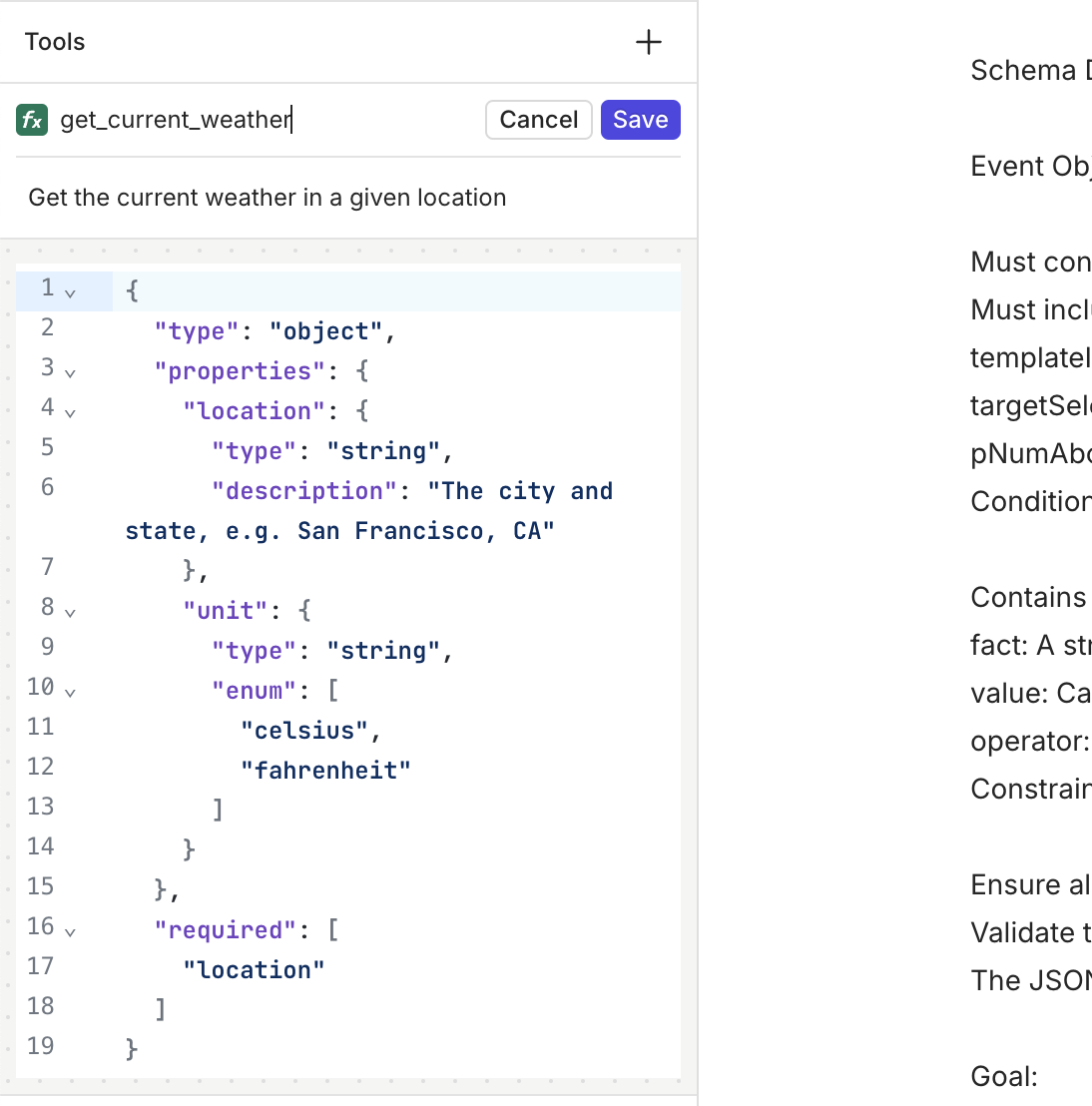
- Purpose: Validate input or output payloads during Experiments or Deployments using a predefined JSON Schema.
- How It Works: Enter a JSON Schema specifying required fields and their expected types. For example:
- Use Case Example: A JSON Evaluator can ensure that generated content includes mandatory fields like “title” and “length,” blocking invalid payloads. For a more extensive explanation on how to set this up in your Deployment, you can go here.
- Guardrails: Toggle guardrails to block outputs that don’t adhere to the schema, ensuring compliance during Deployments or Experiments.
Master Your RAG with RAGAS Evals
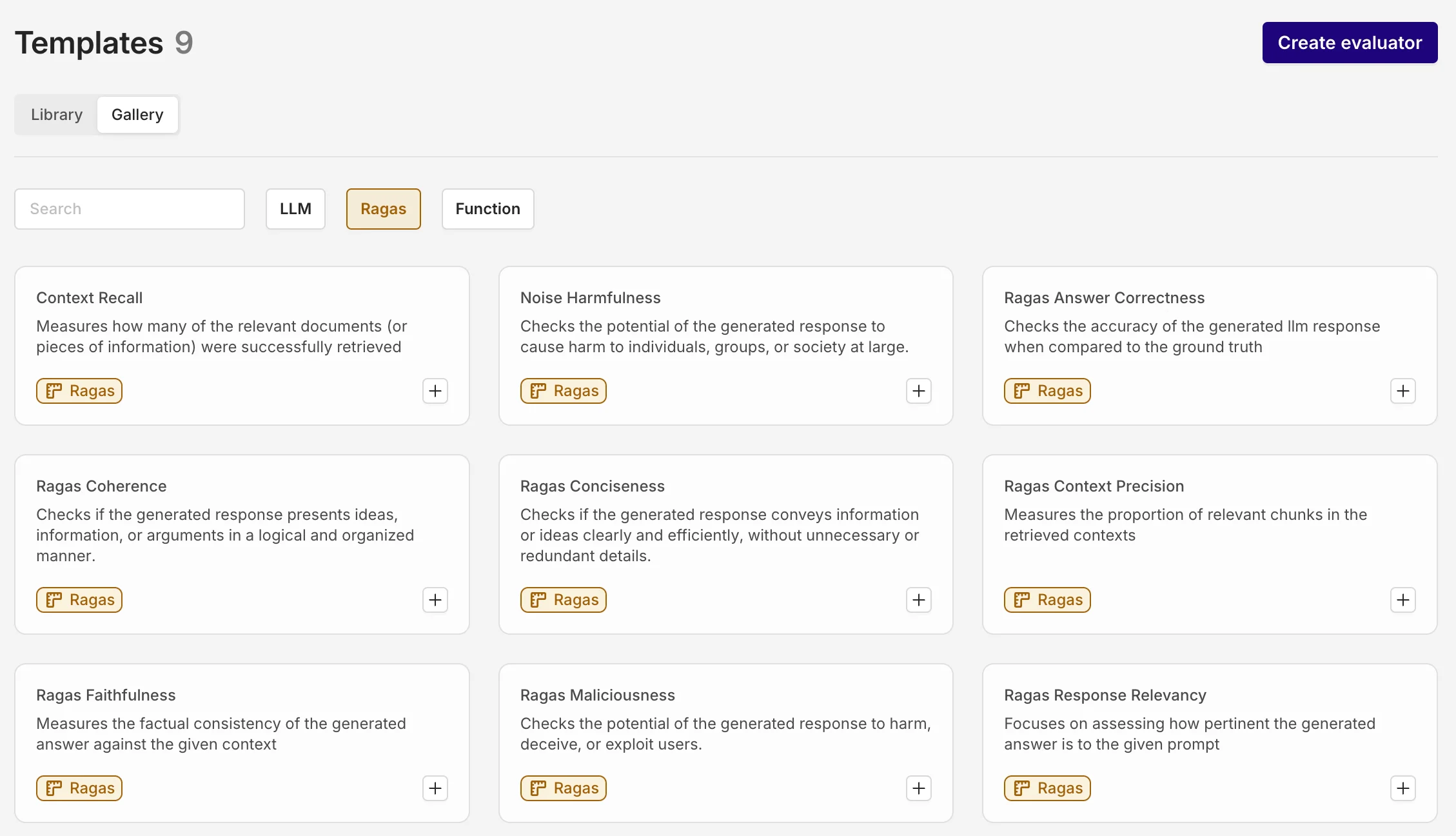
The Ragas Evaluators are now available, providing specialized tools to evaluate retrieval-augmented generation (RAG) workflows. These evaluators make it easy to set up quality checks when integrating a Knowledge Base into a RAG system and can be used in Experiments and Deployment to ensure responses are accurate, relevant, and safe.Key Features- Out-of-the-Box Functionality: RAGAS Evaluators are ready to use and cannot be reconfigured, offering a consistent evaluation framework.
- Reference-Based Scoring: Some evaluators require a reference to calculate metrics like accuracy or faithfulness.
- Scoring Scale: Evaluations return a score between 0 and 1, with higher scores indicating better performance (e.g., higher relevance or faithfulness).
-
Context Precision: Assesses how well retrieved chunks align with the user’s query.
- Example: Ensures chunks about “home insurance” are prioritized when the query asks about coverage, filtering out irrelevant topics like auto insurance.
-
Response Relevancy: Evaluates how directly the generated answer addresses the query.
- Example: For “What are the fees for international transfers?” it ensures the answer is concise and focused on the fees without unrelated details.
-
Faithfulness: Ensures the response is factually consistent with the retrieved context.
- Example: For “What is the company’s remote work policy?” it checks if claims (e.g., “three days remote”) match the policy document.
-
Context Entity Recall: Verifies that critical entities from the reference answer are included in the retrieved content.
- Example: For “Tell me about the Taj Mahal,” ensures entities like “Shah Jahan” and “Agra” are retrieved.
-
Context Recall: Measures if all necessary details from a reference are retrieved.
- Example: For “What are the main benefits of product X?” it ensures all benefits like “cost savings” and “improved efficiency” are included.
-
Noise Sensitivity: Checks if the system ignores irrelevant information in the retrieved context.
- Example: For “What is LIC known for?” it ensures the response focuses on LIC’s attributes, filtering out unrelated economic data.
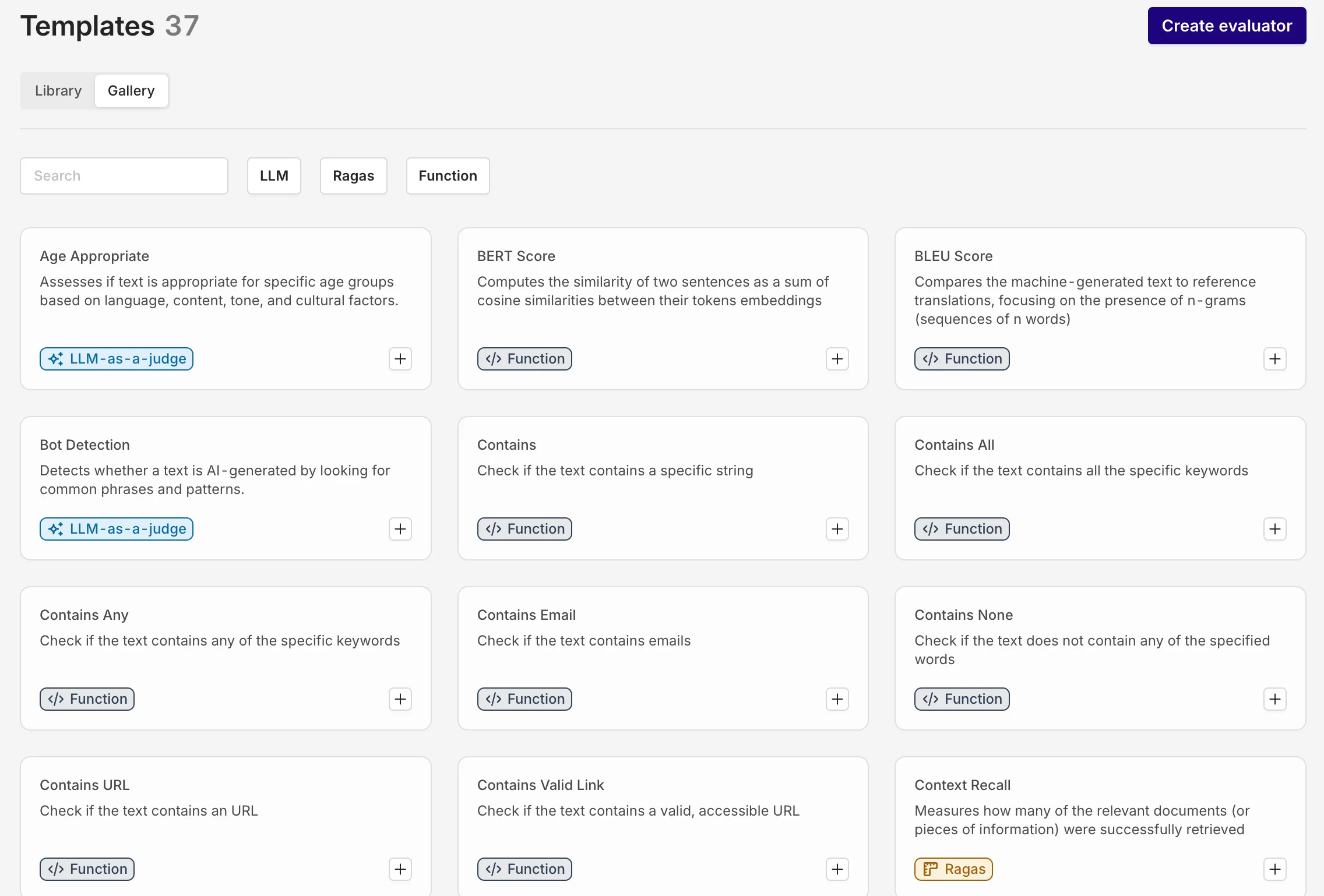
Evaluator Library: 50+ Ready-to-Use and Tailorable Evaluators
Introducing the new Evaluator Library:Key Features:1. Gallery of Preconfigured Evaluators:- The library includes 50+ preconfigured evaluation templates tailored for a wide range of use cases, from quality checks to compliance and contextual alignment.
- These templates are organized into categories such as LLM Evaluator, Ragas Evaluator, and Function Evaluator checks to help you find the right tool for your needs quickly.
- Each preconfigured evaluator can be customized and configured to fit specific project requirements.
Once tailored, evaluators can be added to your personal Library for reuse in Experiment and Deployment.
-
Evaluators are designed to work effortlessly in both experiments and deployments, enabling consistent and reliable quality control across development stages.
Improved LLMs as a Judge
LLM-as-a-Judge Enhancements:We’ve significantly improved our existing LLM Evaluator feature to provide more robust evaluation capabilities and enforce type-safe outputs.1. Type-Safe Output:
- When you configure the output type as a number, boolean, or other types, the LLM ensures the result adheres strictly to the defined format.
-
Additionally, each output includes a clear, concise explanation to support transparency and reliability in the evaluation process.
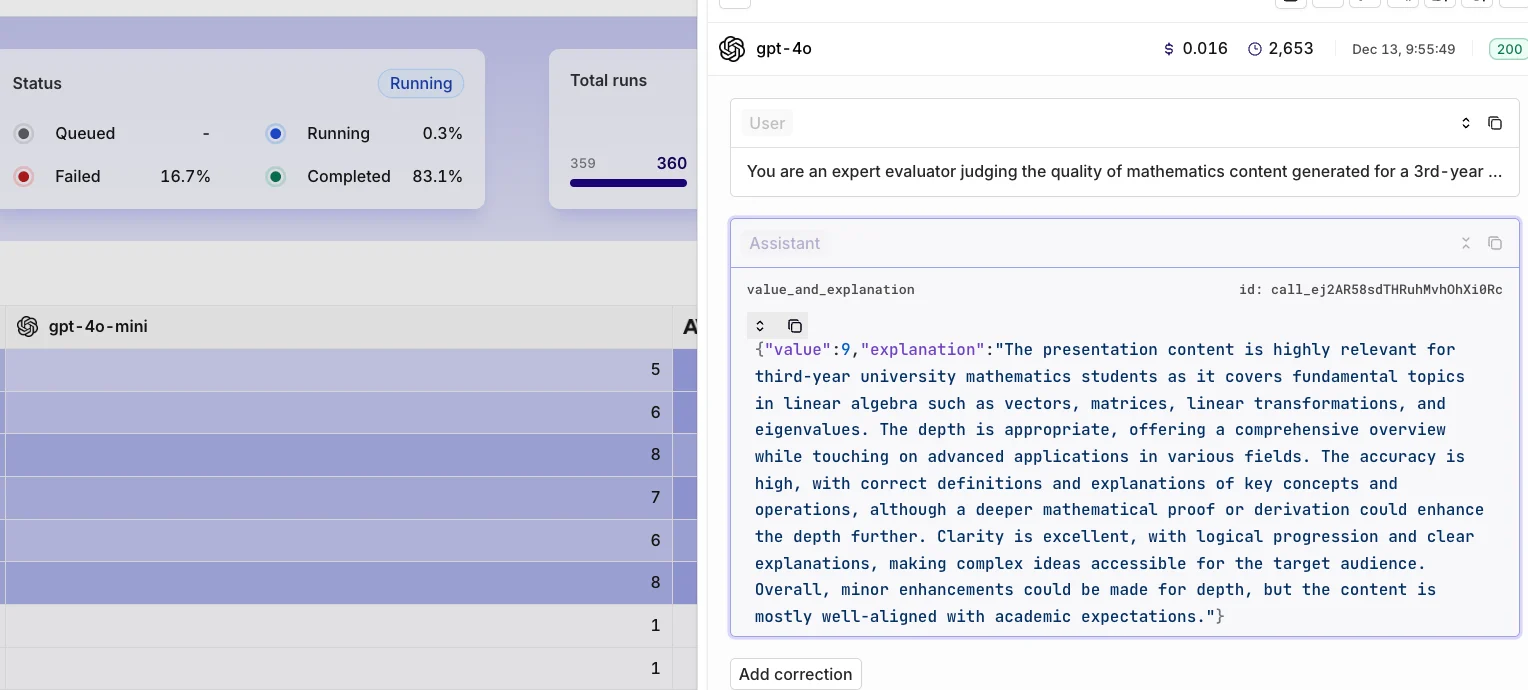
- The LLM-as-a-Judge now seamlessly integrates into live deployments, enabling asynchronous quality evaluation with a configurable sample rate. This approach provides actionable insights without disrupting workflows, ensuring consistent quality and minimizing drift.
-
The LLM-as-a-Judge also supports Guardrail Mode, actively enforcing quality standards by blocking inputs or outputs that fail to meet defined criteria.
Online Evaluators in Live Deployments
You can now configure Evaluators after you have added them to your Library directly in Deployments > Settings for both input and output, giving you full control over Deployments.Why Are Evaluators Important?
- Quality and Safety: Evaluators mitigate LLM risks by monitoring and ensuring output quality and safety.
- Performance Insights: They provide clear feedback on updates, helping teams identify improvements or regressions and refine iterations effectively.
What Are Evaluators?
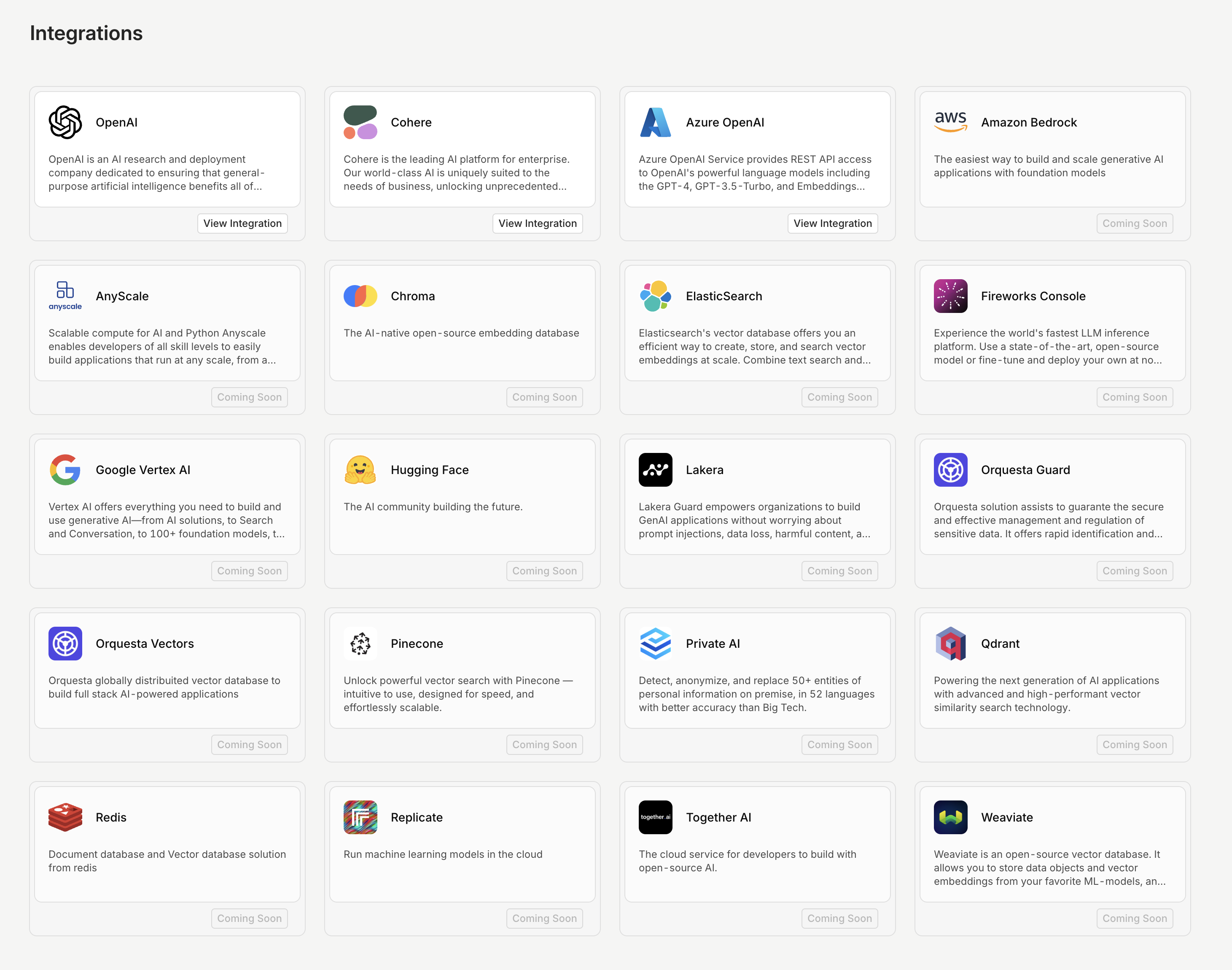
Evaluators are tools designed to assess the quality, relevance, and safety of AI inputs or outputs, ensuring reliable and effective system performance. Off the shelf, we offer several options, including LLM Evaluator, Ragas Evaluator, Function Evaluator and HTTP Evaluators. Additionally, the evaluators allow for the following configuration:- Sample Rate Option: Run evaluations on a subset of calls (e.g., 10%) to balance coverage and efficiency.
- Cost Management: Reduces additional expenses associated with running evaluators, especially LLM-based ones.
- Latency Control: Minimizes added response time by limiting the number of calls evaluated.
Cache your LLM response
Cache and reuse your LLM outputs for near-instant responses, reduced costs, and consistent results.What is Caching?With this release, you can now enable caching for your LLM calls. Caching works by storing both the input and the generated output for a configurable period (TTL – Time-to-Live). When an exact request is made during this time, the cached output is returned instantly, bypassing the need for the LLM to generate a new response.Why Enable Caching?- Cost Savings
- Time Savings
- Improved Consistency
Structured Outputs on Azure
Ensure the model’s responses always stick to your JSON Schema. No more missing fields or incorrect values, making your AI applications more reliable and robust.In addition to the Open AI provided models, you can now use Structured Outputs on Azure hosted models.Using Structured Outputs is the go-to method if you want to ensure that the model is adhering to your JSON Schema.📘 Read more about Structured Outputs in Using Response Format.
Claude 3.5 Haiku and Sonnet (new)
Introducing the upgraded Claude 3.5 Sonnet and the new Claude 3.5 Haiku. The enhanced Claude 3.5 Sonnet offers comprehensive improvements, especially in coding and tool use, while maintaining the speed and pricing of the previous model. These upgrades make it an excellent choice for complex, multi-step development and planning tasks.For those prioritizing speed, Claude 3.5 Haiku combines quick response times with strong overall performance. It’s ideal for user-facing applications and specialized tasks, managing data-rich inputs like personalized recommendations and real-time decision-making with ease.Note: Claude 3.5 Haiku doesn’t support vision just yet.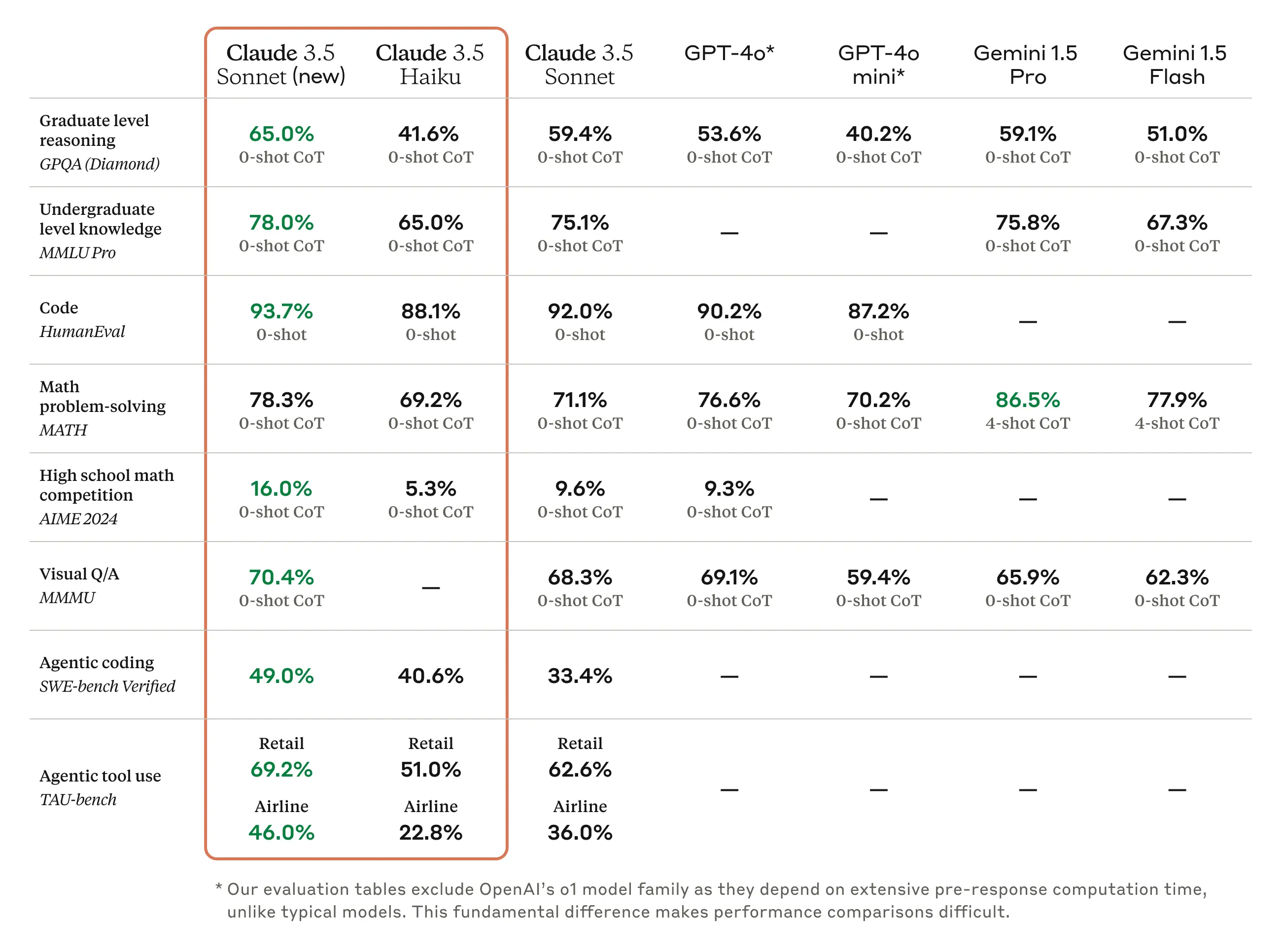
Role Based Access Control improvements
With the improvements to role-based access control (RBAC), it is much easier to assign and change workspace roles in Orq.Orq now offers three distinct workspace roles:- Admin: Complete access across all platform features, including user management, workspace settings, model configurations, and billing.
- Developer: Provides technical access to all essential features, including the ability to deploy changes within Deployments. Developers cannot manage models, billing, or users.
- Researcher: Offers access to Playgrounds, Experiments, and Deployments for research purposes. Researchers can review and annotate logs but cannot modify or deploy changes.
📘 Read more on how to set up permissions in our documentation
Attach files to a Deployment
One common request we hear is whether it’s possible to attach files to an LLM — for example, to extract data from a PDF or engage with its content. With this update, you can now do just that.📘 We support pdf, txt, docx, csv, xls - 10mb maxThe content of the files will be incorporated into the initial system or user message. We recommend adjusting your prompt as you would when using variables in a prompt. The added content will be highlighted in green. See the example below:
🚧 Be aware that we only extract the raw data, no images or objects. Also, encrypted files are not supported.
When should I attach a file and not use a Knowledge Base?
- The need for full context understanding
- Dynamic document context
- Private or sensitive data
How to use it?
To attach one or more files to a Deployment, follow these steps:- Upload your files
- Receive the
_id
- Send the file
_idin addition to your normal Orq API call
Log Filtering
The ‘Log Filters’ feature is now available, following high demand from our users. Monitoring logs is essential for tracking performance and identifying areas for improvement, and with this new feature, it’s now easier to find the exact data you need to make informed decisions.With Log Filters, you can quickly sort through large sets of logs and focus on the most relevant information for your workflow. Here are some key use cases:- Optimize Prompts: Filter logs with low ratings to pinpoint where your prompts need improvement and refine them for better outcomes.
- Troubleshoot Issues: Filter logs with error statuses to identify what went wrong and address any issues in your setup.
- Monitor Fallbacks: Filter logs that triggered a fallback model to see where the primary model didn’t perform as expected.
📘 Read more on our documentation page: Filters
Prompt Snippets
Introducing Prompt Snippets, a feature designed to boost your efficiency by allowing you to reuse key parts of your prompt across multiple variants.When working with multiple deployment variants that share common prompt elements, you no longer need to update each one individually. Instead, edit the snippet once, and all related variants will automatically reflect the change, saving you time and reducing manual effort.Using a Prompt Snippet
When you type{{snippet., a list of all available snippets will appear. You can then select the snippet you’d like to use.Configuring a Prompt Snippet
Head to the Prompt Library to create and configure your Prompt Snippet.Version control
Prompt Snippets are fully version-controlled, making it easier to track changes and correct mistakes, especially in collaborative environments. Be aware that updates to snippets will automatically apply to all deployments using them, so ensure any changes are intentional and properly tested.❗️ Please note that if you modify the snippet, all deployments containing that snippet will be automatically updated
📘 Read more on our documentation: Prompt.
Output Masking
We’ve added a new Output Masking feature to further strengthen security for the most sensitive use cases. With this feature, you can now mask the entire model’s output in a Deployment, providing an additional layer of data protection.In addition to the existing capability to mask input variables—such as marking patient_information as PII to prevent sensitive data from being stored on the Orq.ai platform—Output Masking extends this protection to the model’s complete output as well, ensuring that sensitive information remains secure throughout the entire process.Enabling Output Masking
Go to your Deployment > Settings > toggle Output Masking on.📘 Read more on how to set up Output Masking in our Deployment Security and Privacy documentation
Workspace usage metrics
We’ve added a new feature to the Billing page called Workspace Usage. This tool provides users with a clear overview of how many API calls they’ve used out of their available limit within their current billing cycle. The usage tracking starts from the beginning of your subscription.It’s important to note that exceeding your API usage limit does not stop you from making further calls. However, once you surpass the free API call limit, additional charges will apply for any extra usage.Structured outputs
Structured Outputs is a feature that makes sure the model’s responses always follow your provided JSON Schema. This means you don’t have to worry about the model leaving out any required parts or making up incorrect values.Why should you use Structured Outputs?
- Reliable format: You don’t have to check or fix responses using the wrong format anymore.
- Clear refusals: When the model refuses something for safety reasons, it’s now easily detectable programmatically.
- Easier prompts: You don’t need to prompt the model to adhere to the schema anymore.
Using Structured Outputs
There are two ways of using the Structured Outputs functionality:response_format(recommended) - In the dropdown menu (see the video below), you can select the JSON pill and specify your schema.- Function Calling - In the tool, you can toggle the functionality of the structured output on/off.
- gpt-4o 2024-08-06 and later
- gpt-4o-mini 2024-07-18 and later
🚧 Reminder: To use Structured Outputs, all fields must be specified as required.If you want to read more about Structured Outputs, please visit OpenAI’s documentation here
Improved authentication
🚧 We removed the email and password login combination to enhance the security of our platform.To improve the security of our platform, you will be able to log in using the following methods:
- Magic Link Sign-In: Enter your email address, and we’ll send you a login link with a code for easy access. This means that you can also set up Two-Factor Authentication (2FA) or Multi-Factor Authentication (MFA) for added security.
- Google Single Sign-On (SSO): Seamlessly log in using your Google account.
- Microsoft Single Sign-On (SSO): Use your Microsoft account for quick and secure access.
New GoogleAI provider and Gemini models
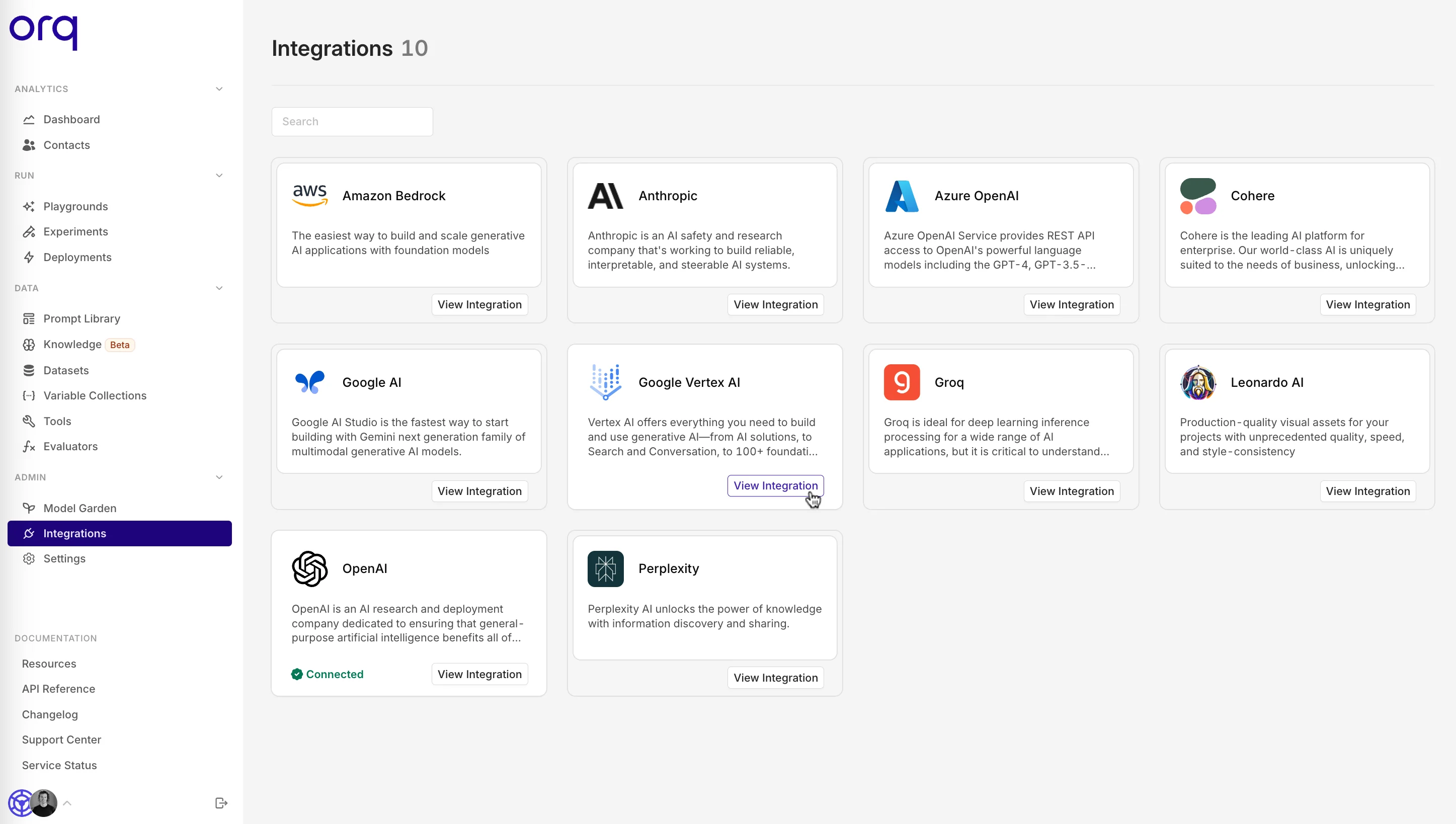
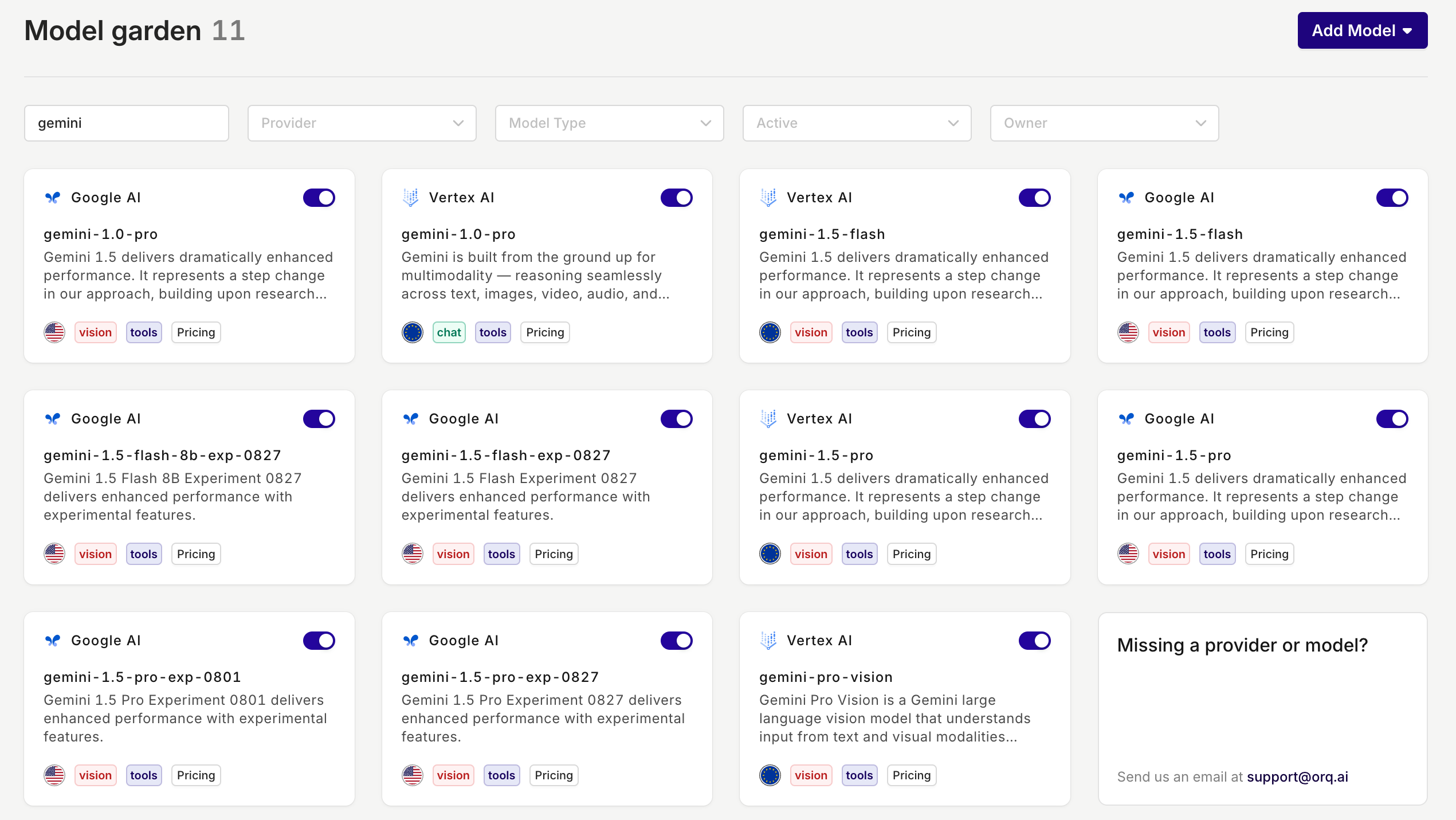
With the introduction of Google AI as a new provider on the platform, the previous ‘Google’ provider is renamed to Vertex AI.If you were using Google as a provider before, you don’t have to do anything, you will only see a different provider name. The model will remain exactly the same.📘 Google AI allows you to set up your own API keys, whereas Vertex AI does not give you this option.
Why should I use Google AI instead of Vertex AI?
In addition to Google AI allowing you to set up your own API keys, they also offer their latest and experimental models. So, if you want to test out their newest models, Google AI is the way to go.The new models that are available in Google AI:- Gemini-1.5-flash-8b-exp-0827
- Gemini-1.5-flash-exp-0827
- Gemini-1.5-pro-exp-0801
-
Gemini-1.5-pro-exp-0827
Export Experiment Results
To give data scientists greater flexibility, we now allow you to export your Experiment results directly from Orq.ai. This update provides the freedom to extend your analysis beyond the platform, enabling you to work with your data in your preferred tools and environments.How it works:- Choose your file type: Select from CSV, JSON, or JSONL formats based on your specific requirements.
- Receive your data: After selecting your preferred format, your Experiment results will be compiled and sent to you via email, ready for further analysis.
- Leverage the exported data for custom visualizations, integrations, or further analysis in your preferred tools.
- Utilize the output of LLM generations in various formats for downstream tasks or additional finetuning.
Knowledge Bases & RAG
Start building even more reliable AI applications by equipping LLMs with accurate and relevant knowledge. This will greatly improve their knowledge and thus reduce the likelihood of hallucinations.Why use a Knowledge Base?
The primary purpose of a knowledge base and a Retrieval-Augmented Generation (RAG) is to provide a reliable source of information that an LLM can access. By querying a knowledge base, an LLM can retrieve relevant data to answer questions or solve problems more accurately. This integration ensures that the information provided is both relevant and precise, enhancing the overall effectiveness of the model.Use cases
- Reduced Hallucination: By relying on a well-structured knowledge base, the likelihood of the LLM generating incorrect or fabricated information (hallucinations) is significantly decreased.
- Specific Context: A knowledge base allows for the inclusion of domain-specific or company-specific information, ensuring that the responses generated by the LLM are more aligned with the intended context.
- Up-to-Date Information: Unlike static models, a knowledge base can be continuously updated with the latest information, providing the LLM with current and accurate data.
📘 Read more about Knowledge Bases in our Knowledge Base docs
Webhooks
A much-requested feature, webhooks, is now added to the Orq.ai platform.Webhooks allow you to automate a lot of things in real-time, including:- Automated data ingestion and processing: feeding real-time data from sources into Orq.
- Automated workflow orchestration: triggering specific deployments based on events.
- Logging: the ability to store the requests (input and output) back into your system.
- Monitoring and alerting: set up webhooks to alert relevant stakeholders about changes in model performance.
📘 Read more about webhooks in our docs.
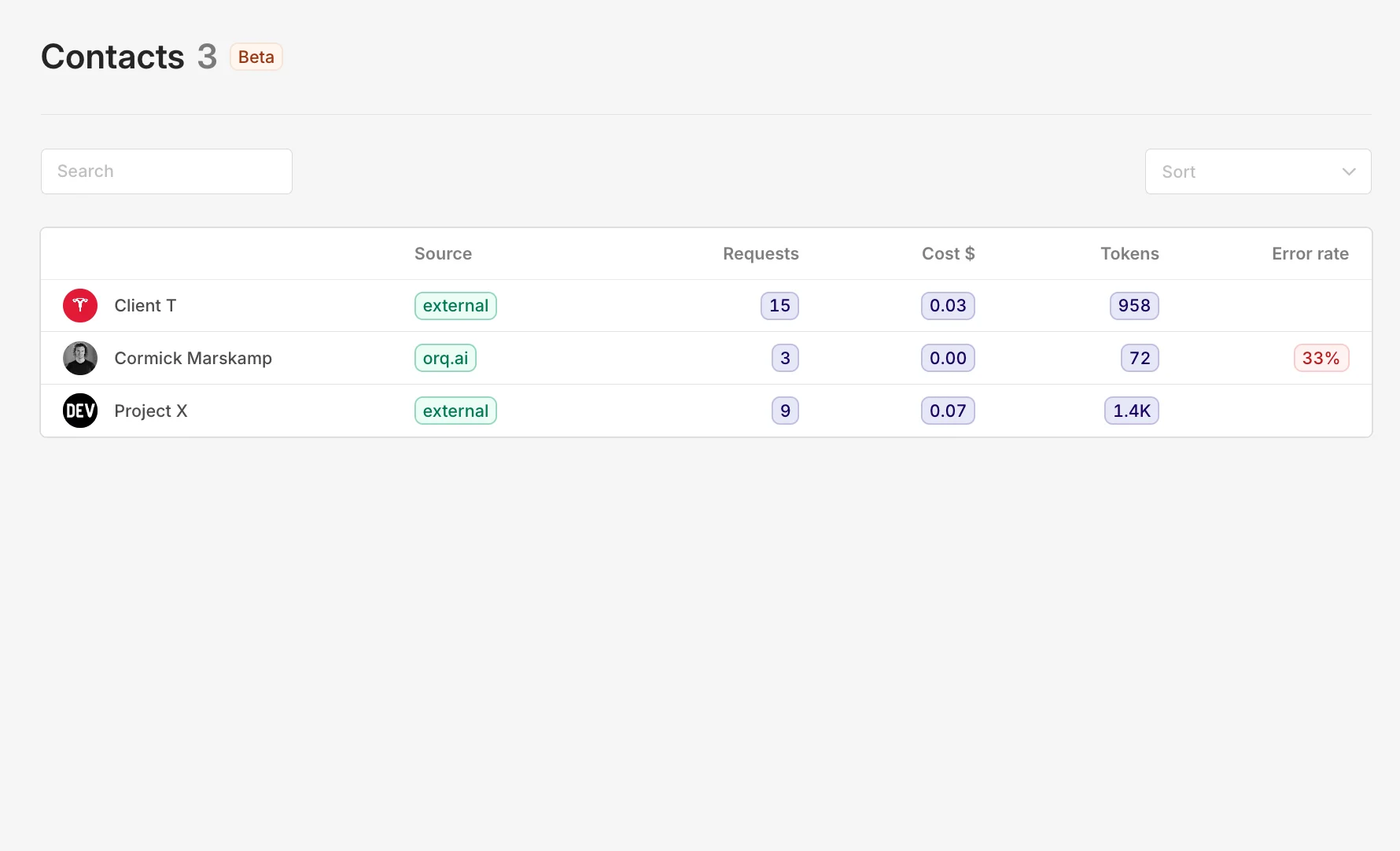
Contact analytics
To gain more insights and control over your LLM consumption, we added contact analytics.A contact is an entity that can be anything you’d like to track, such as an individual, team, project, or client.Some use cases include:- Track Individual Users: Monitor costs and error rates for timely support.
- Track Internal Projects: Ensure projects stay within budget and meet goals.
- Track Client Projects: Get clear metrics per client projects.
-
Track Specific Teams: Analyze team performance and optimize resource allocation.
📘 Read more on how to set up contact analytics in our docs
Onboard private models on Azure
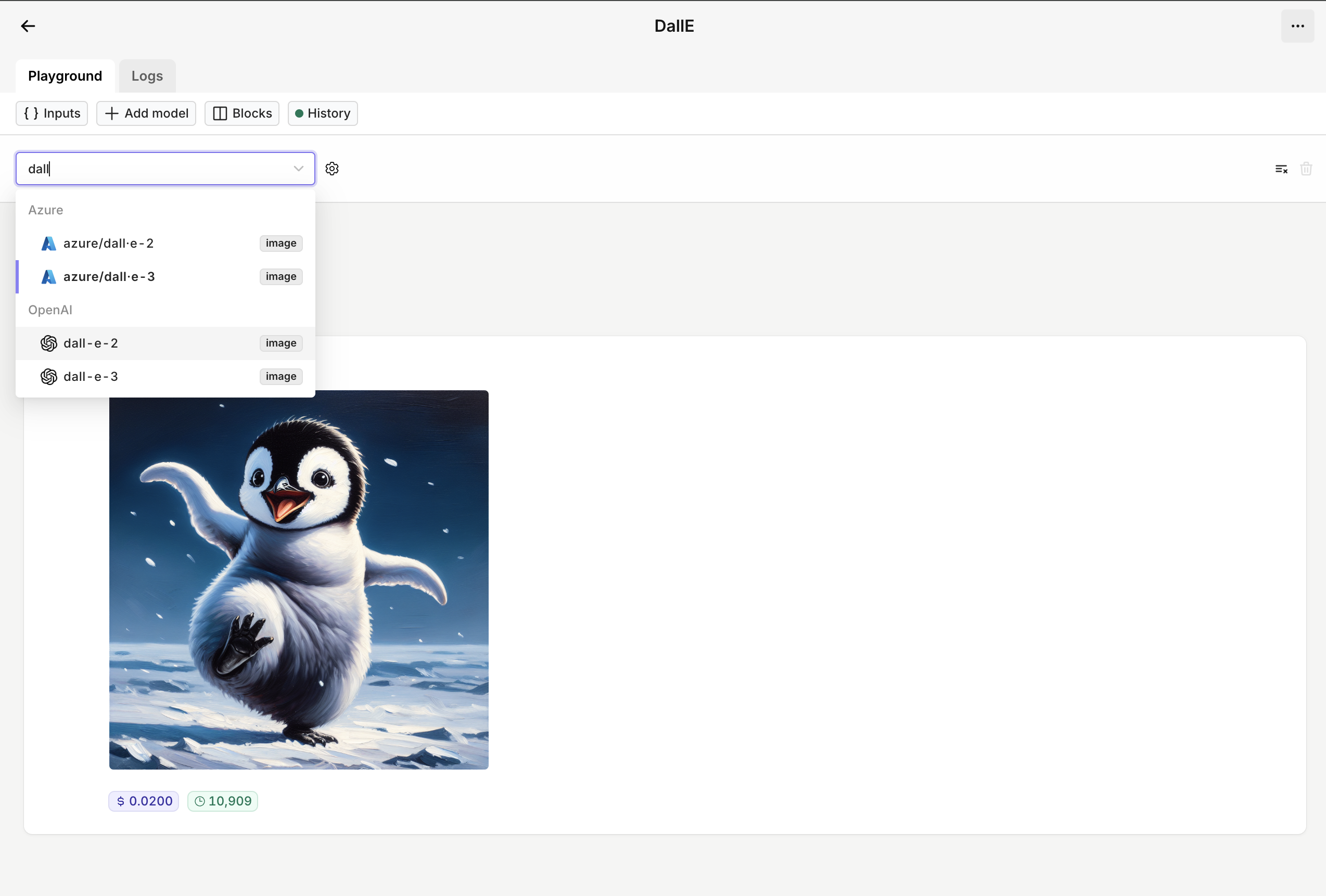
You can now add your own private and/or finetuned models to the Orq.ai AI Router.As of now, you can only add models hosted on Azure. Soon, we’ll also support the self-onboarding of private models through OpenAI and Vertex AI.Use the interactive walkthrough below to see how the onboarding process works.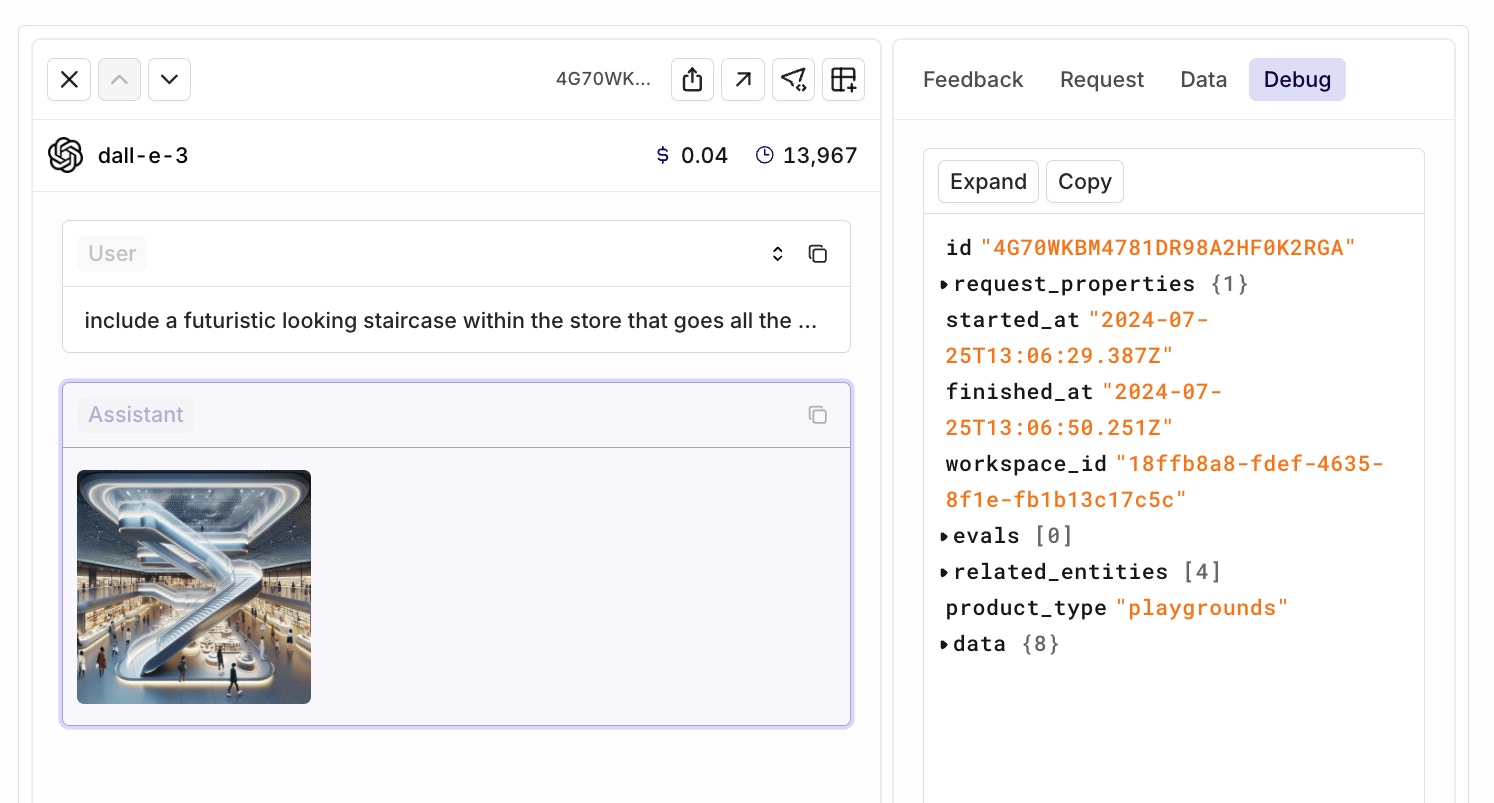
GPT-4o mini
OpenAI has introduced GPT-4o mini, a smaller, more efficient, and cheaper model replacing GPT-3.5 Turbo. This follows similar moves by Anthropic (Claude 3 Haiku) and Google (Gemini 1.5 Flash).Key features:- Significantly smarter than GPT-3.5 Turbo, but not as capable as GPT-4o (see benchmark).
- 60% cheaper compared to GPT-3.5 Turbo.
- It’s a vision model, meaning it can interpret images.
- Context window is as big as GPT-4o (128k).
Claude 3.5 Sonnet
Two hours after Claude 3.5 Sonnet was released, it became available on Orq.ai. Toggle it on in the AI Router and try it out yourself!A little about the new model. First off, Claude 3.5 Sonnet can handle both text and images. It’s also Anthropic’s top-performing model to date, outshining the previous Claude 3 Sonnet and Claude 3 Opus in various AI benchmarks (see image).One area where Claude 3.5 Sonnet does seem to excel is in speed. Anthropic claims it’s about twice as fast as Claude 3 Opus, which could be a game-changer for developers building apps that need quick responses, like customer service chatbots.The model’s vision capabilities have also seen a significant boost. It’s better at interpreting charts, graphs, and even reading text from less-than-perfect images. This could open up some interesting possibilities for real-world applications.However, it’s worth noting that Claude 3.5 Sonnet still has the same context window of 200,000 tokens as its predecessor. While this is a decent amount (about 150,000 words), it’s not a step up from what we’ve seen before.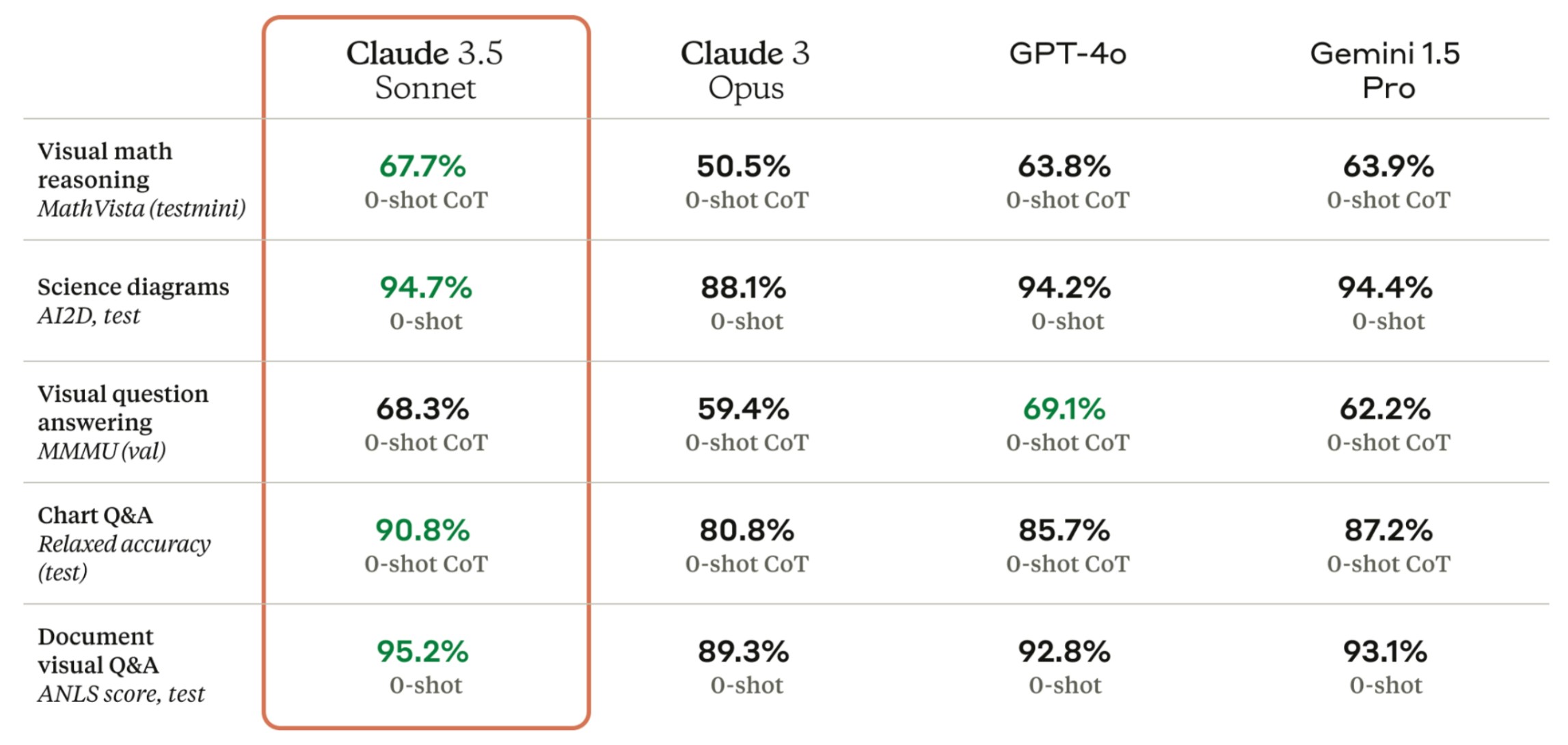
Prompt library
The new Prompt library lets you create prompt templates that you can reuse throughout the whole platform.With the filtering capabilities, you can easily find the right prompt for your use case and effectively manage multiple prompts.Check the new feature out in your workspace or in this interactive walkthrough below.Llama 3 on Perplexity
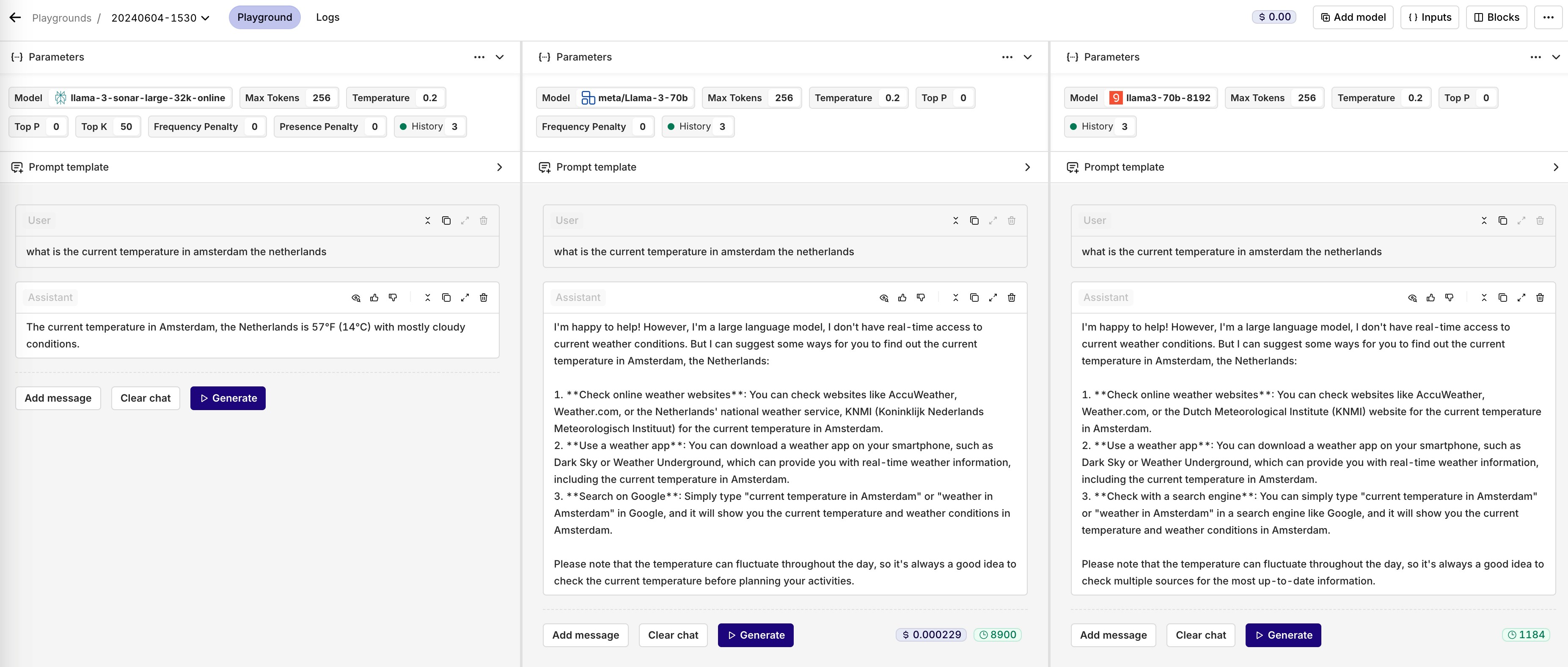
Start using the best open source model, hosted on perplexity, in Orq.You could already use the Llama 3 models hosted on Anyscale and Groq. However, being able to use Llama-3 on Perplexity opens up new possibilities and use cases.Because the model is able to go online, it is able to:- Generate up-to-date responses
- Retrieve dynamic data about the latest news etc.
- Understand real-world context better
Multi API key selector
You can now select which API key to use in your Playgrounds, Experiments, and Deployments.Select which API key to use with the new integration selector pill.This only works after you have set up more than one API key. Note: This feature does not apply on Azure and AWS.In the example below, I use the exact same model configuration as my fallback model. However, I will use my second API key in case the first one doesn’t work.Keyboard shortcuts
For the real prompt engineers in Orq, we introduced some keyboard shortcuts in the Playground module. If your cursor is located within the prompt template, you can use the hotkeys below to generate an output.cmd/ctrl + enter runs the current block.shift + cmd/ctrl + enter runs all the blocks.Feel free to contact us for other shortcut suggestions.
Deployment Routing
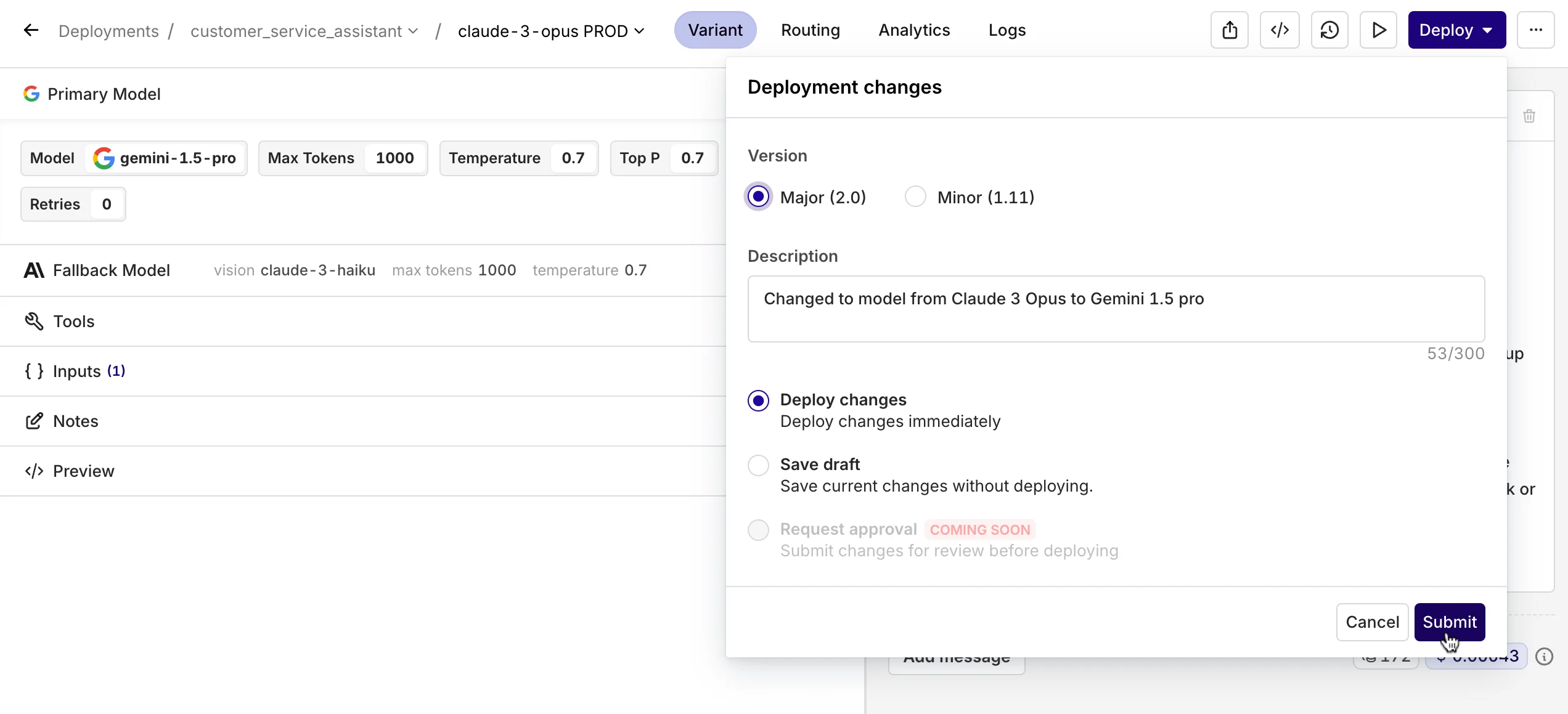
When opening a Deployment, you now immediately enter the Prompt Studio.To switch to other Variants, you can click on the variant name, which opens a dropdown menu with all the other variants that you can choose to switch to. In the same dropdown menu, you can also choose to add another variant.Under the new Routing tab, you can still see the Business Rules Engine and configure it like you’re used to.Tools in Experiments
Start using Tools, also known as Function Calling, in an Experiment.Once you have set up your Tools in the Resource Tab, you can add them in the configuration tab in your Experiment.A strong feature is to use Tools in combination with the Valid JSON and Valid JSON Schema Evaluators.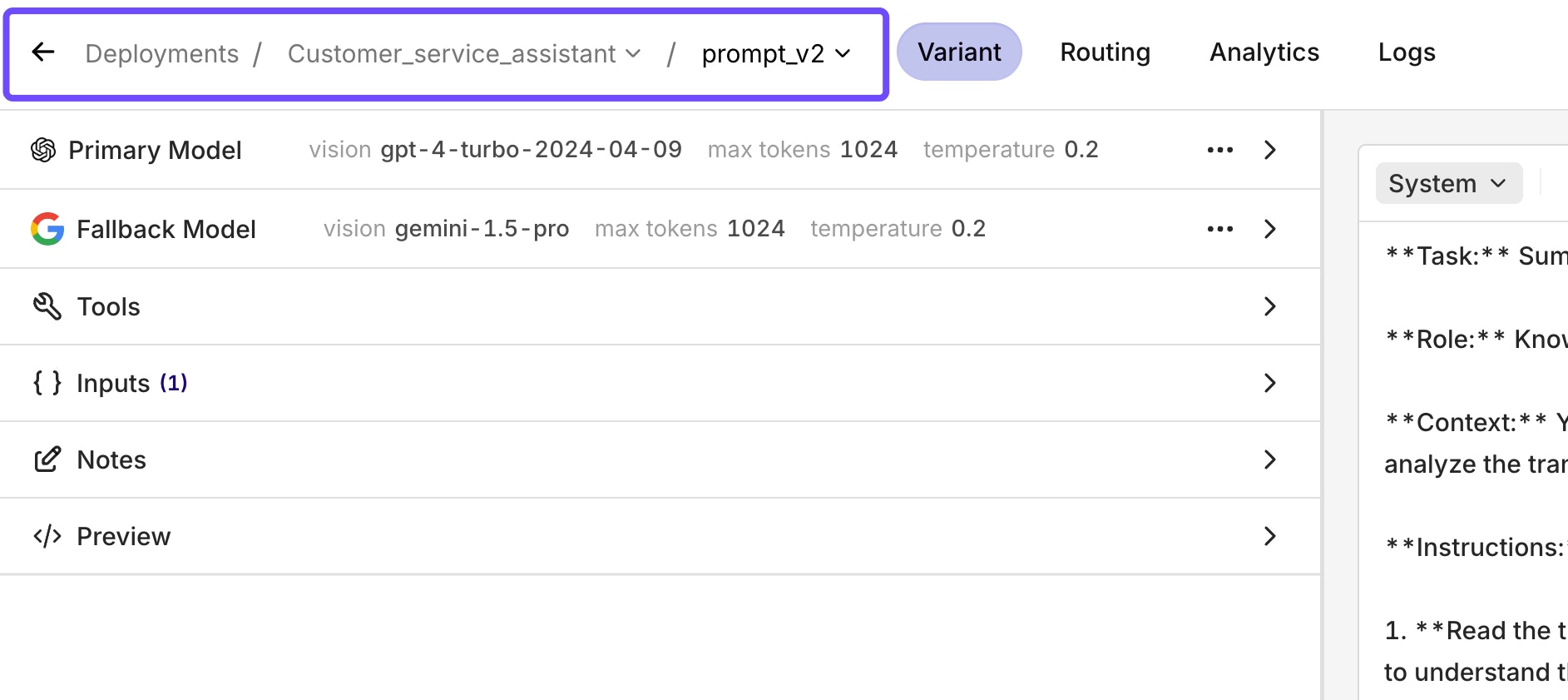
Experiment aggregate metrics
With the new Experiment aggregate metrics, you can do a much more accurate comparison between models and/or configurations.These filters are crucial when doing large Experiments. The heatmap still provides you with a quick glance at what the differences are, but the filter allows you to make a more precise comparison.The filter includes the sum, average, median, min, max, range, and standard deviation.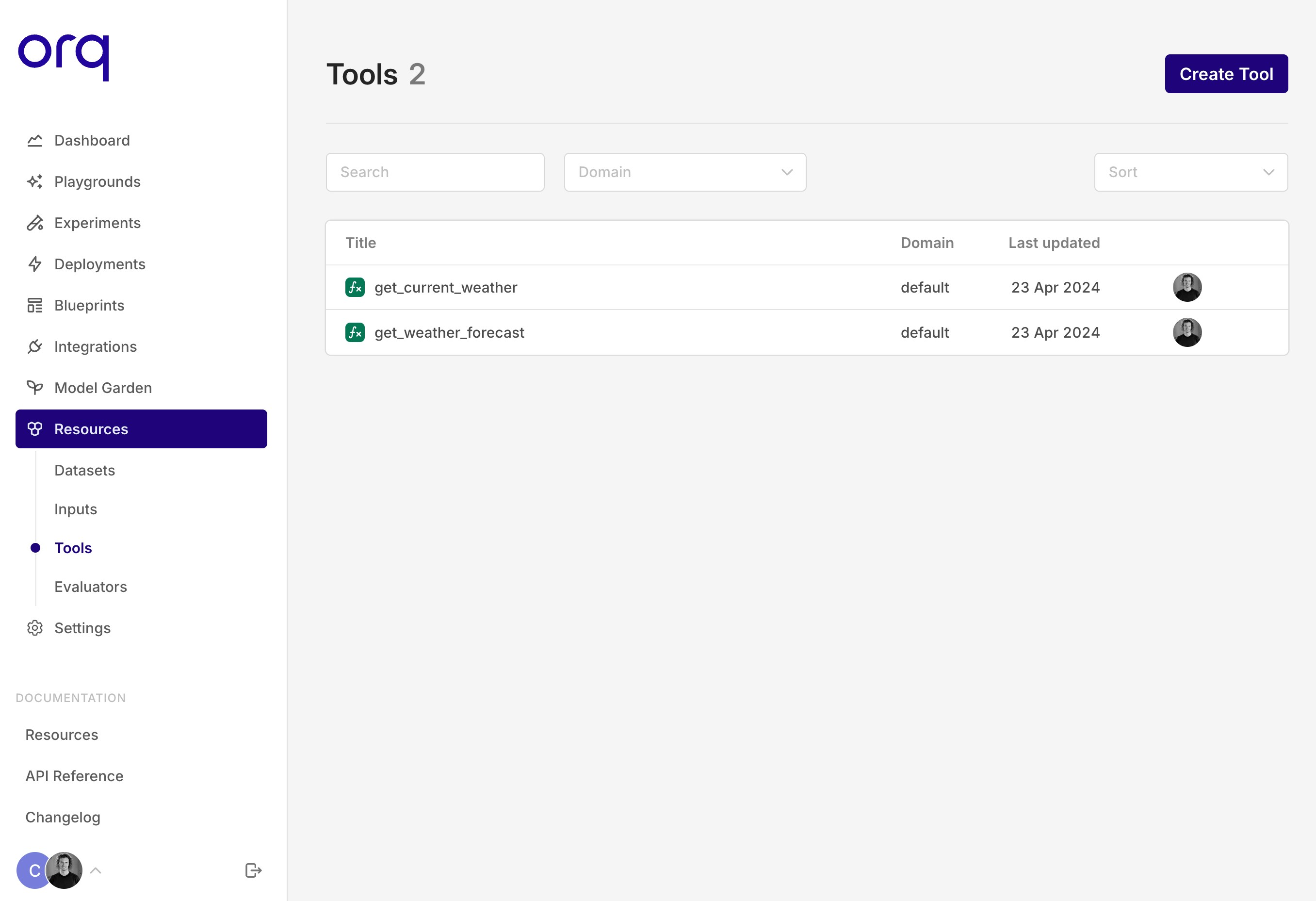
Google Gemini Pro 1.5
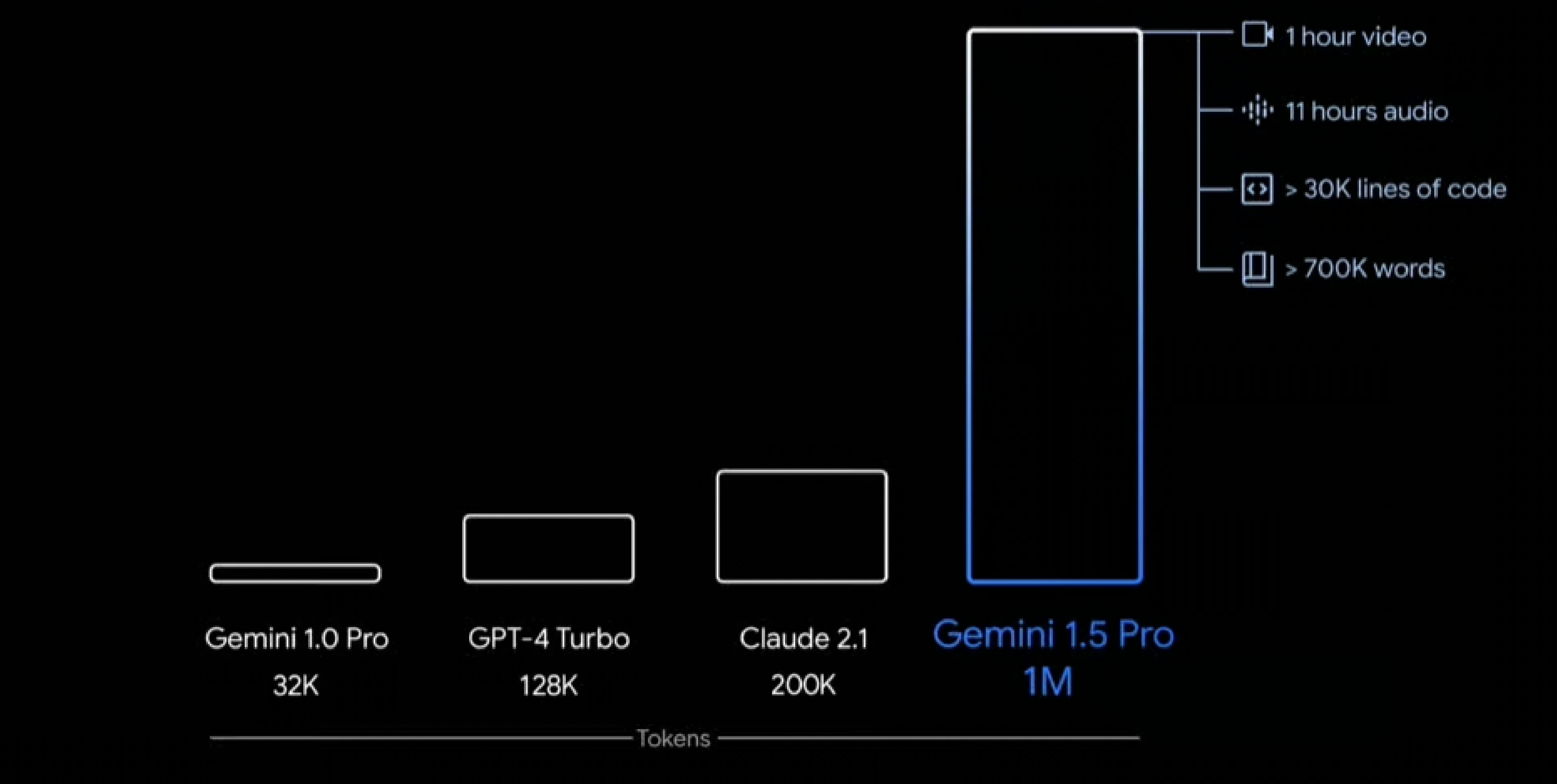
Start using Google’s Gemini Pro 1.5 across all three modules on Orq. The newest model from Google is not only more advanced than its predecessor but also boasts several key differentiating features.Top reasons why you should start testing Gemini Pro 1.5 today:- 1 million context window! - Allowing it to understand a much greater context than before.
-
Complex multimodality reasoning - It’s able to understand video, audio, code, image, and text.
Vision models are now available
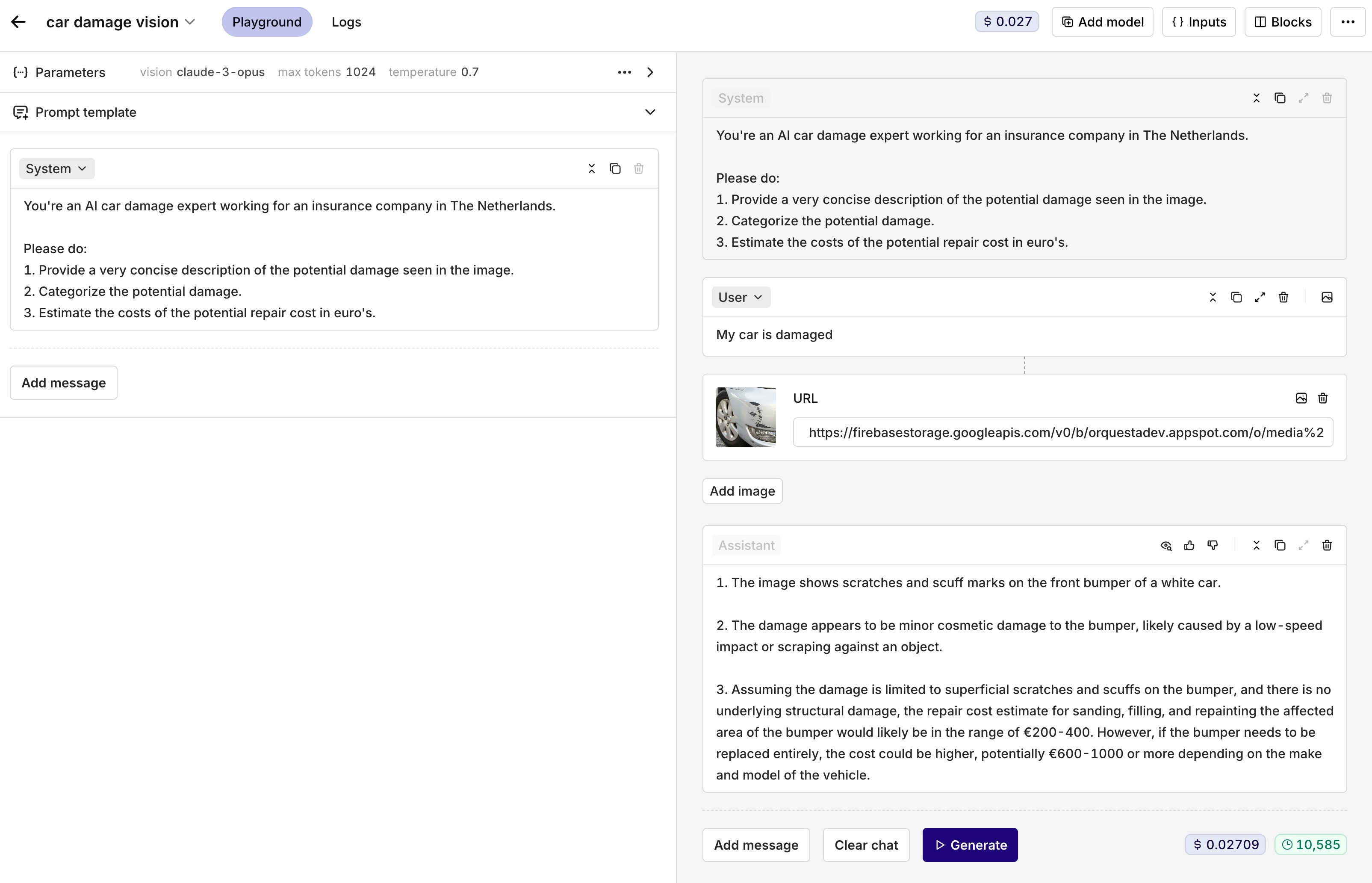
Start using vision models to unlock the even greater potential of Generative AI.Vision models and image models are different. While image models create images, vision models interpret them.We currently support the following vision models:- Claude-3-haiku
- Claude-3-sonnet
- Claude-3-opus
- GPT-4-turbo-vision
- GPT-4-vision-preview
-
Gemini-pro-vision
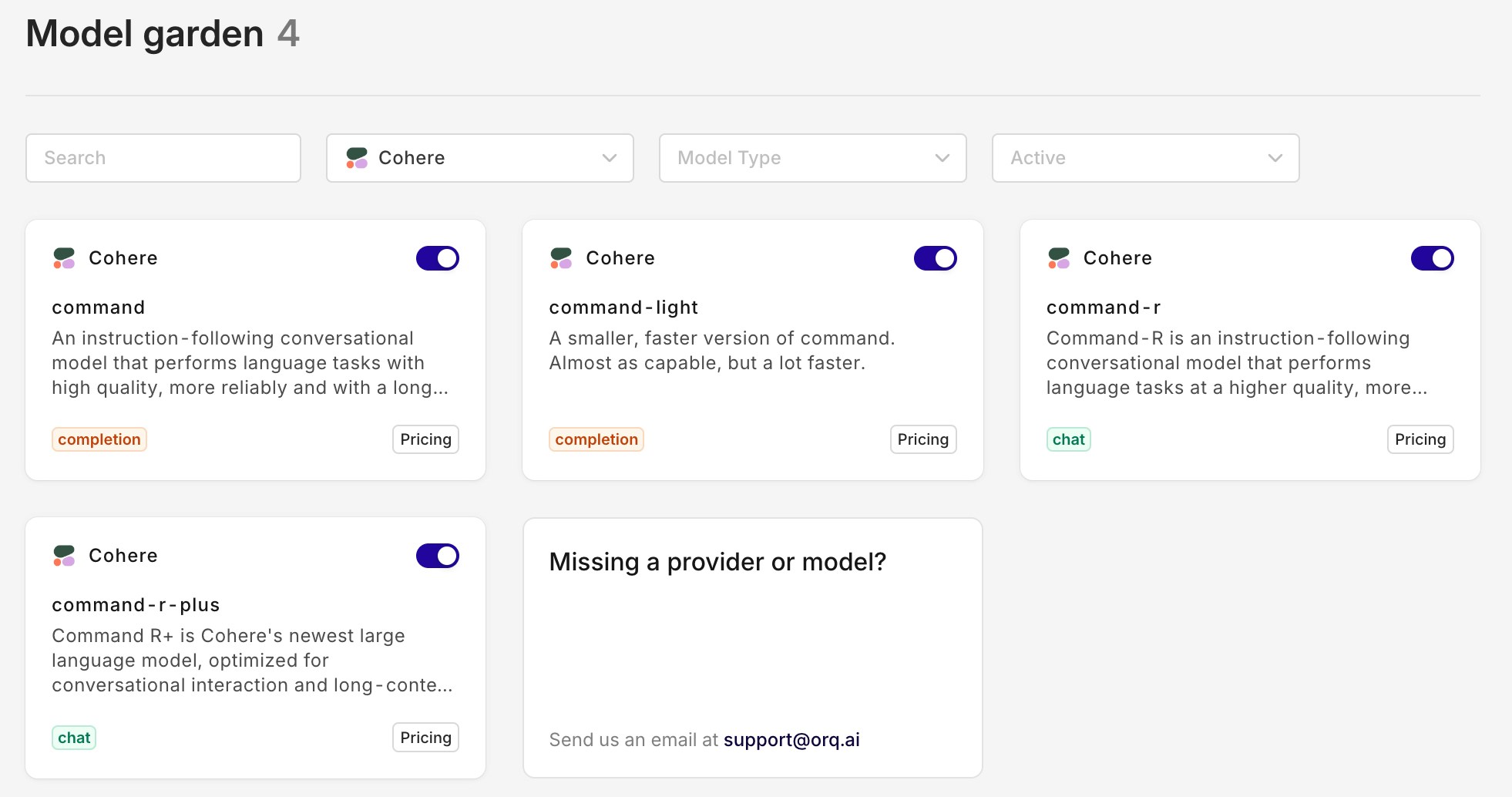
New Cohere models - Command R & Command R+
We now support the latest models from Cohere: Command R & Command R+.Command R is a highly advanced language model designed to facilitate smooth and natural conversations and perform complex tasks requiring long context. It belongs to the “scalable” category of models that provide both high performance and accuracy.The most important key strengths of Command R:- High precision on retrieval augmented generation (RAG) and tool use tasks (function calling)
- Low latency and high throughput
- Large context window 128,000-tokens
-
Multilingual capabilities across 10 key languages, with pre-training data for 13 additional languages
Prompt Studio V2
Today we released the new Prompt Studio V2. Similar to the updated Playground V2, the Prompt Studio is designed for intuitive prompt engineering and consistency across the entire platform.The Prompt Studio can be found when clicking on a variant in the business rules engine. Within the Prompt Studio, you can configure your LLM call. It supports function calling (tools), variable inputs, retries, and fallbacks.Check out the interactive walkthrough below to test it out yourself.New SDKs with breaking changes!
🚧 We recently transitioned our SDK's from @orquesta to @orq-ai across all platforms to align with our branding and focus on AI. This includes some breaking changes!
Python SDK
Installation
BeforeUsage
BeforePython
Python
Node SDK
Installation
BeforeUsage
BeforeTypescript
Typescript
Playground V2
Today, we launched our new Playground V2. This updated layout is designed for prompt engineering. By keeping the prompt template separate from the chat messages, it’s easier to fine-tune your prompt. When you clear the chat messages, the prompt template will still be there.Check out our new Playground V2 in the interactive walkthrough below!Claude 3 - Haiku, Sonnet and Opus are now available
With the launch of Claude 3, Anthropic is challenging the status quo. Its most advanced model ‘Opus’ is supposedly better than GPT-4. However, it’s also around 2.5 times more expensive than GPT-4. Haiku, the cheapest and least capable model, is around the same price as GPT-3.5 and is really fast.On another note, none of the Claude models support image and video generation. However, they do have the ability to interpret and analyze images. Moreover, they do have a default context window of 200k tokens, making it useful for larger data sets and variables.The Sonnet and Haiku models are available on Anthropic as well as on AWS Bedrock. Whereas Opus is currently only available on Anthropic.You can toggle them on in the AI Router and try them out yourself!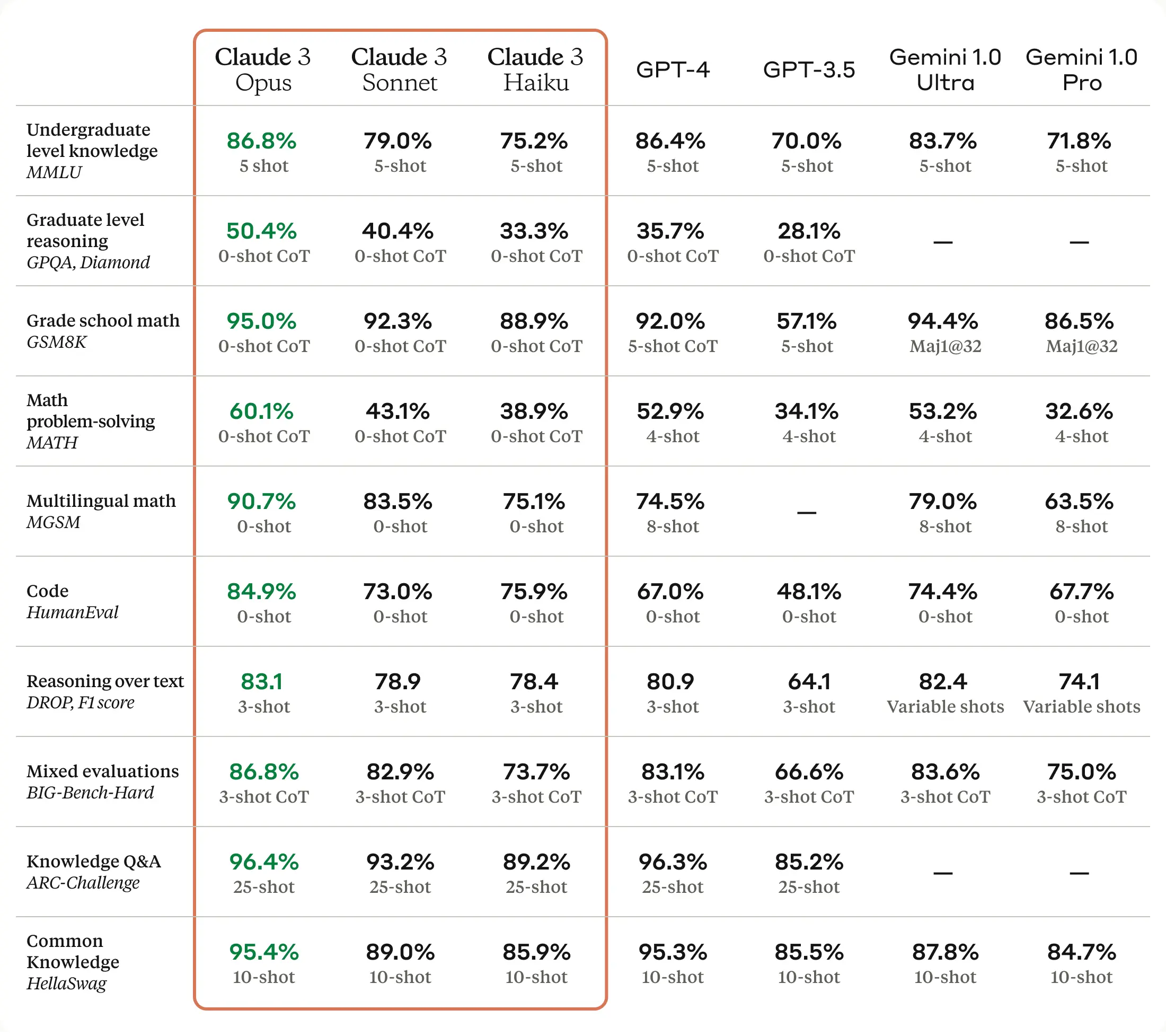
Hyperlinking
With the new Hyperlinking feature, you are able to take your use case from one module to the other. Switching between the Playground, Experiments, and Deployments allows you to make quick iterations throughout the whole platform. Whether you want to take your Playground setup to Experiments or your Deployment to Playground, it’s all possible.Example: You are running a Deployment but want to quickly test out what would happen if you change your prompt. You don’t want to change the prompt within your Deployment because it’s in production. With the new Hyperlinking feature, you can open the exact same configuration used in one module in the other. Follow these steps to try it out yourself:- Navigate towards the Logs tab
- Click on the log that has the configuration that you want to iterate on
- Click on the three-dotted menu in the upper right corner
- Click open in Playground
- Click on ‘View Playground’
- You’ll be redirected to the Playground and see the exact same configuration you are using in your Deployment
Use Groq as your LLM provider
You can now use Groq as your LLM provider. It currently hosts the following models: llama2-70b-chat, mixtral-8x7b-32768, and Gemma-7b-it.What is Groq and why should I try them out?Groq has recently gained a lot of attention for being one of the top companies providing fast LLM inference solutions. There’s a growing need among Gen AI application builders to decrease response times, as lowering latency is key for real-time AI applications. The field is getting crowded, with many companies competing in LLM inference. Groq being one of them, claims to offer inference speeds that are 18 times faster than some well-known cloud-based services. The models hosted by Groq utilize the Groq LPU™ Inference Engine, which is powered by their specialized hardware called Language Processing Units (LPUs) to enhance LLM performance.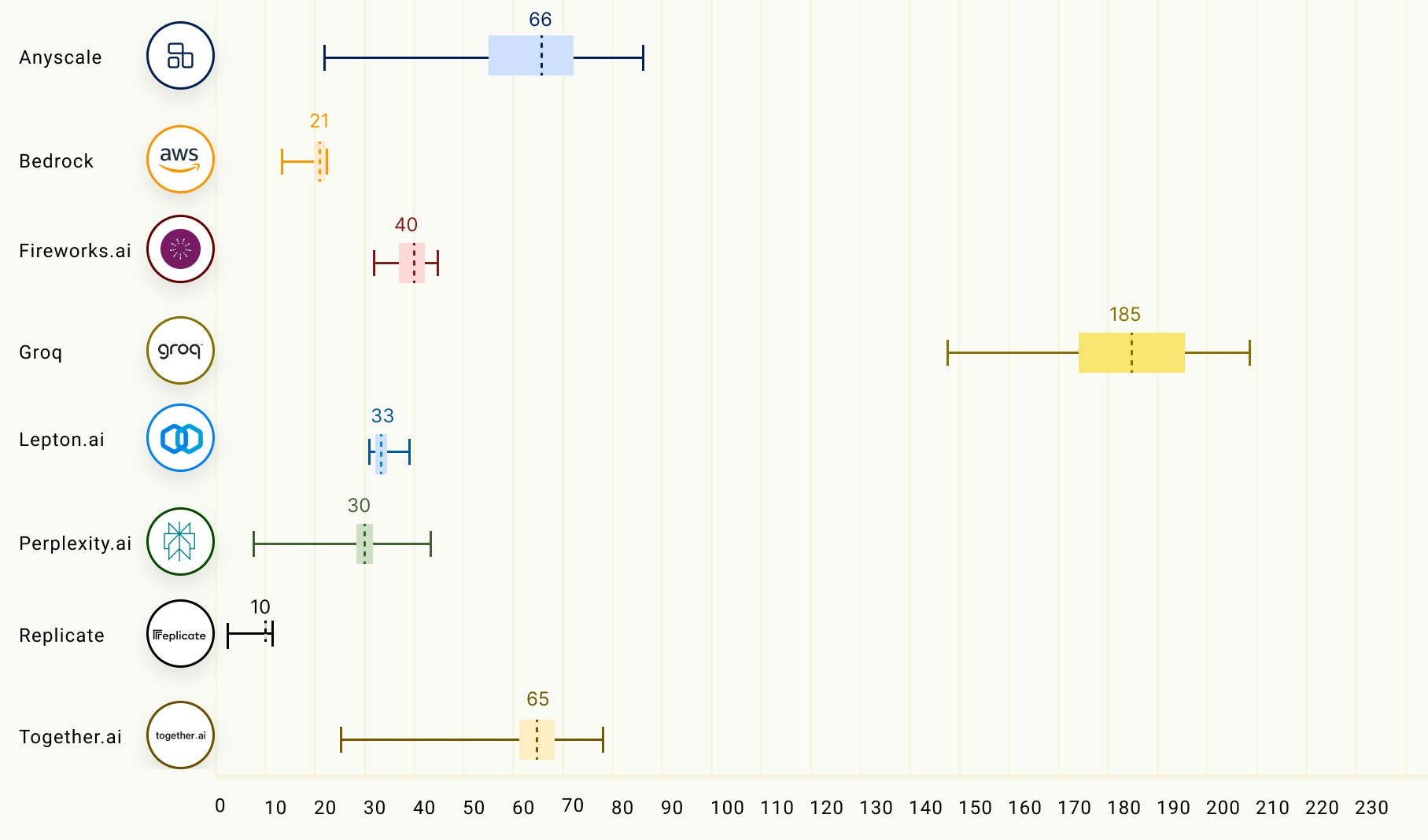
Make your own custom LLM Evaluator
You can now create your own custom LLM evaluator. This allows you to go beyond the standard evaluators like BLEU and Valid JSON.In the example below, we made an evaluator that compares the tone of voice of the generated text against the desired tone in the reference.Read more about Experiments and Evaluators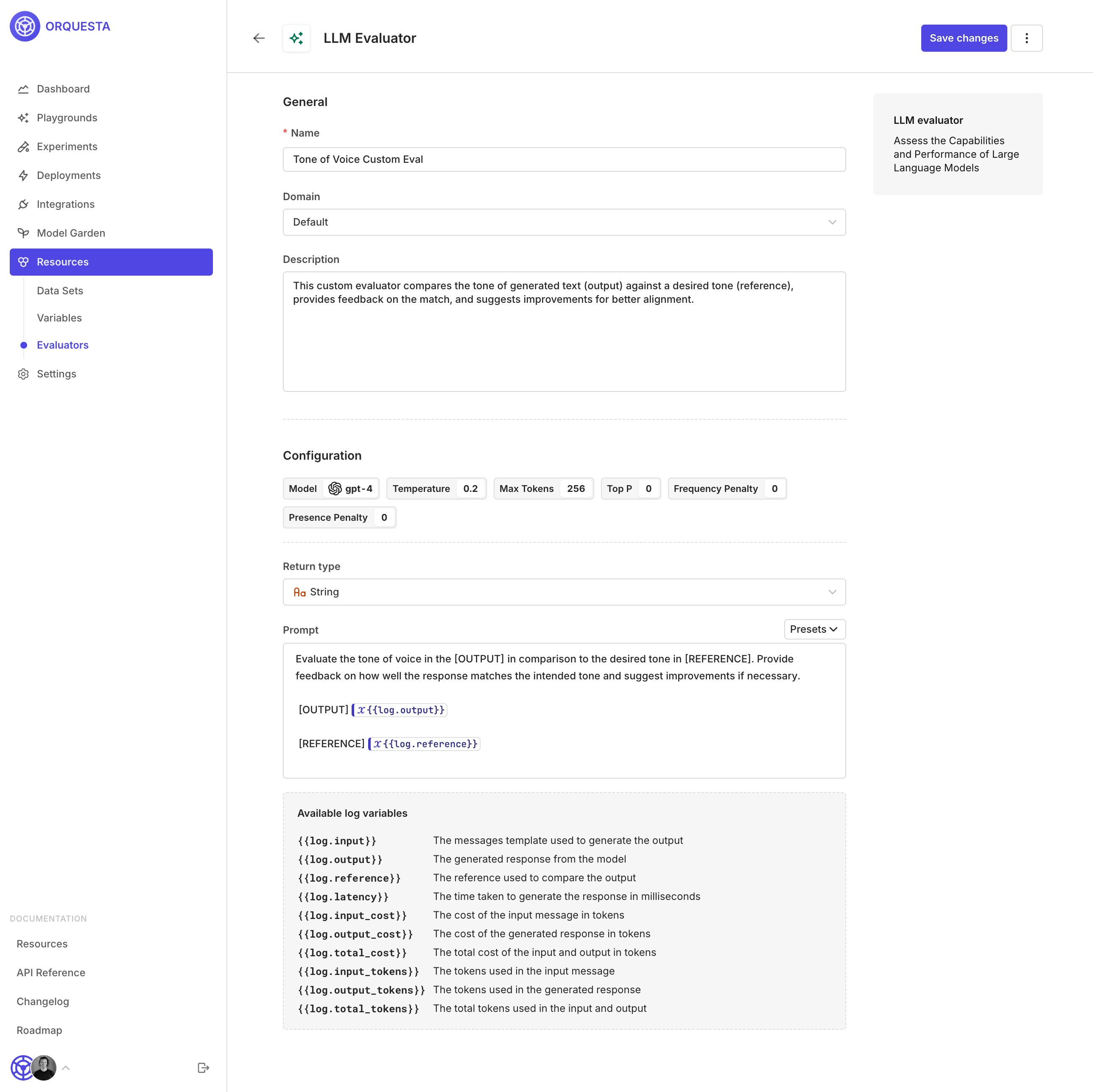
Use LLM as a Reference in Experiments
With this new feature, you’re able to use the output of a large language model like GPT-4 as the reference for another model like Gemma-7b and Mistral-large (see image).For most of the evaluators, you need a reference. This is because an eval like cosine similarity needs two things to compare to each other (the newly generated text and the reference text).Example use case: A new model has been released which is faster and less expensive than the model you are currently using. Although your current model is performing well, you are interested in comparing the performance of the new model. To compare the two models, you have selected your current model (GPT-4) as the reference model in the configuration. This will serve as a benchmark for the new model’s performance. When running the experiment, the reference model will be completed first, and then the output of that model will be used as a reference for the other models. To measure the similarity between the output of the newer models and the reference model, you can use an evaluator such as cosine similarity.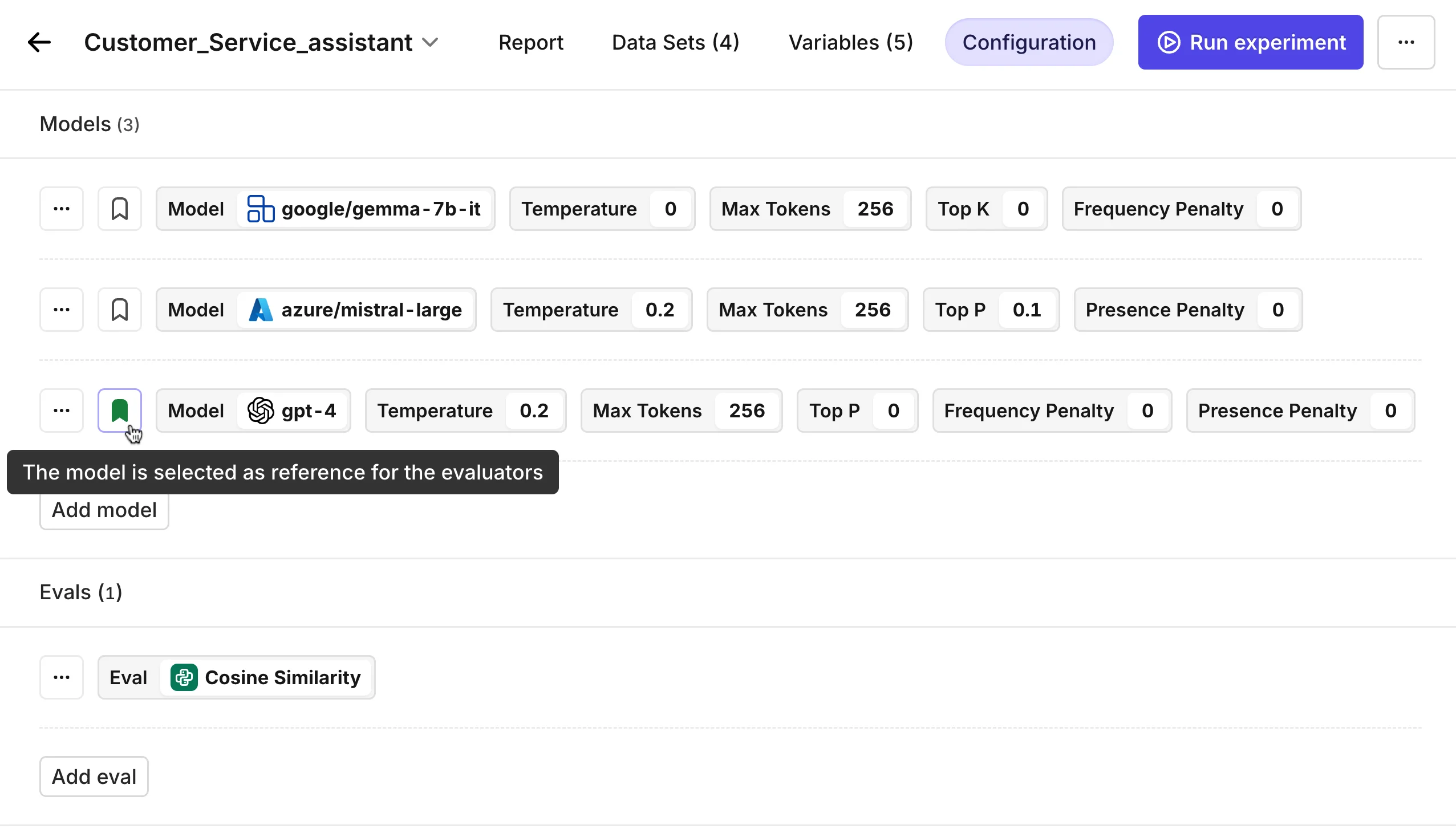
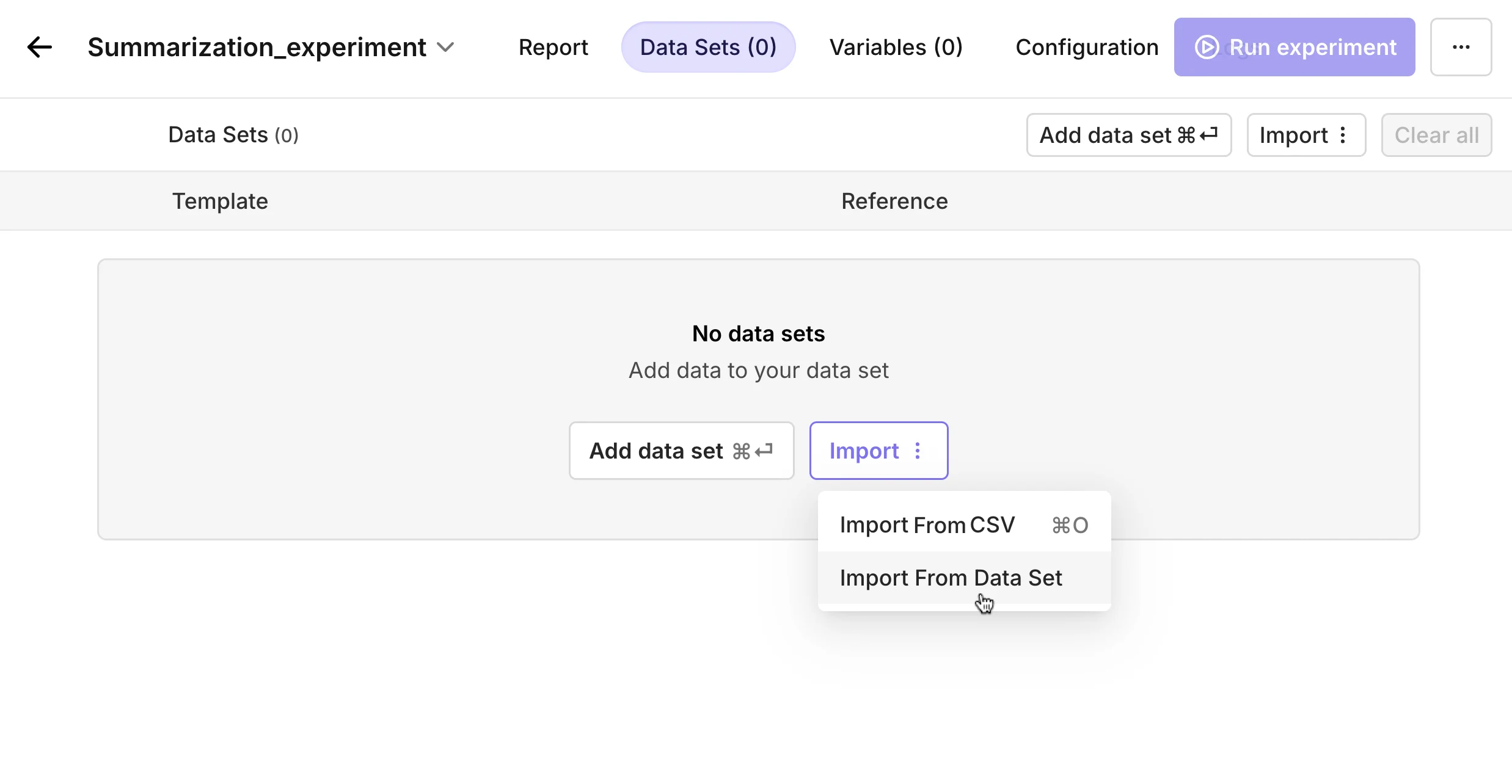
Resource management
Save your data sets, variables, and evaluators in the newly added resources tab.With this new feature, you don’t have to constantly re-upload your resources anymore.Example: After finetuning your prompt, simply save the prompt in the resources tab so you can easily access it during your next workflow.The resources are divided into 3 categories:Data sets - This is where you can store all your prompts and references. Read more about Dataset.Variables - The dynamic elements you put in between curly_brackets are listed here.Evaluators - The standard and custom evals can be stored here. Read more about why you should use evals and when to use which one in Evaluator.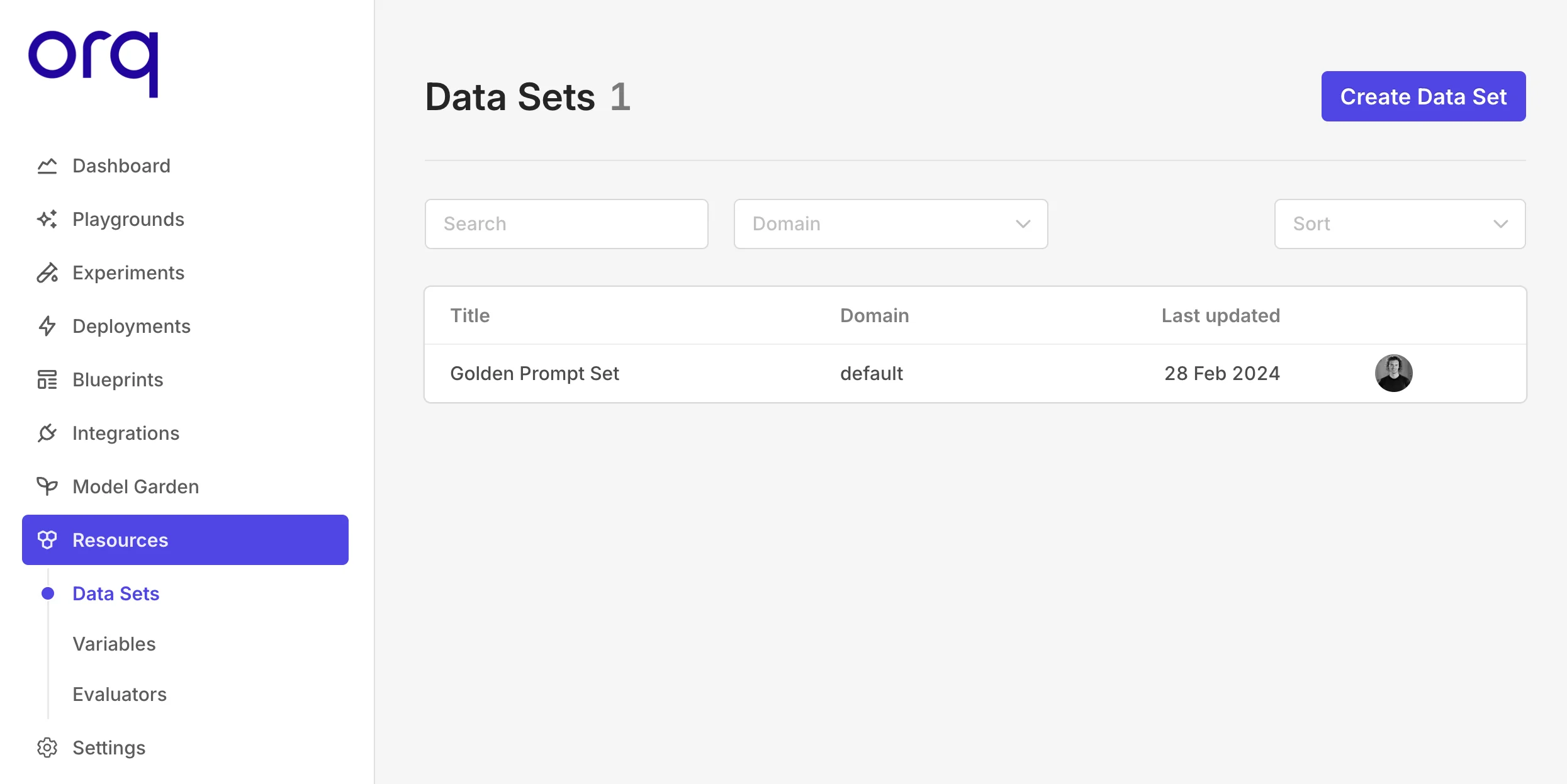
Evaluators are available on our Platform
We have added Evaluators to our platform. With a wide range of industry-standard metrics and other relevant evaluators, you can check whether or not the output of your LLM is accurate, reliable, and contextually relevant.Read more about each evaluator in Evaluators.Python and Node SDK’s improvements
In our latest SDK update, we’re thrilled to share a series of enhancements that significantly boost the performance and capabilities of our platform.Support for messages in the invoke and stream functionalities
Now you can provide a new property in theinvoke and the invoke with stream methods of both SDKs to combine the messages with the prompt configured in Orquesta.Typescript
- Enhanced Contextual Clarity: The use of chat history empowers the model to preserve the context throughout a conversation. This feature ensures that each response is not only coherent but also directly relevant, as the model can draw upon past dialogues to fully grasp the nuances of the current inquiry or discussion topic.
- Streamlined Conversation Flow: Chat history is instrumental in maintaining a consistent and logical flow in conversations. This prevents the occurrence of repetitive or conflicting responses, mirroring the natural progression of human dialogues and maintaining conversational integrity.
- Tailored User Interactions: With access to previous interactions, chat history allows the model to customize its responses according to individual user preferences and historical queries. This level of personalization significantly boosts user engagement and satisfaction, leading to more effective and enjoyable communication experiences.
Support for messages and choices to add metrics
In Orquesta, after every request, you can add custom metrics. On top of the superset that we already support, we also added two new properties,messages and choices. The messages property is designed to log the communication exchange between the user and the model, capturing the entire conversation history for context and analysis. Meanwhile, the choices property records the different response options that the model considers or generates before presenting the final output, providing insights into the model’s decision-making process.Typescript
Support for OpenAI system fingerprint
To help track OpenAI environmental or model changes, OpenAI is exposing asystem_fingerprint parameter and value. If this value changes, different outputs will be generated due to changes to the OpenAI environment.In the new version of the SDK, if you are using an OpenAI model and the invoke method, the system_fingerprint will be exposed in the deployment properties.