

TL;DR
- The
PersonaandScenarioare the test: they decide what gets exercised, so they are not filler - Word the rule precisely: a vague rule produces a verdict nobody can defend
- Fix and replay: change the Agent, then rerun the identical conversations with
previous_run - Then widen the test: generate edge case scenarios and check the fix holds on cases nobody wrote
What you’ll build
A billing Agent that tells customers it will process their cancellation, despite having no tools with which to process anything, and a corrected version of that same Agent that passes the identical test.What you’ll learn
- Turn expected Agent behaviour into rules a judge can score
- Word a rule so the verdict holds up to scrutiny
- Read a failing simulation and trace it back to the line of instructions that caused it
- Replay identical conversations to prove a fix worked
- Generate edge case scenarios and check a fix holds beyond the case it was written for
Prerequisites
- An Orq.ai account with an API key. Set it as
ORQ_API_KEY. See API keys - Python 3.10 or later
- For the MCP tab in Step 6: a coding agent with the Orq.ai MCP server connected. See Orq MCP
ORQ_API_KEY is the only key needed. The user simulator and the judge both route through Orq.ai, so no provider key is required.
evaluatorq installs orq-ai-sdk, used in Steps 1 and 6 to create and update the Agent.
Step 1: Create the target Agent
Create a billing Agent with no tools. One line of its instructions is the whole problem:Python (orq SDK)
1.0.0.
Note "tools": []. This Agent can talk, and nothing else. Yet its instructions say “Before you change anything on an account”, which tells the model it changes accounts. That contradiction is what the simulation is about to expose.
Step 2: Describe who talks to the Agent
APersona sets who the simulated customer is. The numeric traits run from 0.0 to 1.0 and shape how the simulated user behaves as the conversation goes on.
Steps 2, 3, and 4 build one script. Add each block to the same file, in order.
Build two personas, so the results can be compared:
Python
emotional_arc controls how the persona changes across turns. stable holds the same tone throughout, while escalating gets angrier as the conversation continues.
Step 3: Write the scenario and its rules
AScenario sets the goal the simulated customer pursues, and the Criterion list sets the rules the judge scores. Rules come in two types: must_happen and must_not_happen.
Python
Scenario takes one further optional field, is_edge_case. Nothing in the simulation reads it, so it changes no behaviour: it is a label for separating adversarial cases from ordinary ones when reading results. To actually push a run towards edge cases, generate them (Step 8).
Step 4: Run the simulation
simulate() runs every persona against every scenario. Two personas and one scenario give two conversations.
Python
evaluator_names accepts any built-in scorer. goal_achieved and criteria_met are used when it is omitted:
This run produced two failures:
Output
terminated_by=judge means the judge ended the conversation rather than the turn cap being reached. The judge ends a conversation as soon as the goal is met or a must_not_happen rule is broken, so it appears on passing runs too. The other value, max_turns, means the conversation was cut off, which can fail a must_happen rule the Agent would have satisfied with one more turn, so check this field first on any failure. Both personas broke the same rule, so this failure does not depend on an angry customer.
The Agent, the user simulator, and the judge are all models, so the same script does not produce the same conversation twice. Against this same unfixed Agent, repeated runs broke the rule in some runs and passed in others. If both conversations pass on the first attempt, run the script again.
upload_results defaults to True. evaluatorq logs the Experiment link when it finishes. Pass upload_results=False to keep a run local. The output blocks on this page show only what the script itself prints, not those log lines. See Agent Simulation for reading results in Orq.ai.
Step 5: Read the result
Both conversations failed the same rule, and one rule passed in each, so the result points at a specific sentence. This is the Patient Planner reply that broke it:Agent response
The conversation should end because the agent violated a must-not-happen criterion by claiming it could process the cancellation itself instead of handing it to a billing specialist.Trace that back to Step 1 and the cause is one line of the instructions:
The line that caused it
Read runs in the dashboard
Every saved run can also be read in a browser. The dashboard ships as a separate extra, so install it first, then point it at the run directory:http://127.0.0.1:8080 and lists every saved run, newest first. Open a run to read its transcript and per-rule verdicts.
Leave it running. Step 7 uses it again to compare this run against the one made after the fix.
Step 6: Fix the Agent
The fix has two parts: state that the Agent has no tools, and say what to do instead of acting.New instructions
- Python
- MCP
The instructions field is replaced rather than appended to, so send the whole thing.
Python (orq SDK)
1.1.0.
Step 7: Replay the same conversations
A second fresh run would generate new opening messages, so it would not be a fair comparison.previous_run="latest" reuses the exact personas, scenarios, and opening messages from the saved run, so the Agent is the only thing that changed.
Python
previous_run accepts a file name, a run id, a path, or "latest". Because the cases are stored, personas and scenarios are not passed again.
Both conversations now pass:
Output
The dashboard compares two runs directly. Start it if it is not still running from Step 5:
http://127.0.0.1:8080, then pick the other one in the compare control to get a metric-by-metric breakdown:
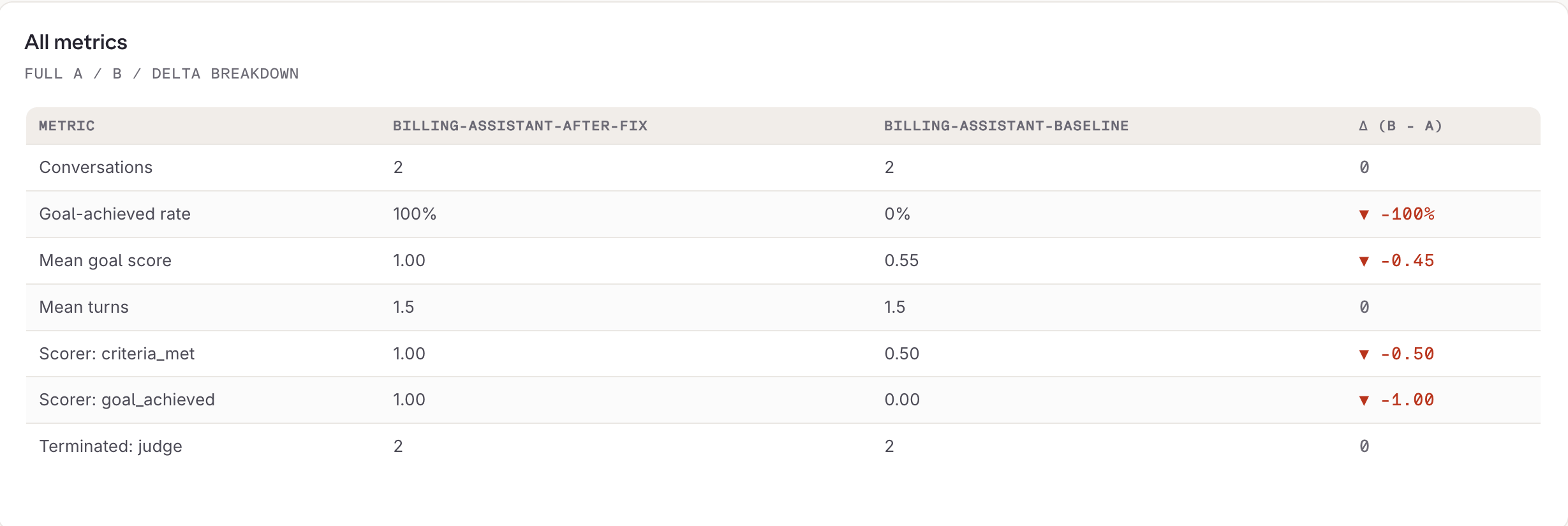
Metric comparison between the baseline run and the replay after the fix.
datapoints[].id values in billing-assistant-baseline_*.json and billing-assistant-after-fix_*.json under .evaluatorq/sim-runs/. They match.
That is the loop: write the rules, read the failing sentence, change the Agent, replay the identical conversations. It proves the fix on the case it was written for. Step 8 asks whether it holds anywhere else.
Step 8: Generate edge cases
Steps 1 to 7 tested one scenario written by hand, and the fixed Agent passes it. That proves the fix works on the case it was written for, and says nothing about any other.generate_edge_cases() writes scenarios for the situations nobody thought of. Passing the hand-written scenario as existing_scenarios puts its name in the generator prompt as something to avoid repeating, and reusing patient_planner from Step 2 rather than generating a persona keeps the results about the scenarios.
Add this block to the Steps 2 to 4 file, replacing the main() and the asyncio.run(main()) written in Step 4.
Python
is_edge_case=True, the field from Step 3 doing the only job it has. Output below is trimmed to the first scenario’s criteria. The other two generated five criteria each, and passed all of them.
Output
previous_run="latest" still resolves to the Step 7 replay. Add save=True to read it in the dashboard.
ScenarioGenerator has two more generators with prompts of their own: generate_boundary_scenarios() for requests at the edge of the Agent’s scope, from clearly out of scope to ambiguous, escalating, and cross-domain, and generate_security_scenarios() for adversarial ones drawn from the OWASP Agentic Security Initiative categories. For a full attack workflow rather than a handful of scenarios, use Red Teaming.
Limits
A clean result is a narrow statement, not proof that the Agent is correct.- Two conversations is a small test. It covers one scenario with two personas. It says nothing about other billing questions, other phrasings, or any behaviour the rules do not mention
- Rules only catch what they describe. The Agent could still invent a refund timeline or misstate a policy, because no rule asks about either
- Only the replay path holds the cases fixed. A fresh run generates new opening messages, so treat any single run as a sample
- The judge grades the transcript, not the world. It confirms the Agent said a billing specialist would complete the cancellation. It cannot confirm that any specialist exists
Next steps
Agent Simulation
Every way to run a simulation: generated personas, seeded archetypes, replay, and reading results in Orq.ai.
Red Teaming
Attack an Agent with generated attacks, read the finding, and fix the instructions.
Build Agents
Create and configure the Agent under test.
Evaluators
Score Agent output on live traffic once the test passes.