

Objective
Start with a working LangGraph agent and put Orq.ai behind it: route its model calls through the AI Gateway, ground its answers in a Knowledge Base, and record each run in Traces. The agent logic itself barely changes.Use Case
Reach for this pattern when:- An agent is already built on LangChain or LangGraph.
- Standing up a vector database and juggling provider API keys is not worth the overhead.
- Seeing what the agent actually did at runtime matters for debugging.
Prerequisites
- Orq.ai Account: Active workspace in the AI Studio. Create an account to get started.
- API Access: Valid API key from Workspace Settings > API Keys.
- Model Access: At least one model enabled in the AI Gateway, see Using the AI Gateway.
- Python: Version 3.9 or higher.
Step 1: Install and set up the SDK
Install Orq.ai alongside LangGraph and the LangChain packages.Step 2: Turn on tracing
Tracing is one call.orq_tracing_setup hooks into LangChain’s callback system, so every agent run, tool call, and model response streams to Orq.ai with no further changes to the agent.
Python
Step 3: Create a LangGraph agent with the router
Point a standard LangChainChatOpenAI model at the Orq.ai router by overriding base_url. From there the agent is ordinary LangGraph: create_agent is LangChain’s prebuilt constructor that compiles a LangGraph agent under the hood, here wired with one example tool.
Python
Step 4: Test the agent
A small helper wraps the agent call so the later steps stay short. The agent picks the tool, runs it, and returns the answer.Python
Python
Step 5: Switch models through the router
The router addresses models with aprovider/model string, so switching providers is a one-line change. Nothing else moves: the agent, tools, and prompt all stay as they were.
Python
Step 6: Set up the Knowledge Base
Ground the agent in real documents with a Knowledge Base. This takes three calls: create the Knowledge Base, upload the source file, then create a datasource that chunks and indexes it. Create the Knowledge Base and keep itsid to reference it later.
Python
Python
completed. To tune chunk size and overlap, see Chunking Strategy.
Python
Step 7: Add the Knowledge Base search tool
Expose the Knowledge Base to the agent as a tool.search_policy runs a retrieval query and returns the matching chunks, and the system prompt forces the agent to call it before answering.
Python
Step 8: Ask a grounded question
Ask something that can only be answered from the uploaded policy. The agent callssearch_policy first, then answers from the chunks it retrieves.
Python
Step 9: Check the Traces
Open AI Studio > Observability > Traces to inspect any run: the user message, the tool calls, the retrieved chunks, the model responses, and the timings. The setup from Step 2 already captures all of it, with nothing else to add.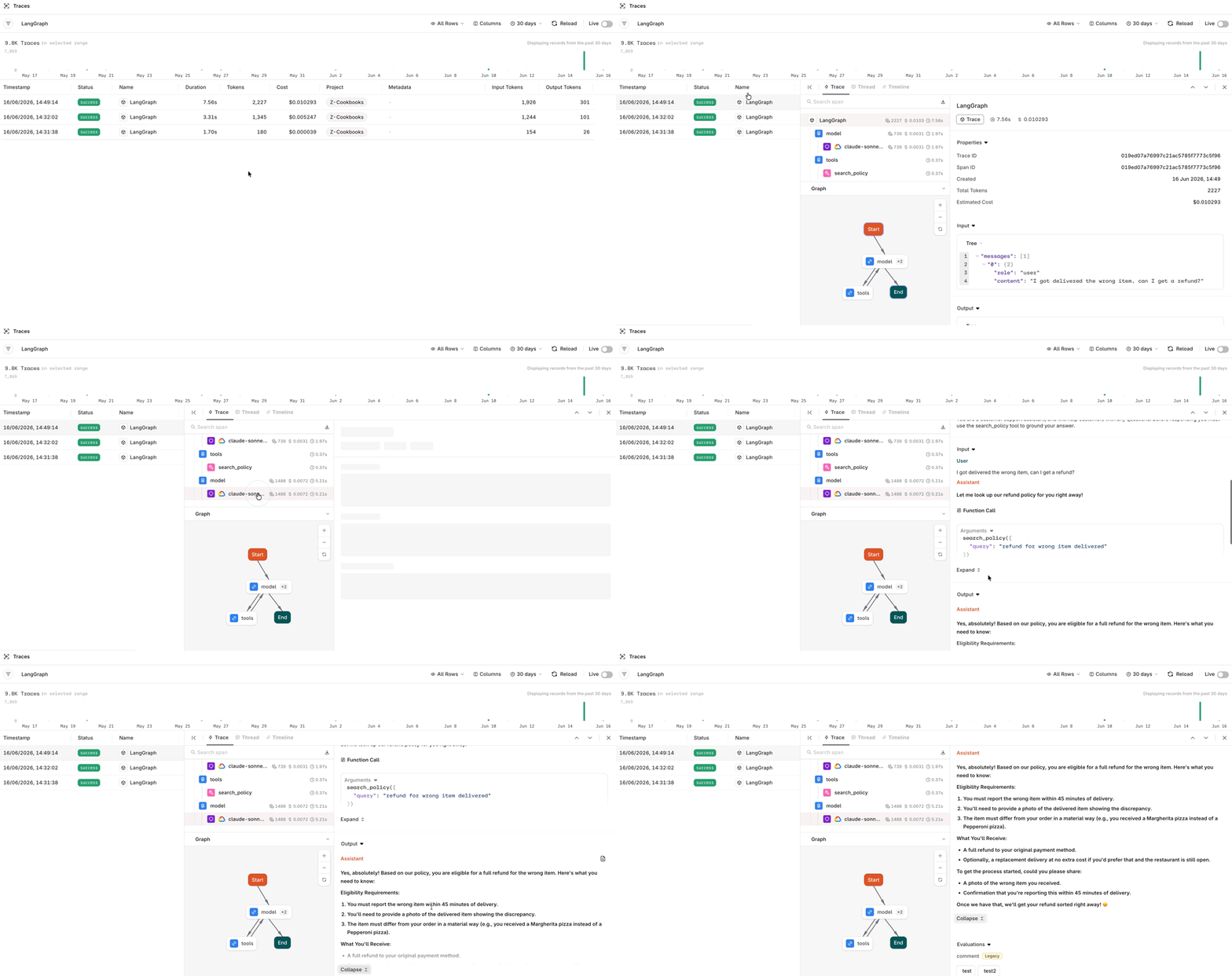
Traces of the LangGraph agent call
To learn more about Traces see Traces.
The LangGraph agent now runs on Orq.ai for routing, retrieval, and observability. Swap the model, the Knowledge Base, or the prompt without rewriting the agent loop.
Related
Simple RAG
Build the same retrieval flow as a standalone deployment, without a framework.
Advanced RAG
Layer more retrieval techniques on top of a Knowledge Base.
LangGraph framework reference
AI Gateway and OpenTelemetry observability details for LangGraph.