

TL;DR
- A public leaderboard scores models on generic data. It does not show which model is cheap enough, and good enough, for this product’s real prompts.
- orq-arena is an open-source CLI. It runs models against each other on supplied prompts. An LLM jury judges the answers, through the AI Gateway.
- The output is a report and a raw data file. Both are evidence a team can show stakeholders. Re-run the same benchmark later, when a new model ships.
- This cookbook runs one real benchmark: a flagship model against two cheaper models. The question: is the extra cost worth it for this task? In this run, most of the flagship’s lead came from writing longer answers, not better ones.
What you’ll build
A benchmark of three models, two from Anthropic and one from OpenAI, on eight support and product prompts. A three-model jury judges the answers. The jury comes from providers outside the candidate pool. The result is a report that ranks all three models by quality, and shows cost against quality.What you’ll learn
Model selection is an ongoing decision, not a one-time pick. A leaderboard win does not prove a model is worth its price for a specific task. orq-arena turns “which model should we use” into a process anyone can repeat: run it on real prompts, get evidence, run it again later. Two things make the result trustworthy:- Bias controls: every pair is judged in both orders, so order alone cannot decide a result. A judge whose votes look unreliable is dropped from that round.
- Statistics: rankings use a Bradley-Terry model, the same method behind chess ELO, with bootstrapped 95% confidence intervals. Two models with overlapping intervals are not automatically tied. The report checks this directly and states the answer.
Prerequisites
- Python 3.10 or later, and uv.
- An Orq.ai API key with at least one chat model enabled. Create one under workspace settings: see the API keys guide.
- Install steps, the full config reference, and the method behind the ranking live at orq-arena’s own docs and on the Model Arena page of this site. This cookbook does not repeat them.
uv tool install puts the orq-arena command on the global PATH. But the command reads .env, --config, and prompt files from the current directory, not the install location. Run every command below from inside the cloned repository.Step 1: Install and connect
.env. Set ORQ_API_KEY to the key from Prerequisites. Never paste the key into a shared terminal, and never commit it.
Confirm the install, and check which models the workspace has enabled, at zero cost:
Step 2: Choose a model pool that tests a real decision
The useful comparison is not “flagship against flagship.” It is: the team already pays for a flagship model on this task. Is that necessary? This run tests two alternatives at once: a cheaper model from the same vendor, and a cheaper model from a different vendor. Save this ascookbook.yaml:
cookbook.yaml
claude-sonnet-5 is the incumbent flagship. claude-haiku-4-5 is a cheaper model from the same vendor. gpt-5.4-mini is a cheaper model from a different vendor, with its reasoning turned off to keep the comparison fair.
Judges: all three judges come from providers outside the candidate pool. A judge that shares a provider with a candidate can favor that candidate’s writing style over its actual quality. This is a known risk in LLM-as-judge setups. Check the pool before spending anything:
A judge also needs to turn its own reasoning off. If it does not, a low
judge_max_tokens cap can cut its answer short and turn its vote into a failure. This can push a round below quorum. Check the model’s metadata for supports_reasoning, or watch for the CLI’s own pool is thinking-clean message at the start of a run.Step 3: Write prompts that resemble production traffic
orq-arena reads prompts from a JSONL file, one object per line. Trivia questions do not test a jury’s judgment. Realistic task prompts do. Save this ascookbook-prompts.jsonl:
cookbook-prompts.jsonl
--prompts orq:<dataset_id>. No export step is needed.
Step 4: Run the benchmark
--rounds 8 matches the prompt count, so the run uses every prompt. Without it, the run uses a smaller, seeded slice set by match.max_rounds.
The command pauses before it spends anything:
y to run it. Add -y to skip this prompt in a script. run refuses to proceed on non-interactive input without -y, so this flag is also what a CI job or a scheduled re-run needs.
Step 5: Read the report
The run writes three files.cookbook-battles.jsonl holds every judged round, with both full answers and every vote. cookbook-battles.run.json is a manifest recording the exact config, hashes, and candidate list the run used. cookbook-battles.report.html is one shareable file, with no external assets.
This run produced:
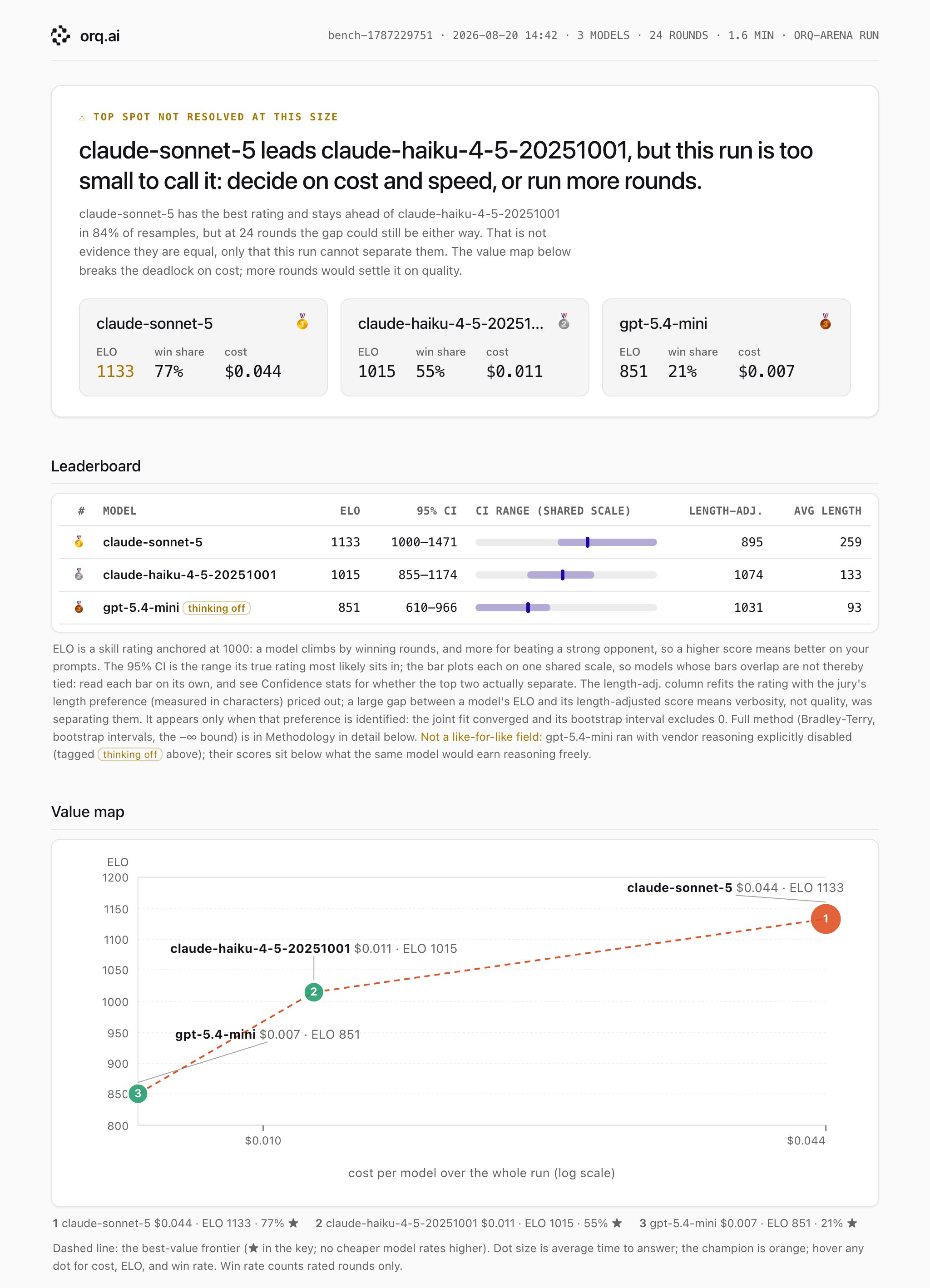
This run's report: claude-sonnet-5 leads on raw ELO, but the confidence intervals overlap, and the length-adjusted column reverses the ranking.
Two of them overlapping does not mean the two models are tied, because both are drawn from the same resamples and share the anchoring… Whether the top two separate is decided on the bootstrap of their difference… reported in Confidence stats.The second half of the answer is the length-adjusted column.
claude-sonnet-5 wrote the longest answers, 259 characters on average against 133 and 93. Once that length preference is priced out, its score drops from first place to last. Both cheaper models rank above it. This does not prove claude-sonnet-5 writes worse answers. It shows that much of its lead in this run came from writing longer answers, which this jury rewarded, not necessarily from writing better ones. That is the real finding here: the number a team would use to justify the flagship’s price was mostly a length effect, not a quality one.
Two more numbers worth reading from the report:
- Jury agreement: 92% in this run. Low agreement is a sign to fix the judging criteria before trusting a ranking from it.
- Inconclusive rounds: 5 of 24 round-slots did not reach the
min_successful_judgesquorum, and were not rated. This is expected. A jury vote below quorum is reported honestly as “no result,” not forced into one.
Going further
This cookbook covers the core loop: install, configure, run, read the report. orq-arena has three more commands, documented in the CLI reference:rejudgere-scores an existing run with a different jury. It costs judge tokens only, since the answers are already recorded. Use it to check whether a ranking holds under a different panel.annotateandanchorbuild a blinded human-review page from a recorded run, then merge the resulting votes back in, to check how well the jury agrees with human raters.reportrebuilds the HTML page from a saved log, with no API calls. Use it to regenerate a report later, or after a manifest changes.
orq-arena report examples/quickstart/battles.jsonl, orq-arena pool, and orq-arena refresh-catalog --show.
Model Arena
Full prerequisites, first-run walkthrough, and how to read the report in depth.