

 AI Studio
 Control Tower
 AI Router






































Configuring Private OpenAI-Compatible Models
Private OpenAI-compatible models allow you to connect and manage your own OpenAI-like endpoints directly from Model Garden or AI Router.This enables full flexibility to integrate models from providers such as Groq, Together AI, Mistral, or any custom OpenAI-compatible deployment, all with workspace-level isolation and ownership. Once configured, these models are available throughout Orq.ai and can be used seamlessly within Deployments, Experiments, and the AI Router.
Supported Capabilities
Private OpenAI-compatible models fully support the same capabilities as standard OpenAI models, including:- Chat completion with function calling and structured outputs.
- Embedding generation for vector search and semantic retrieval.
- Image generation endpoints (DALL-E compatible).
- Completion (legacy models and instruction tuning).
- Vision capabilities when supported by the provider.
Adding a Private OpenAI-Compatible Model
To create a private model, head to the Model Garden in the orq.ai Studio and select **Add Model → OpenAI **.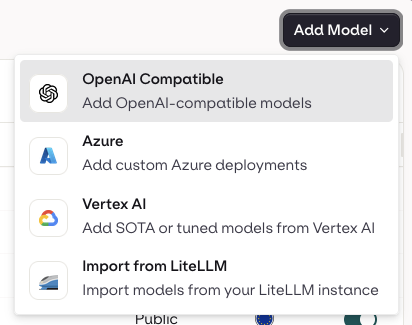
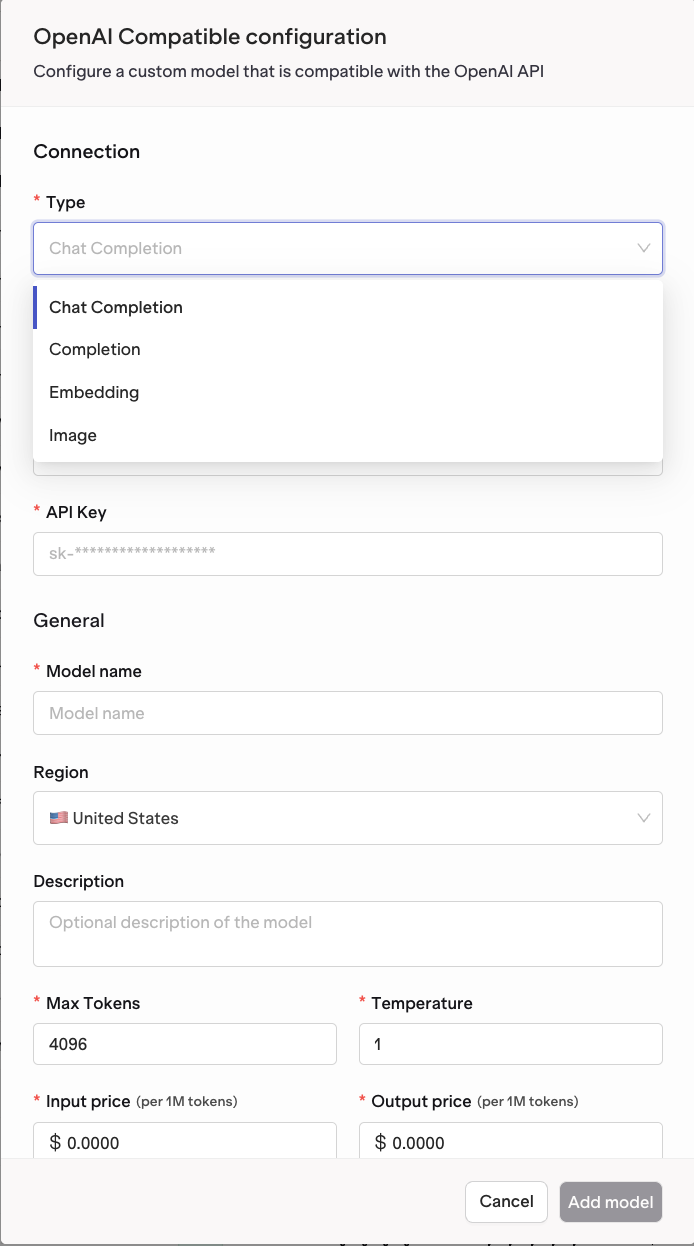
You’ll see a configuration form where you can define all connection details for your model.
Connection Settings
| Field | Description |
|---|---|
| Type | Select the type of model to connect: Chat Completion, Completion, Embedding, or Image. |
| Base URL | Enter the base API URL of your OpenAI-compatible endpoint. For example: https://api.groq.com/openai/v1 or https://api.openai.com/v1. |
| API Key | Your authentication key for the service. This will be stored securely and used for all subsequent requests. |
General Settings
| Field | Description |
|---|---|
| Model Name | The name that will appear in your Model Garden and across orq.ai. Example: Custom Groq Llama 3.3. |
| Model ID | The model identifier as defined by your provider. Example: llama-3.3-70b-versatile or gpt-4o-mini. |
| Region | Select the deployment region for your model, such as United States or Europe. |
| Description | (Optional) Add a short note about what this model is used for. |
Advanced Configuration
| Field | Description |
|---|---|
| Max Tokens | Maximum token limit for model outputs. |
| Temperature | Controls randomness in the model output. |
| Input Price (per 1M tokens) | Define the cost per million input tokens for billing and analytics. |
| Output Price (per 1M tokens) | Define the cost per million output tokens. |
Saving and Validating Your Configuration
After filling in the configuration form, click Add Model.orq.ai automatically validates your setup by:
- Checking endpoint connectivity.
- Verifying your API key and authentication.
- Testing supported model capabilities.
- Deployments
- Experiments
- AI Router calls