

Overview
Codex is an AI coding assistant that supports Model Context Protocol integrations. With Orq MCP, manage AI workflows directly from Codex while writing code.Prerequisites
- Codex installed
- Active Orq.ai account
- Orq.ai API key
Installation
Add MCP Server via Terminal
Set theORQ_API_KEY environment variable and add the Orq MCP server directly from the terminal:
your-api-key-here with your actual API key from Workspace Settings → API Keys.
Add MCP Server via UI
- Open Codex Settings by clicking Codex → Settings in the top-left menu
- Click MCP Servers in the sidebar
- Click Connect to a custom MCP to open the configuration form
- Fill in the MCP server details:
- Name:
Orq.ai - Connection Type: Select Streamable HTTP tab
- URL:
https://my.orq.ai/v2/mcp
- Name:
- Add authentication in the Environment variables section:
- Click + Add environment variable
- Key:
AUTHORIZATION - Value:
Bearer YOUR_ORQ_API_KEY
- Replace
YOUR_ORQ_API_KEYwith your actual API key from Workspace Settings → API Keys - Click Save
Verify Installation
In Codex chat, ask: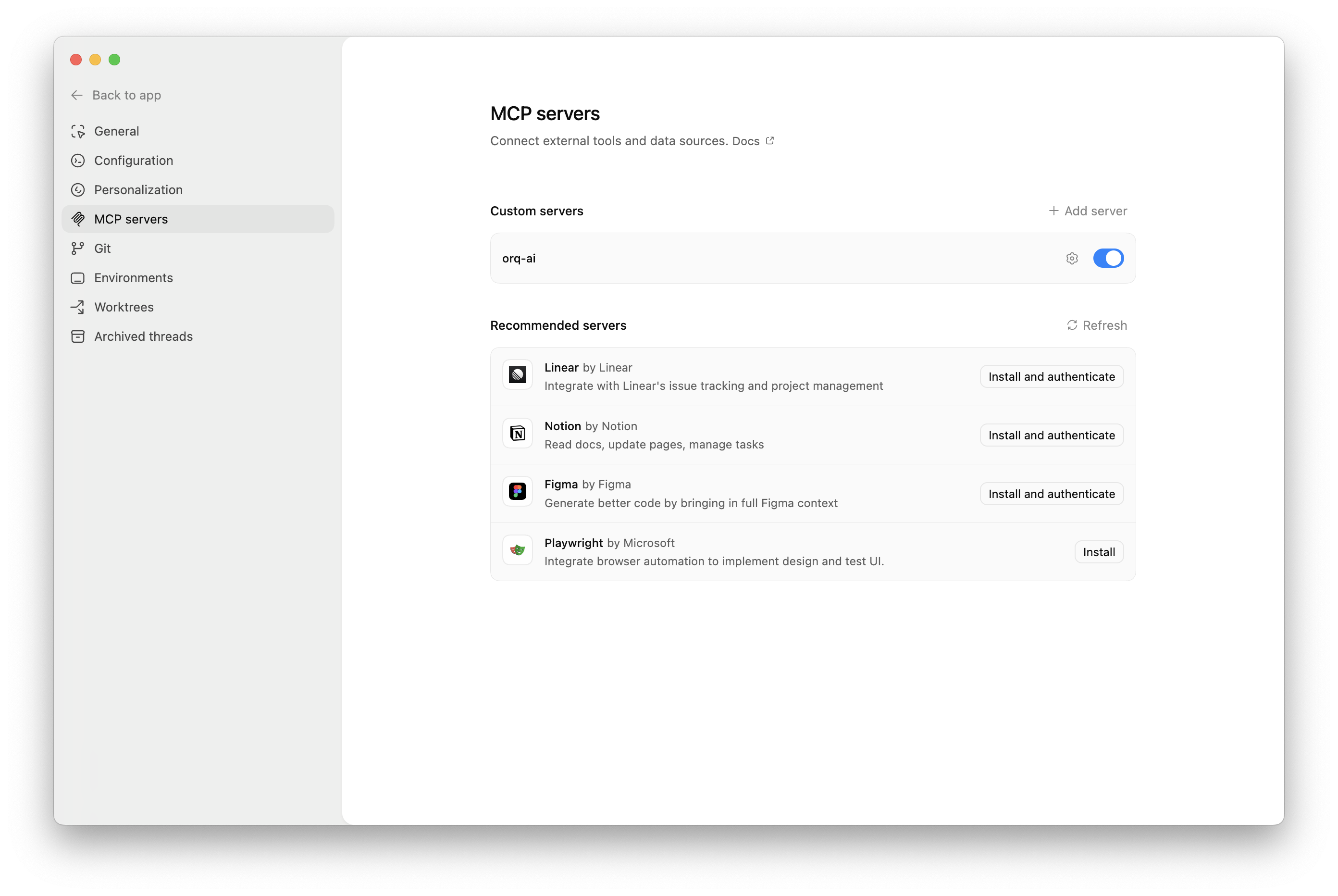
Available Commands
Use natural language to ask Codex to perform these operations:Agents
Agents
Create an agent with custom instructions and toolsGet agent configuration for [agent-key]Update agent [agent-key] with new instructions or modelConfigure agent with evaluators and guardrailsInvoke agent [agent-key] with input [message]Retrieve agent response [response-id]
Deployments
Deployments
Create a deployment called [deployment-key]Get deployment configuration for [deployment-key]
Skills
Skills
Create a skill called [skill-key]List all skills in my workspaceGet skill [skill-key]Update skill [skill-key]Delete skill [skill-key]
Analytics
Analytics
Get analytics overview for my workspaceShow me workspace metrics for the last 7 daysQuery analytics filtered by deployment ID
Datasets
Datasets
Create a dataset called "customer-queries"List all datapoints in dataset [dataset-key]Add datapoints to dataset [dataset-key]Update datapoint [datapoint-id]Delete specific datapoints in dataset [dataset-key]Delete dataset [dataset-key]
Experiments
Experiments
Create an experiment from dataset [dataset-key]List all experiment runsExport experiment run [run-id] as CSVRun experiment and auto-evaluate results
Evaluators
Evaluators
Get evaluator configuration for [evaluator-key]Create an LLM-as-a-Judge evaluator for toneCreate a Python evaluator to check response lengthAdd evaluator to experiment [experiment-key]Update evaluator [evaluator-key] with a new promptUpdate Python evaluator [evaluator-key] with revised code
Traces
Traces
List traces from the last 24 hoursShow me traces with errorsGet span details for trace [trace-id]Find the slowest traces from todayShow all traces for thread [thread-id]
Models
Models
List all available chat modelsList all available embedding modelsInvoke model [model-id] with prompt [message]
Search
Search
Search for datasets named "customer"Find experiments in project [project-id]List directories in project [project-id]
Documentation
Documentation
Search the Orq.ai docs for [topic]
Managing Entities
Managing Entities
Delete agent [agent-key]Delete experiment [experiment-key]Delete evaluator [evaluator-key]Delete prompt [prompt-key]Delete knowledge base [knowledge-base-key]
delete_dataset to delete a dataset along with all its datapoints.Usage Examples
Chat Commands
Use natural language to interact with Orq:- Generate 30 synthetic test case examples
- Use
create_datasetto create a new dataset named “API Integration Tests” - Use
create_datapointsto add all test cases to the dataset - Confirm creation with the dataset ID and summary
- Calculate the time range for the last 24 hours
- Use
list_traceswith error status filter - Display trace IDs, error messages, and timestamps
- Provide a summary of error types and frequency
- Search for the “user-feedback” dataset using
search_entities - Use
create_experimentwith two configurations (one for GPT-5.2, one for Claude Sonnet 4.6) - Run the experiment against all datapoints in the dataset
- Display the experiment ID and status
Code Context Integration
Codex can use Orq data while you’re coding:- Use
query_analyticswith deployment key filter for “recommendation-engine” - Set time range to the last 7 days
- Analyze metrics like request count, error rate, latency, and token usage
- Provide a summary report with trends and insights
Troubleshooting
Connection Issues
Connection Issues
- Verify the MCP endpoint URL
- Check the API key is valid
- Ensure network connectivity
- Review Codex logs for errors
Authentication Failures
Authentication Failures
- Confirm API key is valid
- Check API key permissions
- Try regenerating the API key
- Verify the Authorization header format
Tool Execution Errors
Tool Execution Errors
- Check the tool name is correct
- Verify required parameters are provided
- Review error messages in Codex
- Consult MCP tools list