









Getting Started

OpenAI Agents and the Assistants API enable powerful AI-driven automation through structured conversations and tool calling. Tracing these interactions with Orq.ai provides in-depth insights into agent performance, token usage, tool utilization, and conversation flows to optimize your AI applications.

Prerequisites

Before you begin, ensure you have:
  • An Orq.ai account and API Key.
  • OpenAI API key and access to the Assistants API.
  • Python 3.8+.

Install Dependencies

# Core OpenTelemetry packages
pip install opentelemetry-sdk opentelemetry-instrumentation opentelemetry-exporter-otlp

# OpenAI Agents SDK
pip install openai-agents

# Orq OpenAI Agents Instrumentation SDK
pip install orq-ai-sdk

Configure Orq.ai

Set up your environment variables to connect to Orq.ai’s OpenTelemetry collector: Unix/Linux/macOS:
export OTEL_EXPORTER_OTLP_ENDPOINT="https://api.orq.ai/v2/otel"
export OTEL_EXPORTER_OTLP_HEADERS="Authorization=Bearer $ORQ_API_KEY"
export OTEL_RESOURCE_ATTRIBUTES="service.name=openai-agents-app,service.version=1.0.0"
export OTEL_EXPORTER_OTLP_TRACES_PROTOCOL="http/json"
export OPENAI_API_KEY="<YOUR_OPENAI_API_KEY>"
Windows (PowerShell):
$env:OTEL_EXPORTER_OTLP_ENDPOINT = "https://api.orq.ai/v2/otel"
$env:OTEL_EXPORTER_OTLP_HEADERS = "Authorization=Bearer <ORQ_API_KEY>"
$env:OTEL_RESOURCE_ATTRIBUTES = "service.name=openai-agents-app,service.version=1.0.0"
$env:OTEL_EXPORTER_OTLP_TRACES_PROTOCOL="http/json"
$env:OPENAI_API_KEY = "<YOUR_OPENAI_API_KEY>"
Using .env file:
OTEL_EXPORTER_OTLP_ENDPOINT=https://api.orq.ai/v2/otel
OTEL_EXPORTER_OTLP_HEADERS=Authorization=Bearer <ORQ_API_KEY>
OTEL_RESOURCE_ATTRIBUTES=service.name=openai-agents-app,service.version=1.0.0
OTEL_EXPORTER_OTLP_TRACES_PROTOCOL=http/json
OPENAI_API_KEY=<YOUR_OPENAI_API_KEY>

Integrations

Basic Example

from opentelemetry.sdk.trace import TracerProvider
from opentelemetry.sdk.trace.export import BatchSpanProcessor
from opentelemetry.exporter.otlp.proto.http.trace_exporter import OTLPSpanExporter
from orq_ai_sdk.openai_agents_instrumentation import OpenAIAgentsInstrumentor
from agents import Agent, Runner

# Set up OpenTelemetry
tracer_provider = TracerProvider()
tracer_provider.add_span_processor(BatchSpanProcessor(OTLPSpanExporter()))

# Instrument OpenAI agents with Orq.ai
OpenAIAgentsInstrumentor().instrument(tracer_provider=tracer_provider)

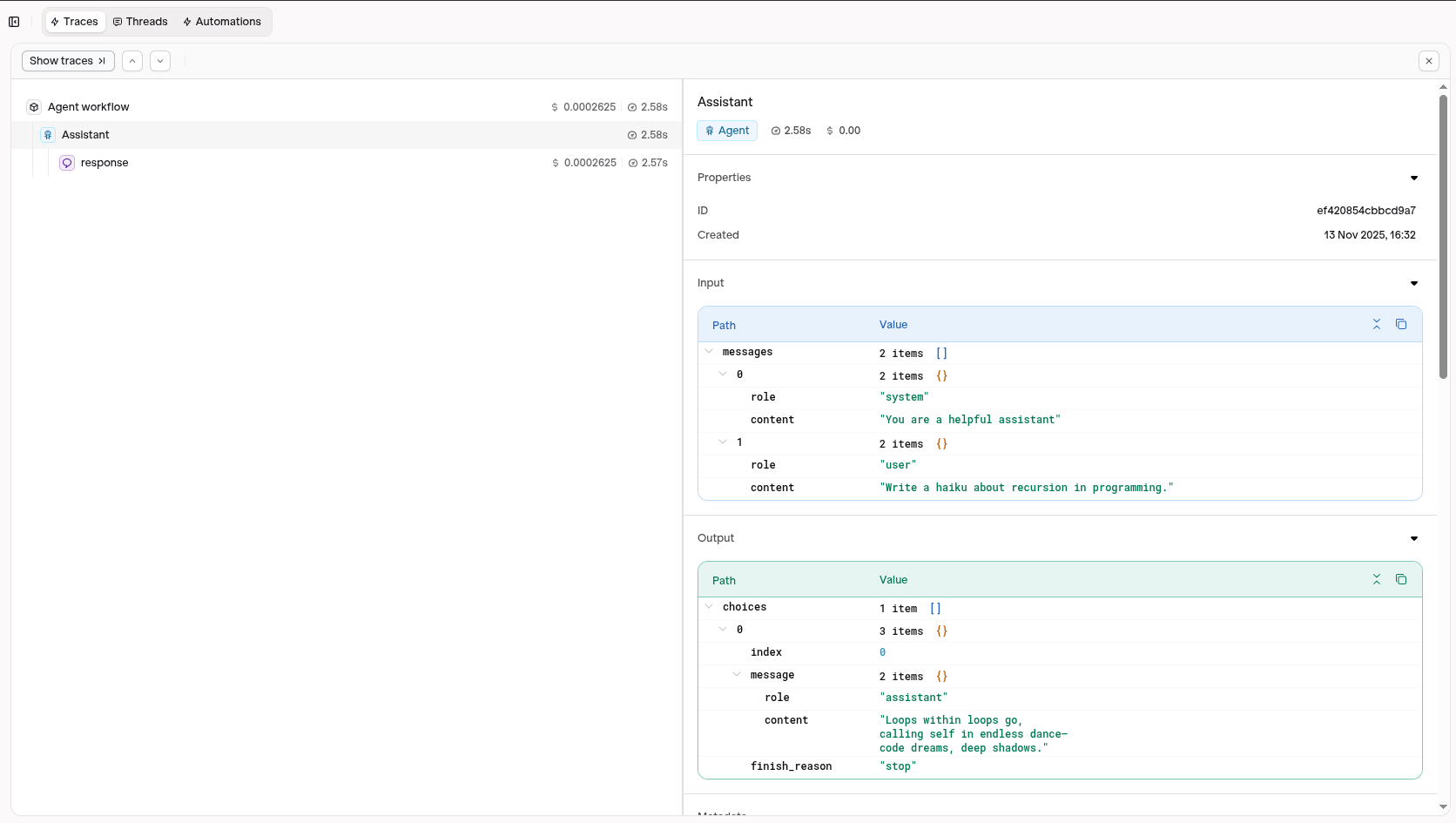
agent = Agent(name="Assistant", instructions="You are a helpful assistant")

result = Runner.run_sync(agent, "Write a haiku about recursion in programming.")
print(result.final_output)

Advanced Example with Function Calling

from opentelemetry.sdk.trace import TracerProvider
from opentelemetry.sdk.trace.export import BatchSpanProcessor
from opentelemetry.exporter.otlp.proto.http.trace_exporter import OTLPSpanExporter
from orq_ai_sdk.openai_agents_instrumentation import OpenAIAgentsInstrumentor
from agents import Agent, Runner, function_tool

# Set up OpenTelemetry
tracer_provider = TracerProvider()
tracer_provider.add_span_processor(BatchSpanProcessor(OTLPSpanExporter()))

# Instrument OpenAI agents with Orq.ai
OpenAIAgentsInstrumentor().instrument(tracer_provider=tracer_provider)

@function_tool
def get_weather(location: str) -> str:
    """Mock weather function"""
    return f"The weather in {location} is sunny, 72°F"

def advanced_assistant_with_tools():
    # Create agent with tools using Agents SDK
    agent = Agent(
        name="Weather Assistant",
        instructions="You are a weather assistant. Use the get_weather function to provide weather information.",
        # Tools parameter with the decorated function
        tools=[get_weather]
    )

    # Run the agent with user input
    result = Runner.run_sync(
        agent,
        "What's the weather like in Boston?"
    )

    return result

# Run the example
result = advanced_assistant_with_tools()
print(result.final_output)

Custom Spans for Agent Operations

Python
from opentelemetry.sdk.trace import TracerProvider
from opentelemetry.sdk.trace.export import BatchSpanProcessor
from opentelemetry.exporter.otlp.proto.http.trace_exporter import OTLPSpanExporter
from opentelemetry import trace
from orq_ai_sdk.openai_agents_instrumentation import OpenAIAgentsInstrumentor
from agents import Agent, Runner

# Set up OpenTelemetry
tracer_provider = TracerProvider()
tracer_provider.add_span_processor(BatchSpanProcessor(OTLPSpanExporter()))

trace.set_tracer_provider(tracer_provider)

# Instrument OpenAI agents with Orq.ai
OpenAIAgentsInstrumentor().instrument(tracer_provider=tracer_provider)

# Get a tracer
tracer = trace.get_tracer(__name__)

def agent_workflow_with_custom_spans():
    with tracer.start_as_current_span("agent-workflow") as span:
        span.set_attribute("workflow.type", "research_assistant")

        with tracer.start_as_current_span("agent-creation") as create_span:
            # Create agent using Agents SDK
            agent = Agent(
                name="Research Assistant",
                instructions="You are a research assistant specialized in data analysis.",
                # Note: Built-in tools work differently in Agents SDK
                # You'd need to import and use specific tools like CodeInterpreterTool, FileSearchTool
            )
            create_span.set_attribute("agent.name", "Research Assistant")
            create_span.set_attribute("agent.model", "gpt-4")  # Default model

        with tracer.start_as_current_span("agent-execution") as exec_span:
            # Execute the agent with input
            result = Runner.run_sync(
                agent,
                "Analyze the trends in the uploaded dataset"
            )

            exec_span.set_attribute("message.content_length", len("Analyze the trends in the uploaded dataset"))
            exec_span.set_attribute("execution.status", "completed")

        span.set_attribute("workflow.success", True)

        return {
            "agent_name": "Research Assistant",
            "final_output": result.final_output,
            "execution_status": "completed"
        }

# Run the workflow
result = agent_workflow_with_custom_spans()
print("Final output:", result["final_output"])

Next Steps

Verify Traces in the Studio.
You can also call OpenAI’s models and APIs using the AI Gateway.