

Orq.ai also includes a fully hosted knowledge base powered by Pinecone. This is a great option to enable retrieval without managing infrastructure. This guide is for users who prefer to connect their own Pinecone project or another third-party vector database.
Why External Vector Databases Matter
Connecting an external vector database gives full control over data ingestion, embedding logic, and scaling. This can be especially useful when:- Working with sensitive or proprietary datasets that need to stay within a controlled infrastructure
- Using custom embeddings not generated within Orq.ai’s built-in knowledge base
- Integrating with other data pipelines where the vector database is a shared component
- Building multi-source retrieval systems that combine local and remote sources
Step 1: Install dependencies
Install the Orq SDK along with the Pinecone client and supporting tools:Get an API key
An API key is required to make calls to a Pinecone project. Use the widget below to generate a key. Users without a Pinecone account will be signed up for the free Starter plan automatically.Python
Bash
Step 2: Initialize the Orq.ai and Pinecone clients
The Orq.ai client communicates with the Orq.ai platform. Initialize it with an API key stored as an environment variable (ORQ_API_KEY) or passed directly. Initialize the Pinecone client using the generated Pinecone API key:
Step 3: Create an index
In Pinecone, there are two types of indexes for storing vector data: Dense indexes store dense vectors for semantic search, and sparse indexes store sparse vectors for lexical/keyword search. For this quickstart, create a dense index integrated with an embedding model hosted by Pinecone. With integrated models, upsert and search with text; Pinecone generates vectors automatically.To use external embedding models instead, see Bring your own vectors.
Step 4: Upsert records
Prepare a sample dataset of factual statements from different domains like history, physics, technology, and music. Format the data as records with an ID, text, and category. These objects are expected to contain achunk_text key because of the field_map specified when creating the index above.
Other fields not mapped in the field mapping, like category, will become metadata on the upserted records.
Step 5: Check index stats
Pinecone is eventually consistent, so there can be a slight delay before new or changed records are visible to queries. View index stats to check whether the current vector count matches the number of upserted vectors (50):Step 6: Semantic search
Search the dense index for ten records most semantically similar to the queryFamous historical structures and monuments.
Because the index is integrated with an embedding model, provide the query as text; Pinecone converts it to a dense vector automatically.
Step 7: Improve results
Reranking results is one of the most effective ways to improve search accuracy and relevance, but there are many other techniques to consider. For example:- Filtering by metadata: When records contain additional metadata, limit the search to records matching a filter expression.
- Hybrid search: Add lexical search to capture precise keyword matches (e.g., product SKUs, email addresses, domain-specific terms) in addition to semantic matches.
- Chunking strategies: Chunk content in different ways to improve results. Consider factors like the length of the content, the complexity of queries, and how results will be used in the application.
Step 8: Pass the reranked results to Orq.ai
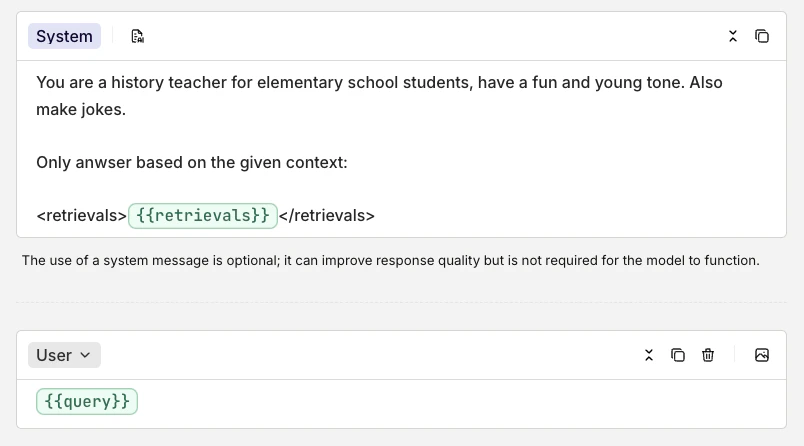
Once results are retrieved and optionally reranked from Pinecone, pass them into an Orq.ai Deployment for generation. Store the original user query in a variable: this is the input sent to Orq.ai under thequery field. The cleaned and reranked chunks from Pinecone are passed under the retrievals field, allowing Orq.ai to use them as contextual support for generation.
This is what the system and user prompt look like configured in Orq.ai:
Next steps
Pinecone is now connected to an Orq.ai Deployment with external retrieval results passed into a live workflow. This pattern works the same way with any external vector database. Retrieve the most relevant chunks, pass them as context, and let Orq.ai handle generation and orchestration. To improve and scale this setup inside Orq.ai:- Use RAGAS inside Orq.ai to evaluate the quality of retrieved chunks before they reach the model. This helps understand whether the retrieval step is improving model output quality.
- Connect other vector databases such as Qdrant or Weaviate using the same interface
- Experiment with prompt variations and test their impact using Orq.ai’s built-in Evaluators
- Version, deploy, and monitor pipelines using Orq.ai’s production features