TL;DR
  • Run experiments from code to compare any AI system against your evaluation criteria, whether it’s Orq-native or built with LangGraph, CrewAI, or your own custom framework
  • Results rendered in Orq’s UI so when experiments complete, prompt engineers can drill into failure points, identify why a version underperforms, and iterate on tool descriptions, agent instructions, or prompts directly in the platform
  • Choose your evaluators using Orq’s native evaluation suite or plug in third-party tools like RAGAS and DeepEval

What is Evaluatorq?

Evaluatorq is an evaluation framework for running experiments programmatically, available in both Python and TypeScript — this cookbook focuses on Python. It features the following capabilities:
  • Define jobs: These are functions that run your model over inputs and produce outputs.
  • Parallel evaluations: enabling running multiple jobs (model configurations, deployments, or agents) simultaneously against the same test dataset, then comparing their results side-by-side and decide which configurations will perform best in production.
  • Flexible Data Sources: Apply jobs and evaluators over datasets. These could be inline arrays, async sources, or even datasets managed in the Orq.ai platform.
  • Type-safe: Built with Python type hints for better IDE support
  • Access to experiments from code: Test Orq deployments, Orq agents, or any third-party framework, execute them over datasets, and evaluate results without leaving your IDE. For examples and common patterns, check out the Evaluatorq repository

What will we build?

We will build two separate Orq.ai-native Agents using different models that act as cloud engineering consultants, evaluate their performance and challenge them against LangGraph Agent for the following task:
"I'm preparing a technical presentation on microservices architecture. 

Can you help me create an outline covering the key benefits, challenges, 
and best practices in cloud computing?"
We will test the Agent configurations by running multiple evaluations in parallel using Evaluatorq. You will learn how to access readily available Orq.ai evaluators and external frameworks like DeepEval. The evaluation stack that we will build consists of: LLM-as-a-judge, DeepEval Faithfulness, DeepEval Answer Relevancy and an example of a custom Python evaluator. You can follow-along the build in Google Colab workbook.

Pre-requisites

1

Getting started

Install the required packages
# Install Evaluatorq
!pip install evaluatorq

# Install Orq SDK
!pip install orq-ai-sdk

# Optional: Third-party evaluators
!pip install ragas deepeval
2

Set up the Agents

Before we run any evaluations, we need to set up two Agents for comparison to do so:
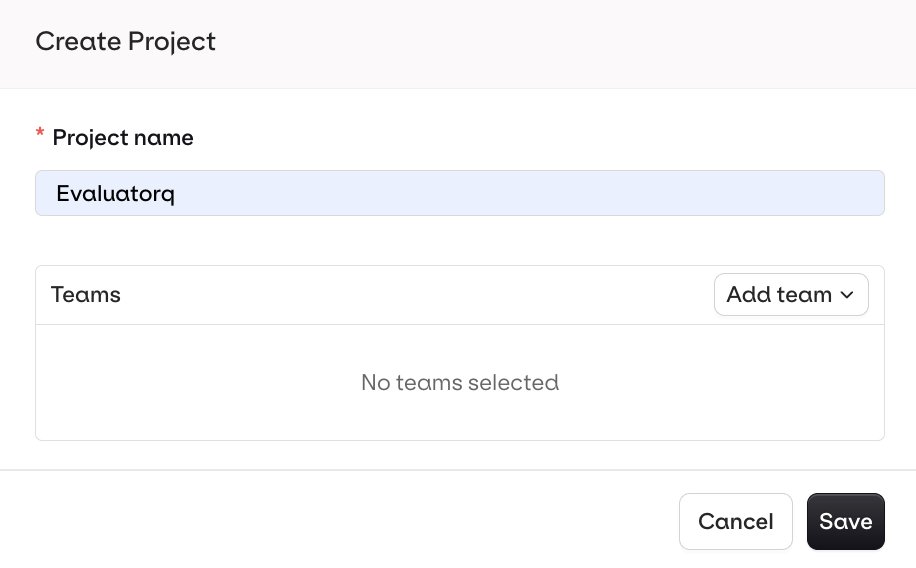
  1. Create a new Project in AI Studio Screenshot2026 01 07at12 15 57
  2. Add Agents to the Project to evaluate Next, in Python we create two Agent variants to evaluate: VariantAwith gpt-4o VariantB with gpt-4o-mini
    Key Agent variables: key : Unique name of the Agent. path : Path to the Project description : Detailed instructions how an Agent should behave model : Foundational model which we will evaluate

    Agent Variant A (gpt-4o)

    from orq_ai_sdk import Orq
    import os
    
    with Orq(api_key=os.getenv("ORQ_API_KEY", "")) as orq:
        agent = orq.agents.create(
            key="VariantA",
            role="Cloud Engineering Assistant",
            description="A helpful assistant for cloud engineering tasks",
            instructions="Be helpful and concise",
            path="Evaluatorq",
            model={"id": "openai/gpt-4o"},
            settings={
                "max_iterations": 3,
                "max_execution_time": 300,
                "tools": []
            }
        )
    
        print(f"Agent created: {agent.key}")
    

    Agent Variant B (gpt-4o-mini)

    from orq_ai_sdk import Orq
    import os
    
    with Orq(api_key=os.getenv("ORQ_API_KEY", "")) as orq:
        agent = orq.agents.create(
            key="VariantB",
            role="Cloud Engineering Assistant",
            description="A helpful assistant for cloud engineering tasks",
            instructions="Be helpful and concise",
            path="Evaluatorq",
            model={"id": "openai/gpt-4o-mini"},
            settings={
                "max_iterations": 3,
                "max_execution_time": 300,
                "tools": []
            }
        )
    
        print(f"Agent created: {agent.key}")
    
3

Assessing Agent performance with parallel evaluators

Once we have the Agent variants set up, we’re ready to run parallel evaluations using Evaluatorq. In the Evaluatorq evaluation framework, you’ll notice the following syntax:
  • @job decorator is a wrapper that identifies and names the function as a job
  • async def your_evaluator evaluators are defined as functions
In the example below we will run four of the following evaluators in parallel:
import asyncio
from evaluatorq import evaluatorq, job, DataPoint, EvaluationResult
from orq_ai_sdk import Orq
import os

ORQ_API_KEY = os.getenv("ORQ_API_KEY", "")
if not ORQ_API_KEY:
    raise ValueError("ORQ_API_KEY environment variable must be set")

# ============================================
# CRITICAL: Set OpenAI API Key for DeepEval
# ============================================
# DeepEval uses OpenAI's API internally for evaluation
# You MUST set this before importing DeepEval
if not os.getenv("OPENAI_API_KEY"):
    print("CRITICAL: OPENAI_API_KEY not set!")
    print("Add this cell BEFORE running evaluation:")
    print("  import os")
    print('  os.environ["OPENAI_API_KEY"] = "sk-your-openai-key"')
    print()

# DeepEval library imports
try:
    from deepeval.metrics import AnswerRelevancyMetric, FaithfulnessMetric
    from deepeval.test_case import LLMTestCase
    DEEPEVAL_AVAILABLE = True
    print("✓ DeepEval loaded")
except ImportError:
    DEEPEVAL_AVAILABLE = False
    print("DeepEval not installed. Run: pip install deepeval")

# ============================================
# CONFIGURATION
# ============================================
orq_client = Orq(api_key=ORQ_API_KEY)
LLM_JUDGE_EVAL_ID = "01KECJTD1GWGF90DMGSP1D8XZN"

# ============================================
# HELPER: Extract Response Text
# ============================================
def extract_response_text(response):
    """Helper function to extract text from Orq agent response."""
    if hasattr(response, 'content'):
        if isinstance(response.content, list):
            return " ".join([
                part.text if hasattr(part, 'text') else str(part)
                for part in response.content
            ])
        return str(response.content)
    return str(response)

# ============================================
# JOB 1: VariantA Agent (GPT-4o)
# ============================================
@job("VariantA")
async def variant_a_agent(data: DataPoint, row: int):
    """VariantA agent using GPT-4o."""
    with Orq(api_key=ORQ_API_KEY) as orq:
        response = orq.agents.responses.create(
            agent_key="VariantA",
            background=False,
            message={
                "role": "user",
                "parts": [{"kind": "text", "text": data.inputs["query"]}]
            }
        )

        return {
            "agent": "VariantA",
            "query": data.inputs["query"],
            "response": extract_response_text(response),
            "context": data.inputs.get("context", "")
        }

# ============================================
# JOB 2: VariantB Agent (GPT-4o-mini)
# ============================================
@job("VariantB")
async def variant_b_agent(data: DataPoint, row: int):
    """VariantB agent using GPT-4o-mini."""
    with Orq(api_key=ORQ_API_KEY) as orq:
        response = orq.agents.responses.create(
            agent_key="VariantB",
            background=False,
            message={
                "role": "user",
                "parts": [{"kind": "text", "text": data.inputs["query"]}]
            }
        )

        return {
            "agent": "VariantB",
            "query": data.inputs["query"],
            "response": extract_response_text(response),
            "context": data.inputs.get("context", "")
        }

# ============================================
# EVALUATOR 1: Orq LLM Judge
# ============================================
async def orq_llm_judge_evaluator(params):
    """Uses Orq's built-in LLM-as-a-judge evaluator."""
    data: DataPoint = params["data"]
    output = params["output"]

    query = data.inputs.get("query", "").strip()
    response = output.get("response", "").strip()

    if not response or not query:
        return EvaluationResult(value=0.0, explanation="Missing data")

    try:
        evaluation = await asyncio.to_thread(
            orq_client.evals.invoke,
            id=LLM_JUDGE_EVAL_ID,
            query=query,
            output=response,
        )

        raw_score = float(evaluation.value.value)
        score = raw_score / 10.0 if raw_score > 1.0 else raw_score
        explanation = str(evaluation.value.explanation or "")[:80]

        return EvaluationResult(
            value=score,
            explanation=f"{output['agent']}: {explanation}"
        )
    except Exception as e:
        return EvaluationResult(value=0.0, explanation=f"Orq error: {str(e)[:50]}")

# ============================================
# EVALUATOR 2: DeepEval Faithfulness
# ============================================
async def deepeval_faithfulness_evaluator(params):
    """Uses DeepEval's faithfulness metric (requires OPENAI_API_KEY)."""
    if not DEEPEVAL_AVAILABLE:
        return EvaluationResult(value=0.0, explanation="DeepEval not installed")

    if not os.getenv("OPENAI_API_KEY"):
        return EvaluationResult(value=0.0, explanation="OPENAI_API_KEY not set")

    output = params["output"]
    query = output.get("query", "").strip()
    response = output.get("response", "").strip()
    context = output.get("context", "").strip()

    if not response or not context:
        return EvaluationResult(value=0.0, explanation="Missing response or context")

    try:
        # Create test case
        test_case = LLMTestCase(
            input=query,
            actual_output=response,
            retrieval_context=[context],
        )

        # Initialize metric
        metric = FaithfulnessMetric(
            threshold=0.5,
            model="gpt-4o-mini",  # Use gpt-4o-mini to save costs
            include_reason=False,
        )

        # Measure (synchronous call in thread)
        def measure_sync():
            metric.measure(test_case)
            return float(metric.score) if metric.score is not None else 0.0

        score = await asyncio.to_thread(measure_sync)

        return EvaluationResult(
            value=score,
            explanation=f"{output['agent']}: Faithfulness {score:.2f}"
        )

    except Exception as e:
        return EvaluationResult(
            value=0.0,
            explanation=f"{output['agent']}: DeepEval error - {str(e)[:50]}"
        )

# ============================================
# EVALUATOR 3: DeepEval Answer Relevancy
# ============================================
async def deepeval_answer_relevancy_evaluator(params):
    """Uses DeepEval's answer relevancy metric (requires OPENAI_API_KEY)."""
    if not DEEPEVAL_AVAILABLE:
        return EvaluationResult(value=0.0, explanation="DeepEval not installed")

    if not os.getenv("OPENAI_API_KEY"):
        return EvaluationResult(value=0.0, explanation="OPENAI_API_KEY not set")

    output = params["output"]
    query = output.get("query", "").strip()
    response = output.get("response", "").strip()

    if not response or not query:
        return EvaluationResult(value=0.0, explanation="Missing query or response")

    try:
        # Create test case
        test_case = LLMTestCase(
            input=query,
            actual_output=response,
        )

        # Initialize metric
        metric = AnswerRelevancyMetric(
            threshold=0.5,
            model="gpt-4o-mini",  # Use gpt-4o-mini to save costs
            include_reason=False,
        )

        # Measure (synchronous call in thread)
        def measure_sync():
            metric.measure(test_case)
            return float(metric.score) if metric.score is not None else 0.0

        score = await asyncio.to_thread(measure_sync)

        return EvaluationResult(
            value=score,
            explanation=f"{output['agent']}: Relevancy {score:.2f}"
        )

    except Exception as e:
        return EvaluationResult(
            value=0.0,
            explanation=f"{output['agent']}: DeepEval error - {str(e)[:50]}"
        )

# ============================================
# EVALUATOR 4: Response Length
# ============================================
async def response_length_evaluator(params):
    """Checks if response length is appropriate."""
    output = params["output"]
    word_count = len(output["response"].split())

    if 50 <= word_count <= 300:
        score, verdict = 1.0, "Good"
    elif word_count < 50:
        score, verdict = word_count / 50, "Too short"
    else:
        score, verdict = 0.5, "Too long"

    return EvaluationResult(
        value=score,
        explanation=f"{output['agent']}: {word_count}w - {verdict}"
    )

# ============================================
# RUN EVALUATION
# ============================================
async def main():
    print("=" * 70)
    print("Comparing Agents: VariantA (GPT-4o) vs VariantB (GPT-4o-mini)")
    print("=" * 70)
    print()

    # Check configuration
    print("Configuration Check:")
    print(f"  ORQ_API_KEY: {'✓' if ORQ_API_KEY else '✗'}")
    print(f"  OPENAI_API_KEY: {'✓' if os.getenv('OPENAI_API_KEY') else '✗ REQUIRED FOR DEEPEVAL'}")
    print(f"  DeepEval: {'✓' if DEEPEVAL_AVAILABLE else '✗'}")
    print()

    if not os.getenv("OPENAI_API_KEY"):
        print("WARNING: DeepEval evaluators will return 0.00 without OPENAI_API_KEY")
        print("Add this in a cell before running:")
        print('os.environ["OPENAI_API_KEY"] = "sk-your-key"')
        print()

    await evaluatorq(
        "variant-comparison",
        data=[
            DataPoint(inputs={
                "query": "What are the best practices for microservices architecture?",
                "context": "Microservices architecture is a design pattern where applications are built as collections of loosely coupled services. Best practices include service independence, API-first design, and fault tolerance."
            }),
            DataPoint(inputs={
                "query": "How do I implement API rate limiting in a production system?",
                "context": "API rate limiting controls the number of requests a client can make to prevent abuse and ensure fair resource allocation. Common strategies include token bucket, leaky bucket, and fixed window algorithms."
            }),
        ],
        jobs=[variant_a_agent, variant_b_agent],
        evaluators=[
            {"name": "orq-llm-judge", "scorer": orq_llm_judge_evaluator},
            {"name": "deepeval-faithfulness", "scorer": deepeval_faithfulness_evaluator},
            {"name": "deepeval-relevancy", "scorer": deepeval_answer_relevancy_evaluator},
            {"name": "length", "scorer": response_length_evaluator},
        ],
    )

    print("\n" + "=" * 70)
    print("✓ Evaluation Complete!")
    print("=" * 70)

if __name__ == "__main__":
    await main()
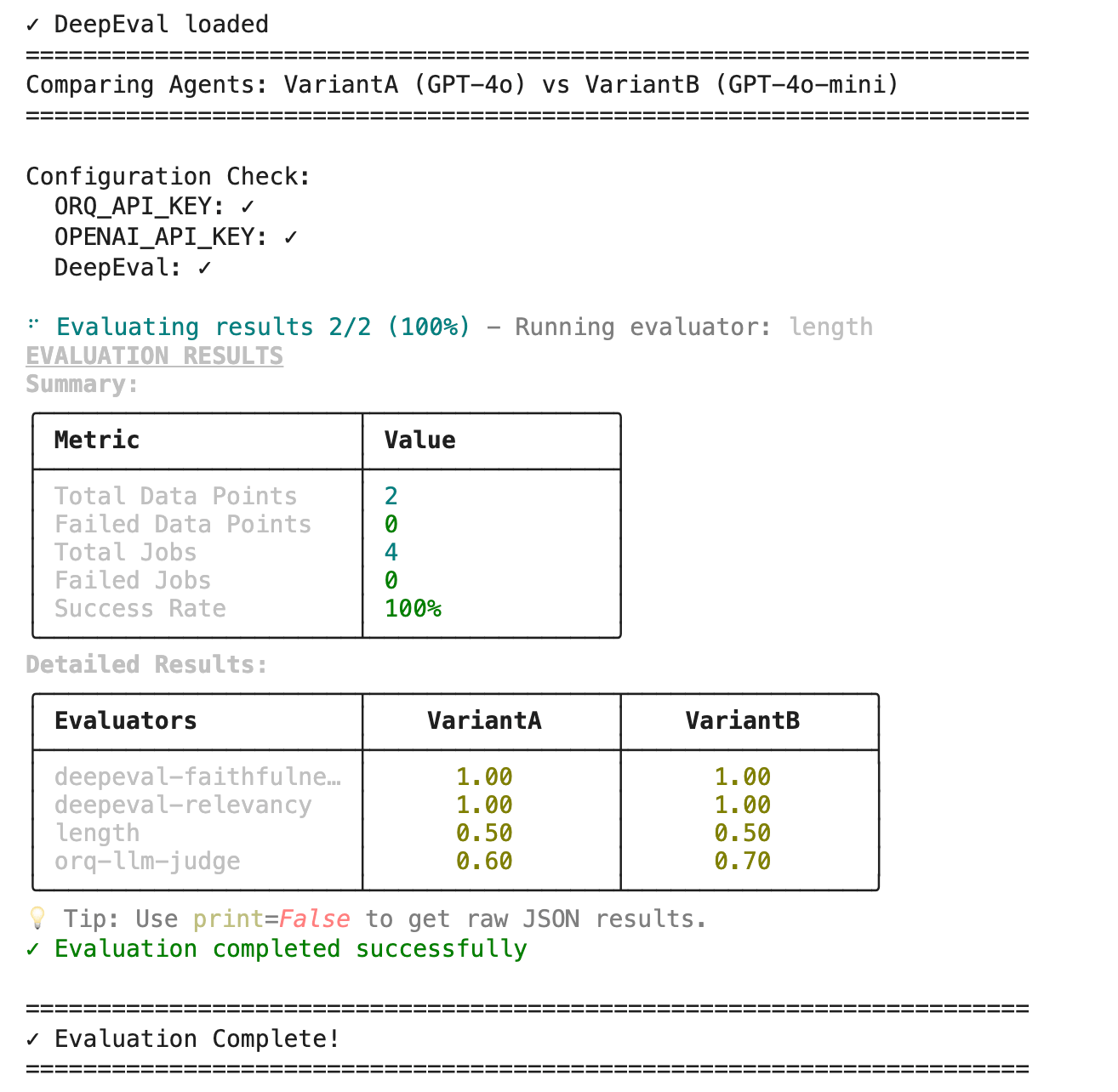
Expected outputEvaluatorsHere you can see that the two Agent variants were evaluated and scored in parallel using 4 different evaluators. Based on this feedback you can optimize your Agent setup using an evaluation metric that is most important for your use-case.Learn more about custom evaluators with Evaluatorq:
Domain-specific evaluators enforce business rules and quality standards unique to your use case, catching issues that generic validators would miss and ensuring outputs meet your exact requirements.
This code demonstrates a parallel evaluation system for validating e-commerce product data. It defines a product_validator job that extracts SKU and price information from product inputs, then runs two concurrent evaluators:
  1. SKU Format Validator: Checks that product SKUs match the required format (3 uppercase letters, hyphen, 5 digits: ABC-12345)
  2. Price Range Validator: Ensures prices fall within acceptable business limits ($0.01 - $10,000.00)
import asyncio
from evaluatorq import evaluatorq, job, DataPoint, EvaluationResult
from orq_ai_sdk import Orq
import os
import re

ORQ_API_KEY = os.getenv("ORQ_API_KEY", "your-api-key-here")

# ============================================
# JOB: E-commerce Product Validator
# ============================================
@job("product-validator")
async def product_validator(data: DataPoint, row: int):
    """Extract and validate product data using AI."""
    with Orq(api_key=ORQ_API_KEY) as orq:
        response = orq.deployments.invoke(
            key="product-extractor",  # Your deployment for product data extraction
            inputs={"product_info": data.inputs["product_info"]},
            messages=[{
                "role": "user",
                "content": f"Extract SKU and price from: {data.inputs['product_info']}"
            }]
        )
        
        answer = response.choices[0].message.content
        
        # Parse AI response for SKU and price
        # Assuming AI returns format like "SKU: ABC-12345, Price: $99.99"
        sku_match = re.search(r'SKU:\s*([A-Z]{3}-\d{5})', answer)
        price_match = re.search(r'\$?([\d,]+\.?\d*)', answer)
        
        return {
            "sku": sku_match.group(1) if sku_match else "",
            "price": float(price_match.group(1).replace(',', '')) if price_match else 0.0,
            "raw_response": answer
        }

# ============================================
# EVALUATOR 1: SKU Format Validator
# ============================================
async def sku_format_validator(params):
    """Validates SKU format: ABC-12345 (3 letters, hyphen, 5 digits)."""
    sku = params["output"]["sku"]
    is_valid = bool(re.match(r'^[A-Z]{3}-\d{5}$', sku))
    
    return EvaluationResult(
        value=1 if is_valid else 0,
        explanation=f"SKU '{sku}' is {'valid' if is_valid else 'invalid'} (expected: ABC-12345)"
    )

# ============================================
# EVALUATOR 2: Price Range Validator
# ============================================
async def price_range_validator(params):
    """Validates price is between $0.01 and $10,000.00."""
    price = params["output"]["price"]
    is_valid = 0.01 <= price <= 10000.00
    
    return EvaluationResult(
        value=1 if is_valid else 0,
        explanation=f"Price ${price:.2f} is {'within' if is_valid else 'outside'} acceptable range ($0.01-$10,000)"
    )

# ============================================
# RUN EVALUATION
# ============================================
async def main():
    await evaluatorq(
        "product-validation",
        data=[
            DataPoint(inputs={"product_info": "Widget Pro SKU: ABC-12345 Price: $99.99"}),
            DataPoint(inputs={"product_info": "Gadget XL SKU: XYZ-67890 Price: $1,499.00"}),
            DataPoint(inputs={"product_info": "Tool Set SKU: DEF-11111 Price: $45.50"}),
        ],
        jobs=[product_validator],
        evaluators=[
            {"name": "sku-format", "scorer": sku_format_validator},
            {"name": "price-range", "scorer": price_range_validator},
        ],
    )

if __name__ == "__main__":
    await main()
Statistical checks prevent flawed data from leading to incorrect conclusions, wasted resources, and poor business decisions.
This code demonstrates a parallel evaluation system for validating numerical dataset quality. It defines a data_analyzer job that computes descriptive statistics (mean, median, standard deviation, count) from numerical inputs, then runs two concurrent evaluators:Outlier Detection - Identifies data points that fall outside acceptable ranges using the Interquartile Range (IQR) method, flagging values beyond 1.5x IQR from Q1/Q3 quartiles
# ============================================
# EVALUATOR 1: Outlier Detection (IQR Method)
# ============================================
async def outlier_detection_scorer(params):
    """Identifies data points outside acceptable ranges using Interquartile Range (IQR) method."""
    output = params["output"]
    values = output["data_points"]
    
    if not values or len(values) < 4:
        return EvaluationResult(
            value=1,
            explanation="Insufficient data for IQR outlier detection"
        )
    
    # Calculate Q1, Q3, and IQR
    sorted_values = sorted(values)
    n = len(sorted_values)
    q1 = sorted_values[n // 4]
    q3 = sorted_values[(3 * n) // 4]
    iqr = q3 - q1
    
    # Flag values beyond 1.5x IQR from Q1/Q3 quartiles
    lower_bound = q1 - 1.5 * iqr
    upper_bound = q3 + 1.5 * iqr
    outliers = [x for x in values if x < lower_bound or x > upper_bound]
    has_outliers = len(outliers) > 0
    
    return EvaluationResult(
        value=0 if has_outliers else 1,
        explanation=(
            f"Found {len(outliers)} outlier(s): {outliers} (beyond 1.5×IQR from Q1/Q3)" 
            if has_outliers 
            else "No outliers detected"
        )
    )
Normal Distribution Checker - Validates whether data approximates a normal distribution by calculating the coefficient of variation and ensuring it falls within the expected 10-30% range
# ============================================
# EVALUATOR 2: Normal Distribution Checker
# ============================================
async def normal_distribution_scorer(params):
    """Validates whether data approximates normal distribution using coefficient of variation."""
    output = params["output"]
    mean = output["mean"]
    std_dev = output["std_dev"]
    
    if mean == 0:
        return EvaluationResult(
            value=0,
            explanation="Cannot calculate coefficient of variation (mean is zero)"
        )
    
    # Calculate coefficient of variation - expected 10-30% range for normal distribution
    cv = (std_dev / abs(mean)) * 100
    is_normal = 10 <= cv <= 30
    
    return EvaluationResult(
        value=1 if is_normal else 0,
        explanation=(
            f"Coefficient of variation: {cv:.2f}% - "
            f"{'Approximates normal distribution' if is_normal else 'Does not approximate normal distribution'} "
            f"(expected: 10-30%)"
        )
    )
Pattern matching validates that extracted data conforms to expected formats, preventing invalid information from entering your systems and workflows.
This code demonstrates a parallel evaluation system for validating extracted text patterns. It defines a text_extractor job that uses regex to extract emails, phone numbers, URLs, and dates from text inputs, then runs two concurrent evaluators:
  1. Email Validation - Applies strict pattern matching to verify extracted email addresses follow proper format
  2. Phone Format Consistency - Checks that all phone numbers use consistent formatting (dashes, dots, or no separators) to ensure data uniformity across records
import asyncio
import re
from evaluatorq import evaluatorq, job, DataPoint, EvaluationResult

@job("text-extractor")
async def text_extractor(data: DataPoint, row: int):
    """Extract and validate text patterns."""
    text = data.inputs["text"]
    
    # Extract potential patterns
    emails = re.findall(r'\b[A-Za-z0-9._%+-]+@[A-Za-z0-9.-]+\.[A-Z|a-z]{2,}\b', text)
    phone_numbers = re.findall(r'\b\d{3}[-.]?\d{3}[-.]?\d{4}\b', text)
    
    return {
        "text": text,
        "emails": emails,
        "phone_numbers": phone_numbers,
    }

async def email_validation_scorer(params):
    """Validate extracted emails."""
    output = params["output"]
    emails = output["emails"]
    
    # More strict email validation
    strict_pattern = r'^[a-zA-Z0-9._%+-]+@[a-zA-Z0-9.-]+\.[a-zA-Z]{2,}$'
    valid_emails = [email for email in emails if re.match(strict_pattern, email)]
    
    all_valid = len(emails) == len(valid_emails)
    
    return EvaluationResult(
        value=1 if all_valid else len(valid_emails) / len(emails) if emails else 1,
        explanation=f"Found {len(emails)} email(s), {len(valid_emails)} valid - {valid_emails if emails else 'none found'}",
    )

async def phone_format_scorer(params):
    """Validate phone number format consistency."""
    output = params["output"]
    phone_numbers = output["phone_numbers"]
    
    if not phone_numbers:
        return EvaluationResult(
            value=1,
            explanation="No phone numbers to validate",
        )
    
    # Check for consistent formatting
    formats = set()
    for phone in phone_numbers:
        if '-' in phone:
            formats.add('dash')
        elif '.' in phone:
            formats.add('dot')
        else:
            formats.add('none')
    
    consistent = len(formats) == 1
    
    return EvaluationResult(
        value=1 if consistent else 0.5,
        explanation=f"Phone numbers use {'consistent' if consistent else 'inconsistent'} formatting: {phone_numbers}",
    )

async def main():
    await evaluatorq(
        "text-extraction",
        data=[
            DataPoint(inputs={
                "text": "Contact us at [email protected] or call 555-123-4567. Visit https://example.com on 12/25/2024."
            }),
            DataPoint(inputs={
                "text": "Email: [email protected], Phone: 555.987.6543, Date: 01/15/2024"
            }),
        ],
        jobs=[text_extractor],
        evaluators=[
            {"name": "email-validation", "scorer": email_validation_scorer},
            {"name": "phone-format", "scorer": phone_format_scorer},
        ],
    )

if __name__ == "__main__":
    await main()
4

Third-party evaluators

RAGAS (Retrieval Augmented Generation Assessment) is a research-backed evaluation framework specifically designed for RAG systems. It provides both reference-free and reference-based metrics that assess retrieval quality and generation quality using LLM-as-a-judge.

Reference-Free Metrics (No Ground Truth Needed):

  • Faithfulness: Checks if the response is grounded in the retrieved context
  • Answer Relevancy: Checks if the response addresses the query

Reference-Based Metrics (Require Ground Truth):

  • Context Precision: Measures if retrieved contexts are relevant to the ground truth
  • Context Recall: Measures if all contexts were retrieved compared to ground truth
import asyncio
from evaluatorq import evaluatorq, job, DataPoint, EvaluationResult
from orq_ai_sdk import Orq
import os

# RAGAS library imports
try:
    from ragas import evaluate
    from ragas.metrics import faithfulness, answer_relevancy
    from datasets import Dataset
    RAGAS_AVAILABLE = True
except ImportError:
    RAGAS_AVAILABLE = False
    print("RAGAS not installed. Install with: pip install ragas datasets")

ORQ_API_KEY = os.getenv("ORQ_API_KEY", "your-api-key-here")

# ============================================
# JOB: RAG-Powered Q&A System
# ============================================
@job("rag-qa-system")
async def rag_qa_system(data: DataPoint, row: int):
    """
    RAG system that answers questions using knowledge base.
    This is what we're evaluating - an Orq deployment with RAG.
    """
    with Orq(api_key=ORQ_API_KEY) as orq:
        response = orq.deployments.invoke(
            key="rag-knowledge-assistant",  # Your RAG-enabled deployment
            context={
                "knowledge_base_id": "your-kb-id"  # Optional: specific KB
            },
            inputs={"question": data.inputs["question"]},
            messages=[{
                "role": "user",
                "content": data.inputs["question"]
            }]
        )
        
        answer = response.choices[0].message.content
        
        # Extract contexts from RAG response (if available in metadata)
        # Adjust based on your actual Orq response structure
        contexts = getattr(response, 'contexts', data.inputs.get("contexts", []))
        if not contexts:
            contexts = ["Retrieved context from knowledge base"]
        
        return {
            "query": data.inputs["question"],
            "response": answer,
            "contexts": contexts,
            "ground_truth": data.inputs.get("ground_truth", "")
        }

# ============================================
# EVALUATOR 1: RAGAS Faithfulness
# ============================================
async def ragas_faithfulness_scorer(params):
    """Evaluate faithfulness using RAGAS metric - checks if response is grounded in context."""
    if not RAGAS_AVAILABLE:
        return EvaluationResult(
            value=0,
            explanation="RAGAS library not available. Install with: pip install ragas datasets",
        )
    
    output = params["output"]
    
    try:
        # Prepare dataset for RAGAS evaluation
        dataset = Dataset.from_dict({
            "question": [output["query"]],
            "answer": [output["response"]],
            "contexts": [output["contexts"]],
        })
        
        # Evaluate using RAGAS faithfulness metric
        result = evaluate(dataset, metrics=[faithfulness])
        score = result["faithfulness"]
        
        return EvaluationResult(
            value=score,
            explanation=(
                f"Faithfulness score: {score:.2f} - Response is grounded in provided context"
                if score >= 0.7
                else f"Faithfulness score: {score:.2f} - Response contains unsupported claims"
            ),
        )
    except Exception as e:
        return EvaluationResult(
            value=0,
            explanation=f"Error evaluating faithfulness: {str(e)}",
        )

# ============================================
# EVALUATOR 2: RAGAS Answer Relevancy
# ============================================
async def ragas_answer_relevancy_scorer(params):
    """Evaluate answer relevancy using RAGAS metric - checks if response addresses the query."""
    if not RAGAS_AVAILABLE:
        return EvaluationResult(
            value=0,
            explanation="RAGAS library not available. Install with: pip install ragas datasets",
        )
    
    output = params["output"]
    
    try:
        # Prepare dataset for RAGAS evaluation
        dataset = Dataset.from_dict({
            "question": [output["query"]],
            "answer": [output["response"]],
            "contexts": [output["contexts"]],
        })
        
        # Evaluate using RAGAS answer relevancy metric
        result = evaluate(dataset, metrics=[answer_relevancy])
        score = result["answer_relevancy"]
        
        return EvaluationResult(
            value=score,
            explanation=(
                f"Answer relevancy score: {score:.2f} - Response directly addresses the query"
                if score >= 0.7
                else f"Answer relevancy score: {score:.2f} - Response is off-topic or incomplete"
            ),
        )
    except Exception as e:
        return EvaluationResult(
            value=0,
            explanation=f"Error evaluating answer relevancy: {str(e)}",
        )

# ============================================
# RUN EVALUATION
# ============================================
async def main():
    await evaluatorq(
        "rag-system-evaluation",
        data=[
            DataPoint(inputs={
                "question": "What is machine learning?",
                "contexts": ["Machine learning is a branch of AI focused on building systems that learn from data."],
                "ground_truth": "Machine learning is a type of AI that allows systems to learn from data."
            }),
            DataPoint(inputs={
                "question": "How does photosynthesis work?",
                "contexts": ["Plants use chlorophyll to capture light energy and convert CO2 and water into glucose."],
                "ground_truth": "Photosynthesis converts light energy into chemical energy in plants."
            }),
            DataPoint(inputs={
                "question": "What are the benefits of cloud computing?",
                "contexts": ["Cloud computing provides scalability, cost efficiency, and flexibility for businesses."],
                "ground_truth": "Cloud computing offers scalability and cost savings."
            }),
        ],
        jobs=[rag_qa_system],
        evaluators=[
            {"name": "ragas-faithfulness", "scorer": ragas_faithfulness_scorer},
            {"name": "ragas-answer-relevancy", "scorer": ragas_answer_relevancy_scorer},
        ],
    )

if __name__ == "__main__":
    await main()
DeepEval is a comprehensive open-source LLM evaluation framework that treats AI testing like software unit testing. Built with pytest integration, it provides 15+ evaluation metrics covering RAG systems, chatbots, AI agents, and general LLM outputs.
Dependencies
pip install deepeval

export OPENAI_API_KEY="your-api-key"
DeepEval implementation 
import asyncio
from evaluatorq import evaluatorq, job, DataPoint, EvaluationResult

# DeepEval library imports
try:
    from deepeval.metrics import (
        AnswerRelevancyMetric,
        FaithfulnessMetric,
        HallucinationMetric,
    )
    from deepeval.test_case import LLMTestCase
    DEEPEVAL_AVAILABLE = True
except ImportError:
    DEEPEVAL_AVAILABLE = False
    print("DeepEval not installed. Install with: pip install deepeval")

@job("llm-output-analyzer")
async def llm_output_analyzer(data: DataPoint, row: int):
    """Analyze LLM outputs for quality assessment."""
    query = data.inputs["query"]
    response = data.inputs["response"]
    context = data.inputs["context"]
    expected_output = data.inputs.get("expected_output", "")
    
    return {
        "query": query,
        "response": response,
        "context": context,
        "expected_output": expected_output,
        "response_length": len(response),
    }

async def deepeval_faithfulness_scorer(params):
    """Evaluate faithfulness using DeepEval metric."""
    if not DEEPEVAL_AVAILABLE:
        return EvaluationResult(
            value=0,
            explanation="DeepEval library not available. Install with: pip install deepeval",
        )
    
    output = params["output"]
    
    try:
        # Create test case for DeepEval evaluation
        test_case = LLMTestCase(
            input=output["query"],
            actual_output=output["response"],
            retrieval_context=[output["context"]],
        )
        
        # Initialize DeepEval Faithfulness metric
        faithfulness_metric = FaithfulnessMetric(
            threshold=0.7,
            model="gpt-4",
            include_reason=True,
        )
        
        # Measure faithfulness
        faithfulness_metric.measure(test_case)
        score = faithfulness_metric.score
        reason = faithfulness_metric.reason if hasattr(faithfulness_metric, 'reason') else ""
        
        return EvaluationResult(
            value=score,
            explanation=(
                f"Faithfulness score: {score:.2f} - {reason}"
                if score >= 0.7
                else f"Faithfulness score: {score:.2f} - Response not grounded in context. {reason}"
            ),
        )
    except Exception as e:
        return EvaluationResult(
            value=0,
            explanation=f"Error evaluating faithfulness: {str(e)}",
        )

async def deepeval_hallucination_scorer(params):
    """Evaluate hallucination using DeepEval metric."""
    if not DEEPEVAL_AVAILABLE:
        return EvaluationResult(
            value=0,
            explanation="DeepEval library not available. Install with: pip install deepeval",
        )
    
    output = params["output"]
    
    try:
        # Create test case for DeepEval evaluation
        test_case = LLMTestCase(
            input=output["query"],
            actual_output=output["response"],
            context=[output["context"]],
        )
        
        # Initialize DeepEval Hallucination metric
        hallucination_metric = HallucinationMetric(
            threshold=0.5,
            model="gpt-4",
            include_reason=True,
        )
        
        # Measure hallucination (lower is better)
        hallucination_metric.measure(test_case)
        score = hallucination_metric.score
        reason = hallucination_metric.reason if hasattr(hallucination_metric, 'reason') else ""
        
        # Invert score so higher is better (1 - hallucination_score)
        inverted_score = 1 - score
        
        return EvaluationResult(
            value=inverted_score,
            explanation=(
                f"Hallucination score: {score:.2f} (lower is better) - No significant hallucinations detected. {reason}"
                if score <= 0.5
                else f"Hallucination score: {score:.2f} - Contains fabricated information. {reason}"
            ),
        )
    except Exception as e:
        return EvaluationResult(
            value=0,
            explanation=f"Error evaluating hallucination: {str(e)}",
        )

async def main():
    await evaluatorq(
        "llm-evaluation-deepeval",
        data=[
            DataPoint(inputs={
                "query": "What is the capital of France?",
                "response": "The capital of France is Paris, known for the Eiffel Tower.",
                "context": "Paris is the capital and most populous city of France.",
                "expected_output": "Paris",
            }),
            DataPoint(inputs={
                "query": "Who invented the telephone?",
                "response": "Alexander Graham Bell is credited with inventing the telephone in 1876.",
                "context": "Alexander Graham Bell was awarded the first US patent for the telephone in 1876.",
                "expected_output": "Alexander Graham Bell invented the telephone.",
            }),
        ],
        jobs=[llm_output_analyzer],
        evaluators=[
            {"name": "deepeval-faithfulness", "scorer": deepeval_faithfulness_scorer},
            {"name": "deepeval-hallucination", "scorer": deepeval_hallucination_scorer},
        ],
    )

if __name__ == "__main__":
    await main()

Orq.ai vs LangGraph Agent

Orq.ai allows you to process third-party agent traces. This evaluation compares two AI agent implementations using GPT-4o model. Both agents act as Cloud Engineering Assistants and are tested on cloud infrastructure questions. Agents tested:
  • LangChain Agent: Direct implementation using LangChain’s ChatOpenAI with custom system prompts
  • Orq Native Agent: Agent deployed through Orq.ai platform with equivalent configuration
Evaluation metrics:
  • DeepEval Faithfulness: Measures how well responses align with provided context
  • Cloud Engineering Relevance: Keyword-based scoring for cloud-specific terminology
1

Set up LangGraph traces in Orq.ai

Follow along the LangGraph vs Orq.ai Agent cell in Google Colab. Variables need to be configured under the Step 1 section:
# ============================================
# STEP 1: Configure Environment Variables
# ============================================
ORQ_API_KEY - For Orq agent access and telemetry exportOPENAI_API_KEY - For LangChain agent and DeepEval metrics
2

Run the evaluators

We set up in this step equivalent configurations of LangChain and DeepEval Agents and run two evaluators on the following those steps:Step 2 - Install and Import LangChainStep 3 - Install and Import DeepEvalStep 4 - Create LangChain Agent (Matching Orq Setup)Step 5 - Call the Orq.ai-native AgentStep 6 - Run DeepEval and Relevance evals
import asyncio
from evaluatorq import evaluatorq, job, DataPoint, EvaluationResult
from orq_ai_sdk import Orq
import os

# ============================================
# STEP 1: Configure Environment Variables
# ============================================
# Orq.ai OpenTelemetry exporter for LangGraph traces
os.environ["OTEL_EXPORTER_OTLP_ENDPOINT"] = "https://api.orq.ai/v2/otel"
os.environ["OTEL_EXPORTER_OTLP_HEADERS"] = f"Authorization=Bearer {os.getenv('ORQ_API_KEY')}"

# Enable LangSmith tracing in OTEL-only mode
os.environ["LANGSMITH_OTEL_ENABLED"] = "true"
os.environ["LANGSMITH_TRACING"] = "true"
os.environ["LANGSMITH_OTEL_ONLY"] = "true"

# ============================================
# STEP 2: Install and Import LangChain
# ============================================
try:
    from langchain_openai import ChatOpenAI
    LANGCHAIN_AVAILABLE = True
    print("✓ LangChain loaded")
except ImportError:
    LANGCHAIN_AVAILABLE = False
    print(" LangChain not installed. Run: pip install langchain-openai")

# ============================================
# STEP 3: Install and Import DeepEval
# ============================================
try:
    from deepeval.metrics import FaithfulnessMetric
    from deepeval.test_case import LLMTestCase
    DEEPEVAL_AVAILABLE = True
    print("✓ DeepEval loaded")
except ImportError:
    DEEPEVAL_AVAILABLE = False
    print(" DeepEval not installed. Run: pip install deepeval")

# ============================================
# CONFIGURATION
# ============================================
ORQ_API_KEY = os.getenv("ORQ_API_KEY")
orq_client = Orq(api_key=ORQ_API_KEY)

# Agent keys
ORQ_AGENT_KEY = "VariantA"  # Your existing Orq agent

# ============================================
# STEP 4: Create LangChain Agent (Matching Orq Setup)
# ============================================
if LANGCHAIN_AVAILABLE:
    llm = ChatOpenAI(
        model="gpt-4o",
        temperature=0.7,
        max_tokens=None
    )

    system_message = """You are a Cloud Engineering Assistant.

Role: Cloud Engineering Assistant
Description: A helpful assistant for cloud engineering tasks
Instructions: Be helpful and concise

Please assist the user with their cloud engineering questions."""

# ============================================
# JOB 1: LangChain Agent
# ============================================
@job("LangChain-Agent-GPT4o")
async def langchain_agent_job(data: DataPoint, row: int):
    """LangChain agent using GPT-4o (matching Orq setup)."""
    if not LANGCHAIN_AVAILABLE:
        return {
            "agent": "LangChain-GPT4o",
            "query": data.inputs["query"],
            "response": "LangChain not available",
            "context": data.inputs.get("context", ""),
            "error": True
        }

    try:
        messages = [
            {"role": "system", "content": system_message},
            {"role": "user", "content": data.inputs["query"]}
        ]

        result = await asyncio.to_thread(llm.invoke, messages)
        response = result.content if hasattr(result, 'content') else str(result)

        print(f"✓ LangChain response: {response[:80]}...")

        return {
            "agent": "LangChain-GPT4o",
            "query": data.inputs["query"],
            "response": response,
            "context": data.inputs.get("context", ""),
            "error": False
        }
    except Exception as e:
        print(f"✗ LangChain error: {e}")
        return {
            "agent": "LangChain-GPT4o",
            "query": data.inputs["query"],
            "response": f"Error: {str(e)}",
            "context": data.inputs.get("context", ""),
            "error": True
        }

# ============================================
# JOB 2: Orq Native Agent (Your Existing Agent)
# ============================================
@job("VariantA")
async def orq_native_agent_job(data: DataPoint, row: int):
    """Orq native agent - VariantA."""
    try:
        with Orq(api_key=ORQ_API_KEY) as orq:
            response = orq.agents.responses.create(
                agent_key=ORQ_AGENT_KEY,
                background=False,
                message={
                    "role": "user",
                    "parts": [{"kind": "text", "text": data.inputs["query"]}]
                }
            )

            # Extract response text
            response_text = ""
            if hasattr(response, 'message'):
                if hasattr(response.message, 'content'):
                    response_text = response.message.content
                elif hasattr(response.message, 'parts'):
                    response_text = " ".join([
                        part.text if hasattr(part, 'text') else str(part)
                        for part in response.message.parts
                    ])
            elif hasattr(response, 'content'):
                response_text = response.content
            else:
                response_text = str(response)

            print(f"✓ Orq response: {response_text[:80]}...")

            return {
                "agent": "Orq-Native-GPT4o",
                "query": data.inputs["query"],
                "response": response_text,
                "context": data.inputs.get("context", ""),
                "error": False
            }
    except Exception as e:
        print(f"✗ Orq agent error: {e}")
        return {
            "agent": "Orq-Native-GPT4o",
            "query": data.inputs["query"],
            "response": f"Error: {str(e)}",
            "context": data.inputs.get("context", ""),
            "error": True
        }

# ============================================
# EVALUATOR 1: DeepEval Faithfulness
# ============================================
async def deepeval_faithfulness_evaluator(params):
    """Uses DeepEval's faithfulness metric (requires OPENAI_API_KEY)."""
    if not DEEPEVAL_AVAILABLE:
        return EvaluationResult(value=0.0, explanation="DeepEval not installed")

    if not os.getenv("OPENAI_API_KEY"):
        return EvaluationResult(value=0.0, explanation="OPENAI_API_KEY not set")

    output = params["output"]

    if output.get("error"):
        return EvaluationResult(value=0.0, explanation=f"{output['agent']}: Job error")

    query = output.get("query", "").strip()
    response = output.get("response", "").strip()
    context = output.get("context", "").strip()

    if not response or not context:
        return EvaluationResult(value=0.0, explanation="Missing response or context")

    try:
        # Create test case
        test_case = LLMTestCase(
            input=query,
            actual_output=response,
            retrieval_context=[context],
        )

        # Initialize metric
        metric = FaithfulnessMetric(
            threshold=0.5,
            model="gpt-4o-mini",  # Use gpt-4o-mini to save costs
            include_reason=False,
        )

        # Measure (synchronous call in thread)
        def measure_sync():
            metric.measure(test_case)
            return float(metric.score) if metric.score is not None else 0.0

        score = await asyncio.to_thread(measure_sync)

        return EvaluationResult(
            value=score,
            explanation=f"{output['agent']}: Faithfulness {score:.2f}"
        )

    except Exception as e:
        print(f"✗ DeepEval error: {e}")
        return EvaluationResult(
            value=0.0,
            explanation=f"{output['agent']}: DeepEval error - {str(e)[:50]}"
        )

# ============================================
# EVALUATOR 2: Cloud Engineering Relevance
# ============================================
async def cloud_engineering_relevance_evaluator(params):
    """Checks if response is relevant to cloud engineering."""
    output = params["output"]
    response = output.get("response", "").lower()

    if output.get("error"):
        return EvaluationResult(value=0.0, explanation=f"{output['agent']}: Job error")

    # Cloud engineering keywords
    cloud_keywords = [
        "aws", "azure", "gcp", "google cloud", "cloud",
        "kubernetes", "k8s", "docker", "container",
        "serverless", "lambda", "ec2", "s3", "rds",
        "deployment", "infrastructure", "devops",
        "ci/cd", "cicd", "pipeline", "terraform",
        "ansible", "microservices", "api", "rest",
        "scalability", "availability", "region",
        "zone", "load balancer", "auto scaling",
        "vpc", "subnet", "security group", "iam"
    ]

    keyword_count = sum(1 for keyword in cloud_keywords if keyword in response)

    if keyword_count >= 4:
        score = 1.0
        verdict = "Highly relevant"
    elif keyword_count >= 2:
        score = 0.7
        verdict = "Relevant"
    elif keyword_count >= 1:
        score = 0.4
        verdict = "Somewhat relevant"
    else:
        score = 0.1
        verdict = "Not cloud-specific"

    return EvaluationResult(
        value=score,
        explanation=f"{output['agent']}: {verdict} ({keyword_count} keywords)"
    )

# ============================================
# RUN EVALUATION
# ============================================
async def main():
    print("=" * 70)
    print("Comparing LangChain vs Orq Native Agent")
    print("Both agents: GPT-4o | Cloud Engineering Assistant")
    print("=" * 70)
    print()

    print("Configuration:")
    print(f"  ORQ_API_KEY: {'✓' if ORQ_API_KEY else '✗'}")
    print(f"  OPENAI_API_KEY: {'✓' if os.getenv('OPENAI_API_KEY') else '✗ REQUIRED FOR DEEPEVAL'}")
    print(f"  LangChain: {'✓' if LANGCHAIN_AVAILABLE else '✗'}")
    print(f"  DeepEval: {'✓' if DEEPEVAL_AVAILABLE else '✗'}")
    print(f"  Orq Agent Key: {ORQ_AGENT_KEY}")
    print()

    if not os.getenv("OPENAI_API_KEY"):
        print("WARNING: DeepEval requires OPENAI_API_KEY")
        print("Set it with: os.environ['OPENAI_API_KEY'] = 'sk-your-key'")
        print()

    await evaluatorq(
        "langchain-vs-orq-comparison",
        data=[
            DataPoint(inputs={
                "query": "How does Kubernetes handle container orchestration?",
                "context": "Kubernetes orchestrates containers through a master-worker architecture. The control plane manages the cluster state, while worker nodes run containerized applications in pods. It handles scheduling, scaling, and self-healing automatically."
            }),
            DataPoint(inputs={
                "query": "What are best practices for CI/CD pipelines in cloud environments?",
                "context": "Best practices for cloud CI/CD include: automating testing at all stages, using infrastructure as code, implementing proper secrets management, maintaining separate environments (dev/staging/prod), and ensuring fast feedback loops."
            }),
        ],
        jobs=[langchain_agent_job, orq_native_agent_job],
        evaluators=[
            {"name": "deepeval-faithfulness", "scorer": deepeval_faithfulness_evaluator},
            {"name": "cloud-relevance", "scorer": cloud_engineering_relevance_evaluator},
        ],
    )

    print("\n" + "=" * 70)
    print("✓ Evaluation Complete!")
    print("Check Orq.ai workspace for results and LangChain traces")
    print("=" * 70)

if __name__ == "__main__":
    await main()
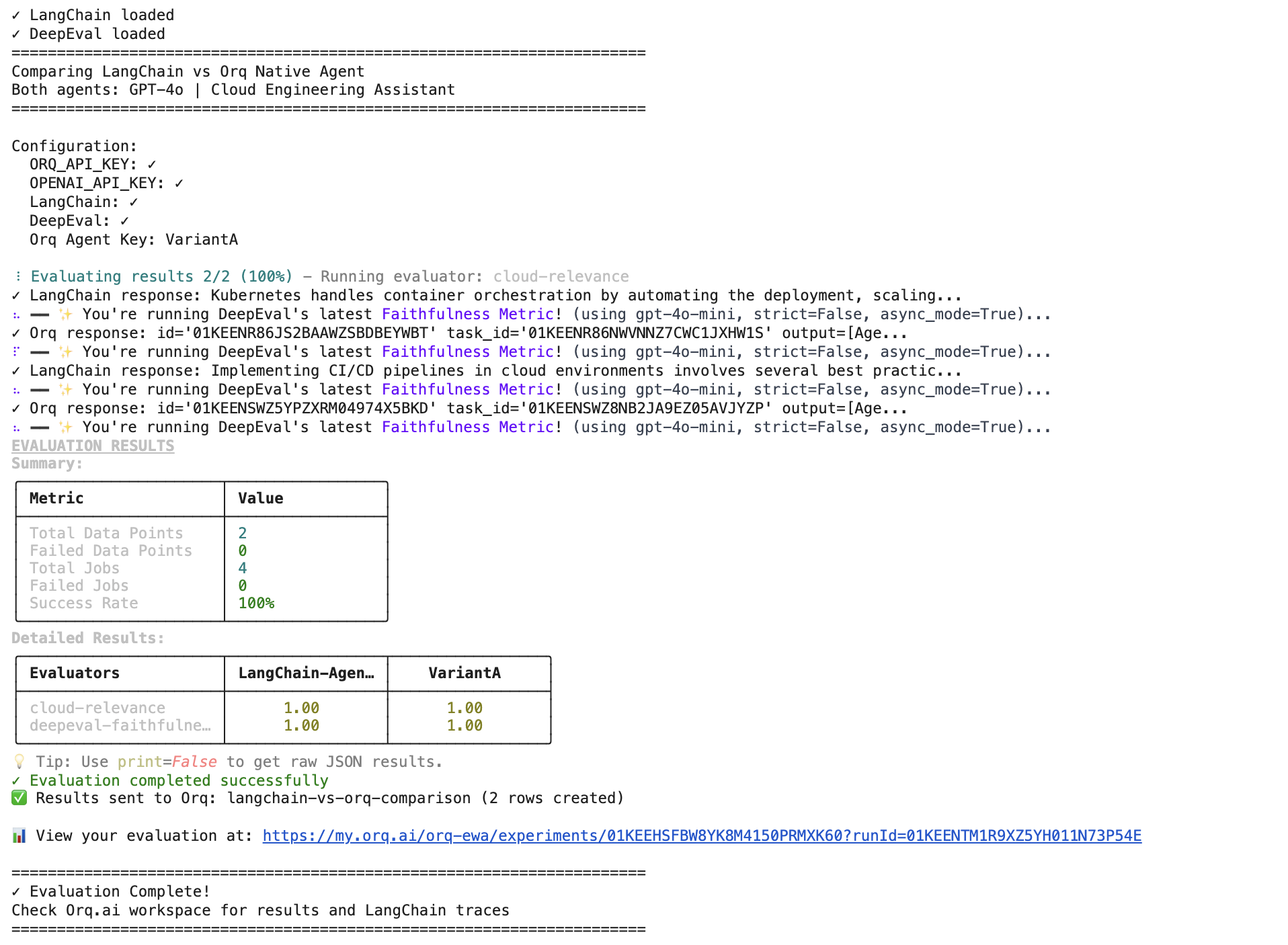
Expected Results:2
3

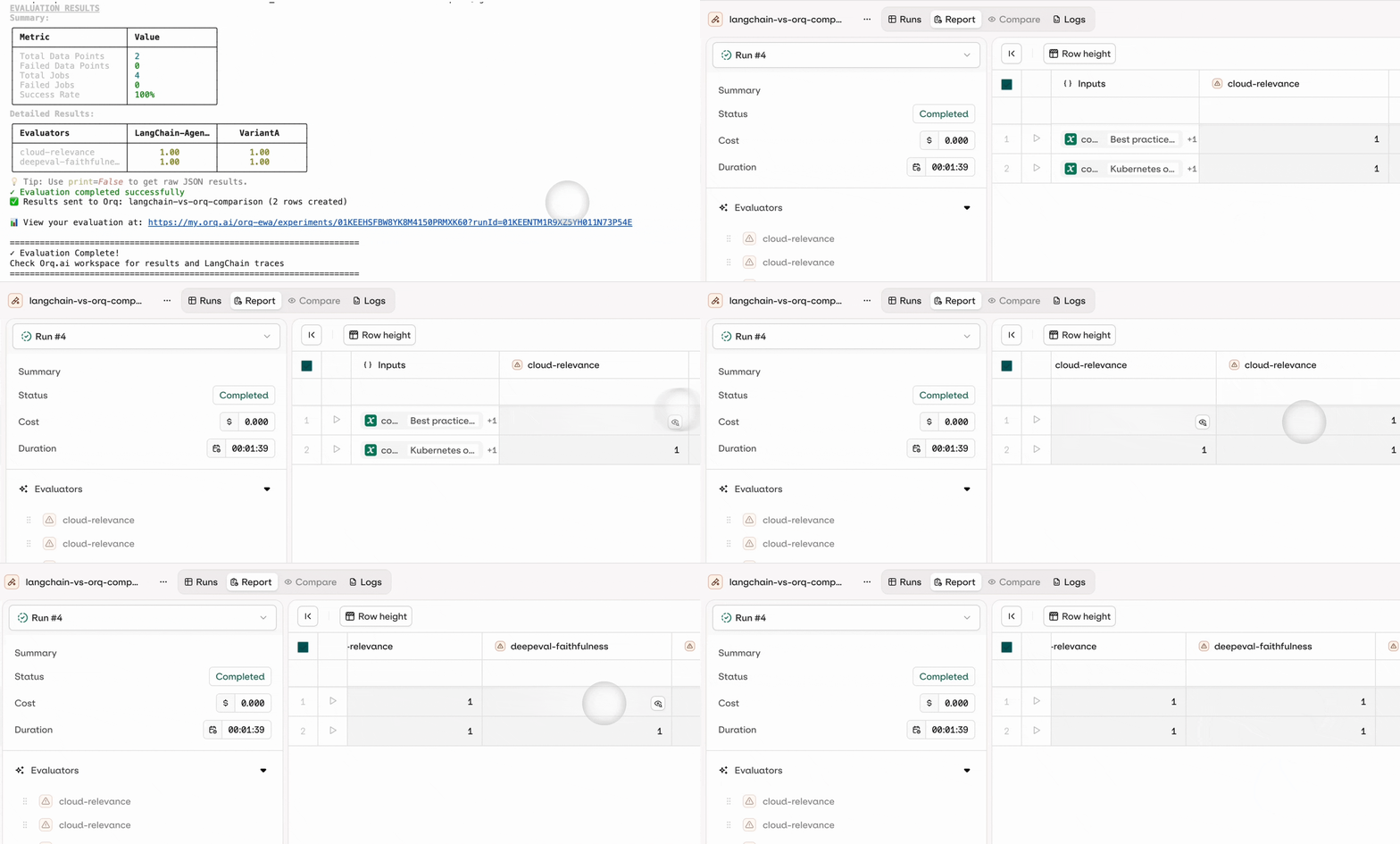
Preview the results in Agent Studio

You can see the results directly in the AI Studio by clicking on the generated link that shows up after you run the agent evaluators:Evaluatorq
Key Takeaways

The real power of Evaluatorq lies in its ability to catch performance dips before they reach users, validate that new model versions maintain quality standards, and provide the confidence needed to iterate quickly on AI systems. Whether you’re optimizing prompt configurations, testing agent decision-making logic, or validating RAG system faithfulness, Evaluatorq gives you the evaluation infrastructure to build reliable, production-ready AI applications at scale.