Orq MCP is live: Use natural language to interrogate traces, spot regressions, and experiment your way to optimal AI configurations. Available in Claude Desktop, Claude Code, Cursor, and more. Start now →
Build LLM-as-a-Judge and Python evaluators in Orq.ai to automatically score model outputs from AI Studio, the API, or the Orq MCP server.
Evaluators are automated tools that assess model outputs within Experiments, Deployments, and Agents. They verify outputs against reference data, enforce compliance criteria, and power Guardrails that block non-compliant generations before they reach users.Two evaluator types are available:
LLM Evaluator
Use a model to judge outputs against any criteria you define in a prompt.
Python Evaluator
Write custom Python code for full flexibility. Use for statistical scoring, regex checks, length validation, or any custom evaluation logic.
HTTP and JSON evaluators are deprecated. Existing HTTP and JSON evaluators continue to work, but cannot be duplicated. Use Python evaluators instead: the requests package is now available for HTTP calls, and pydantic is available for JSON schema validation.
Score model outputs on dimensions like tone, accuracy, or relevance without manual review. Use LLM-as-a-Judge evaluators with custom rubrics, or import pre-built scoring functions from the Hub.
Output compliance checks
Verify that outputs meet specific format, content, or structural requirements. Use Python evaluators for custom logic such as regex checks, length validation, or structural assertions.
Guardrails in Deployments and Agents
Attach evaluators as guardrails to block generations that fail a pass condition. Input guardrails run before the model; output guardrails run after. A failed guardrail returns HTTP 422 to the caller.
Regression testing in Experiments
Run evaluators across a full dataset in an Experiment to track quality over time. Compare evaluator scores across runs and prompt variants to catch regressions before deploying changes.
Before building one from scratch, browse the Hub for ready-to-use evaluators. Add any of them to a Project with the Add to project button, then use them in Experiments, Deployments, and Agents.The Hub groups its evaluators into three categories:
Function Evaluators: deterministic checks such as Contains, Valid JSON, Length Between, and BLEU Score.
LLM Evaluators: model-judged checks such as Tone of Voice, Grammar, PII, and Sentiment Classification.
RAGAS Evaluators: retrieval-augmented generation metrics such as Faithfulness, Context Precision, and Response Relevancy.
orq evals create \
  --type llm_eval \
  --key myKey \
  --path Default/Evaluators \
  --model openai/gpt-5.6-sol \
  --prompt "Give a number response from 0 to 1, 0 for inappropriate, 1 for perfectly appropriate {{log.output}}" \
  --guardrail-config '{"enabled": true, "type": "number", "value": 0.7, "operator": "gte"}'
See install and setup to get started with the CLI. Run orq evals create --help for the full flag reference.
Retrieve an evaluator’s configuration:
Show me the current configuration for the "tone-scorer" evaluator
The assistant uses search_entities to resolve the evaluator ID, then get_llm_eval to retrieve the full configuration including prompt, model, and output type.Create an LLM evaluator:
Create an LLM-as-a-Judge evaluator that scores responses on tone: professional, neutral, or aggressive
The assistant uses create_llm_eval with a categorical scoring rubric and confirms the evaluator ID.Update an existing LLM evaluator:
Update the "tone-scorer" evaluator to also check for formal language and return a boolean instead of a number
The assistant uses search_entities to find the evaluator, then update_llm_eval with the updated prompt and output_type: "boolean".
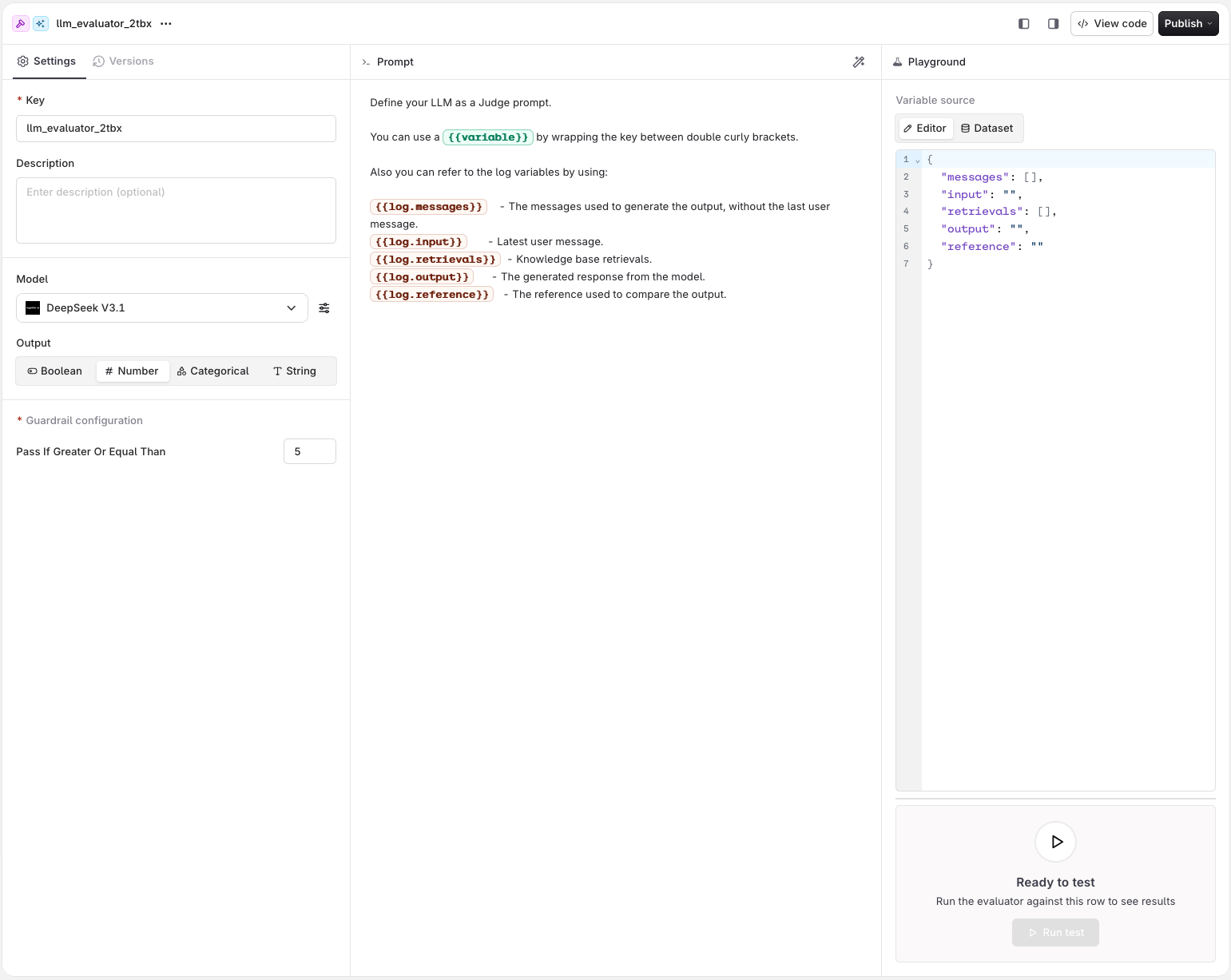
The Model field selects which model acts as judge. Any model enabled in the AI Gateway is available. The model choice affects evaluation quality, cost, and latency.
Select the output type that matches the evaluation criteria. The Guardrail configuration panel is visible directly in the evaluator settings. Set the pass condition for each type:
Boolean
Number
Categorical
String
The model returns a True or False response. Use for binary pass/fail checks.Guardrail: Select True or False. The guardrail passes when the model returns the selected value.
The model returns a numeric score. Use any scale that fits the use case (e.g. 1-5, 0-100).Guardrail: Enter a threshold in Pass if greater or equal than. The guardrail passes when the score meets or exceeds the threshold.
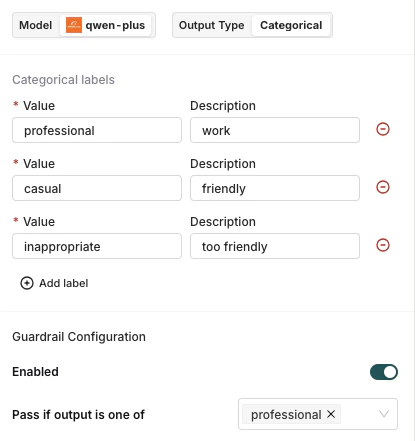
The model classifies the output into one of the predefined labels.When Categorical is selected, a label editor appears below the output type selector. Add one label per row: enter a Value (the exact string the model must return) and an optional Description to guide the model. At least one label is required.Guardrail: Select one or more values in Pass if output is one of. The guardrail passes when the model’s output matches any of the selected labels.
Configure which categorical labels must match for the guardrail to pass.
The model returns a free-form string response. Not available as a guardrail.
Once configured, the evaluator is available as a guardrail in any Deployment or Agent without any additional toggle.
Rate the formality of the following output on a scale of 1 to 5:- 1: Very casual/informal- 5: Very formal/professionalOnly output the number.[OUTPUT] {{log.output}}
Evaluating accuracy on a 0-100 scale
Evaluate how accurate the response [OUTPUT] is compared to the query [INPUT].Score from 0 to 100, where:- 0: Completely inaccurate or irrelevant- 50: Partially accurate- 100: Perfectly accurate and completeOnly output the score as a number.[INPUT] {{log.input}}[OUTPUT] {{log.output}}
Binary pass/fail with numeric output
Evaluate if the response adequately answers the user's question.Return 1 if the response is satisfactory, 0 if it is not.[QUESTION] {{log.input}}[RESPONSE] {{log.output}}
Consistency with the prior conversation
Review the full prior conversation and the latest response.Return 1 if the response stays consistent with what was already discussed, 0 if it contradicts earlier messages.[CONVERSATION] {{log.messages}}[RESPONSE] {{log.output}}
Comparing output against a reference
Compare the response [OUTPUT] against the reference answer [REFERENCE].Return 1 if the response conveys the same meaning as the reference, 0 if it does not.[OUTPUT] {{log.output}}[REFERENCE] {{log.reference}}
Validating tool usage
Review the tool calls made during the run.Return 1 if the correct tool was called with valid arguments for the user's request, 0 otherwise.[REQUEST] {{log.input}}[TOOL CALLS] {{log.tool_calls}}
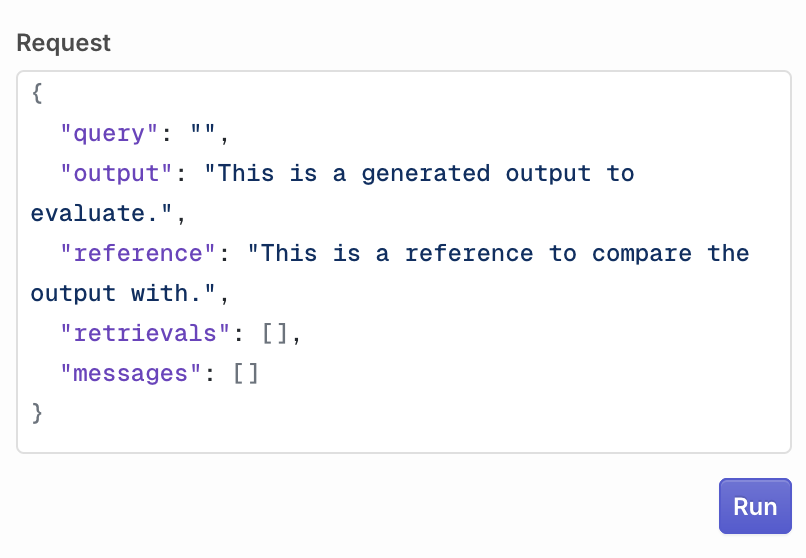
Fill the payload manually. Enter values for messages, input, output, retrievals, and reference. All prompt variables resolve against what you enter.
Configure the LLM payload that will be sent to the evaluator.
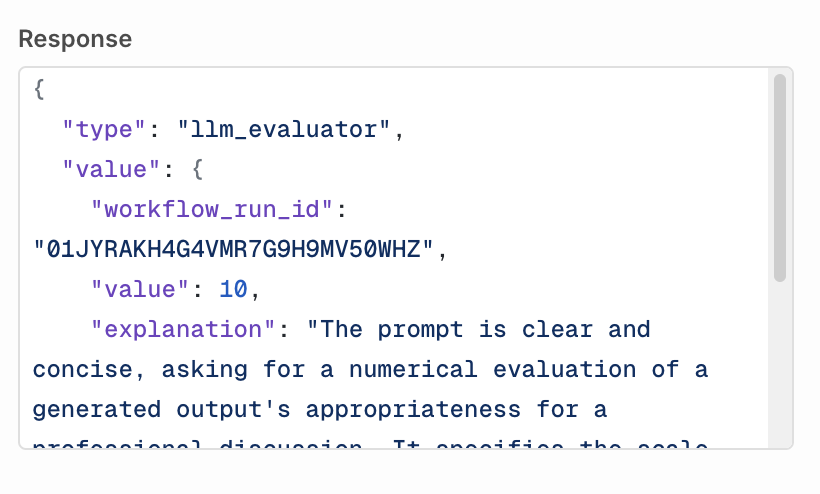
Click Run to execute the evaluator. The result appears in the Response field.
An LLM Evaluator test response.
Select a dataset from the dropdown. Use the row pagination controls to navigate between rows. The selected row’s data is shown in the tree view.The following variables are available in the evaluator prompt when testing with a Dataset:
Source
Prompt variable
Description
inputs.field_name
{{field_name}}
Custom input fields from the dataset row, referenced directly by field name (e.g. {{product_input}})
messages
{{log.messages}}
The messages used to generate the output, without the last user message
reference
{{log.reference}}
The reference used to compare the output
{{log.input}} and {{log.output}} are not available when testing with a Dataset. They are populated only at execution time when an actual model call has been made.
Click Run test to execute the evaluator against the selected row. The result appears in the Response field.
Python Evaluators let you write custom Python code for maximum flexibility: from simple validations (regex, length checks) to complex analyses (statistical scoring, custom algorithms).
Python code is limited to 1 MB (1,048,576 bytes) per evaluator: roughly 1 million characters, or about 20,000 lines of typical Python. Larger code returns a Code exceeds maximum size error and does not run.
AI Studio
API & SDK
CLI
MCP
In a Project or folder, click the button and select Python Evaluator. You are taken to the code editor. Your evaluation function has access to the following fields from the evaluated model’s log:
log["input"]<str>: the last message sent to generate the output
log["output"]<str>: the generated response from the model
log["reference"]<str>: the reference used to compare the output
log["messages"]list<str>: all previous messages sent to the model
log["retrievals"]list<str>: all Knowledge Base retrievals
See install and setup to get started with the CLI. Run orq evals create --help for the full flag reference.
Retrieve a Python evaluator’s configuration:
Show me the current configuration for the "json-validator" evaluator
The assistant uses search_entities to resolve the evaluator ID, then get_python_eval to retrieve the full configuration including code and output type.Create a Python evaluator:
Create a Python evaluator that checks whether the response contains a valid JSON object
The assistant writes a Python snippet that parses the response and validates JSON structure, then uses create_python_eval to register it in your workspace.Update a Python evaluator:
Update the "json-validator" evaluator to also check that the JSON contains a "status" field
The assistant uses search_entities to find the evaluator, then update_python_eval with the updated code.
Within a Deployment or Agent, use the Python Evaluator as a Guardrail to block generations that don’t meet the custom evaluation logic.Use the Pass condition to define when the guardrail passes:
Boolean evaluators: select True or False. The guardrail passes when your function returns the selected value.
Number evaluators: enter a score threshold. The guardrail passes when your function’s return value is greater than or equal to the threshold.
Any evaluator created in Orq.ai, whether LLM or Python, can be attached as a guardrail in a Deployment or Agent. Only the Pass condition needs to be set.
Checking an output survives an external API round-trip
Use the requests package to send the output to an external endpoint and confirm it comes back unchanged. Return True only when the call succeeds and the echoed text matches the output.
Validating an insurance damage assessment report against a schema
Use pydantic to validate that the output is JSON matching the expected damage report schema, including a confidence score between 0 and 1. Return True when it parses and validates, False otherwise.
Python
def evaluate(log):
    import json
    from typing import List
    from pydantic import BaseModel, field_validator, ValidationError

    class Damage(BaseModel):
        type: str
        location: str
        severity: str
        confidence: float
        description: str

        @field_validator("confidence")
        @classmethod
        def confidence_in_range(cls, v):
            if not 0.0 <= v <= 1.0:
                raise ValueError("confidence must be between 0 and 1")
            return v

    class Assessment(BaseModel):
        damages: List[Damage]
        assetType: str
        observations: List[str]
        overallAssessment: str

    try:
        Assessment(**json.loads(log["output"]))
        return True
    except (ValidationError, json.JSONDecodeError, KeyError):
        return False
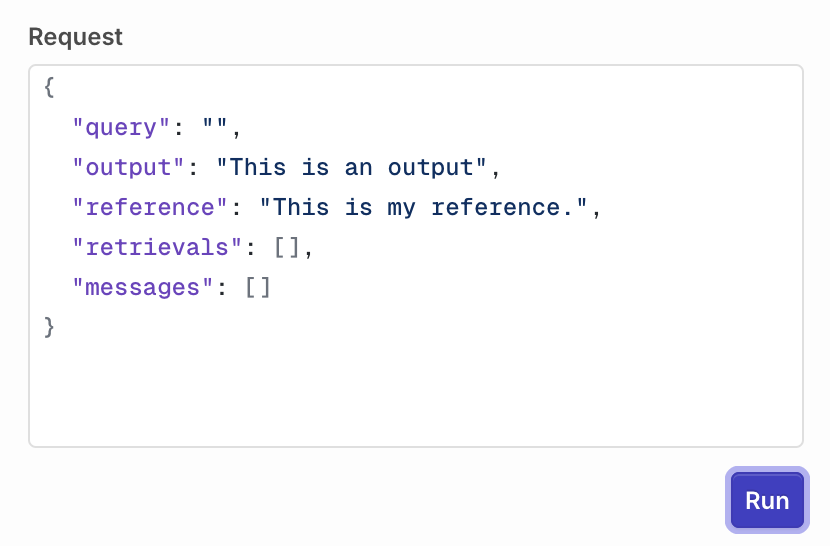
Fill the payload manually in the Editor. Enter values for input, output, reference, messages, and retrievals. All log fields resolve against what you enter.
Configure the payload that will be sent to the Python evaluator.
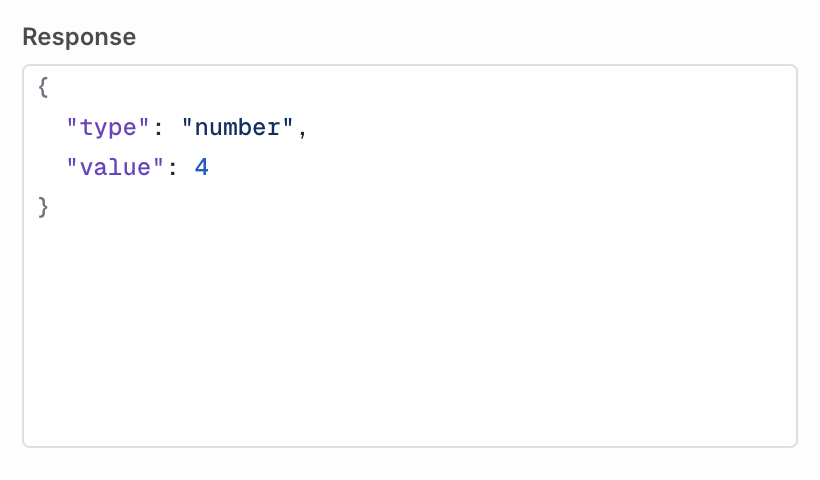
Click Run to execute the evaluator. The result appears in the Response field.
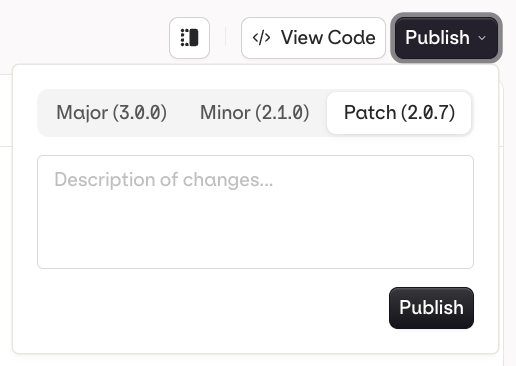
When you are done editing, click Publish to save your changes. You will be prompted to write a commit message and choose a version bump:
Publish a new version of your Evaluator.
Patch (e.g. v1.0.0 to v1.0.1): small fixes, no behaviour change
Minor (e.g. v1.0.0 to v1.1.0): new functionality, backwards compatible
Major (e.g. v1.0.0 to v2.0.0): breaking change or significant rework
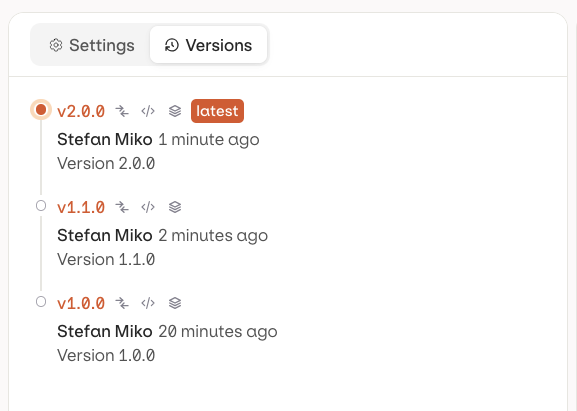
The Versions tab shows the full history with author and publish timestamp for each version.
Evaluator versions.
Each published version has three action buttons:
Action
Icon
Description
Compare
Open a diff view to see what changed between versions, and restore an older one
Code
Load a code snippet to invoke the evaluator at this exact version
Environment
Tag the version with an Environment (e.g. production, staging)
Reference a specific version by appending @ and the version number: my-evaluator@1.0.1. Reference an environment tag directly: my-evaluator@production. Without a suffix, the latest published version is used.
In Compare (see above), click Restore next to an older version to load it into the current working draft.Restore does not publish automatically: the evaluator is loaded into the draft as unpublished changes on the Settings tab, and Publish still needs to be clicked for it to become a real version. Earlier versions are never deleted, so restoring is always reversible.
If there are unpublished changes already, a confirmation dialog asks for confirmation before overwriting them.
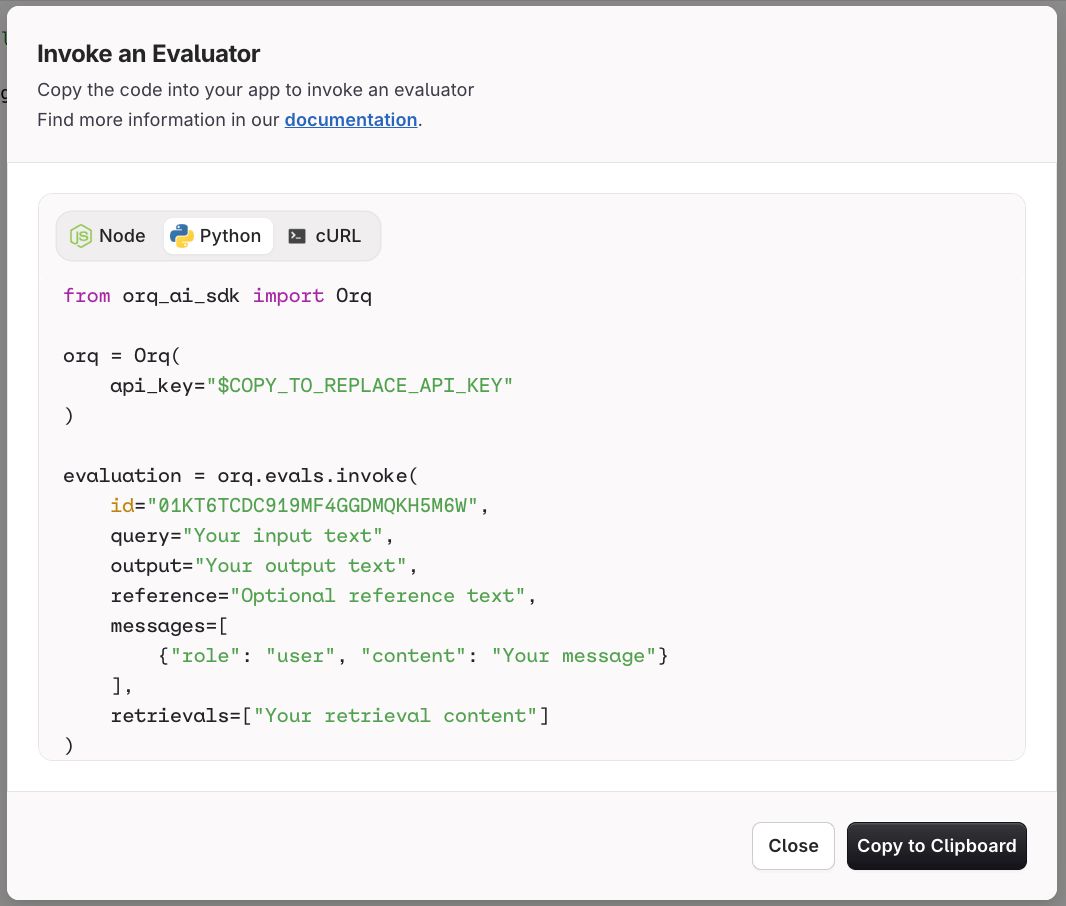
Fetch the evaluator ID from the List Evaluators API, then invoke it. Use the View Code button on your evaluator page in the AI Studio to get a pre-filled snippet.
The Invoke an Evaluator dialog provides ready-to-copy Node, Python, and cURL snippets.
When a guardrail evaluation fails, Orq.ai returns an HTTP 422 Unprocessable Entity. The response body lists every guardrail that did not pass.
Deployments
Agents
{ "code": 422, "error": "Validation failed: Not all guardrails were met while validating the response.", "message": "Validation failed: Not all guardrails were met while validating the response.", "source": "system", "guardrails": [ { "id": "01KMR75R90XDA80020YT8MHP2W", "status": "completed", "started_at": "2026-03-27T17:58:55.330Z", "finished_at": "2026-03-27T17:58:55.364Z", "related_entities": [ { "type": "evaluator", "evaluator_id": "01KK9D8Z0JCEC1ASQJH8R28B57", "evaluator_metric_name": "python_evaluator" } ], "passed": false, "reason": null, "evaluator_type": "output_guardrail", "type": "boolean", "value": false } ]}
Field
Type
Description
id
string
Internal ID of the guardrail result.
status
string
Execution status: "completed" or "failed".
started_at
string
ISO 8601 timestamp when the guardrail evaluation started.
finished_at
string
ISO 8601 timestamp when the guardrail evaluation finished.
related_entities
array
References to the evaluator that ran. Each entry contains type, evaluator_id, and evaluator_metric_name.
passed
boolean
false for every entry in this error response.
reason
string or null
Explanation of the failure, when provided by the evaluator.
evaluator_type
string
"input_guardrail" if the guardrail ran before the model. "output_guardrail" if the guardrail ran after generation.
type
string
The value type returned by the evaluator: "boolean", "number", or "categorical".
value
boolean, number, or string
The raw value returned by the evaluator.
{ "code": 422, "error": "Validation failed: Not all guardrails were met while validating the messages.", "message": "Validation failed: Not all guardrails were met while validating the messages.", "source": "system"}
The guardrails array is not included in Agent responses. Use Traces in the Orq.ai Studio to identify which guardrail failed.
When the evaluator fails to execute: If the evaluator itself fails to run (for example, a network error or timeout), the guardrail is silently skipped and the generation proceeds. Monitor skipped guardrail executions through Traces.When an LLM guardrail’s underlying model fails: If the model powering an LLM guardrail is unavailable, Orq.ai fails the entire request for safety. Since the guardrail could not run, there is no way to know whether it would have blocked the generation.
Evaluatorq is a dedicated SDK for running evaluations programmatically. It supports parallel job execution, flexible data sources (inline, CSV, Orq datasets), and syncs results to the Orq.ai AI Studio.


 AI Studio
 MCP
MCP