Orq MCP is live: Use natural language to interrogate traces, spot regressions, and experiment your way to optimal AI configurations. Available in Claude Desktop, Claude Code, Cursor, and more. Start now →
Start with a working LangGraph agent and put Orq.ai behind it: route its model calls through the AI Gateway, ground its answers in a Knowledge Base, and record each run in Traces. The agent logic itself barely changes.
Tracing is one call. orq_tracing_setup hooks into LangChain’s callback system, so every agent run, tool call, and model response streams to Orq.ai with no further changes to the agent.
Python
from orq_ai_sdk.langchain import setup as orq_tracing_setuporq_tracing_setup(api_key=ORQ_API_KEY)
Point a standard LangChain ChatOpenAI model at the Orq.ai router by overriding base_url. From there the agent is ordinary LangGraph: create_agent is LangChain’s prebuilt constructor that compiles a LangGraph agent under the hood, here wired with one example tool.
Python
from langchain_openai import ChatOpenAIfrom langchain_core.tools import toolfrom langchain.agents import create_agent# Router: a LangChain model pointed at Orqmodel = ChatOpenAI( model="openai/gpt-5.4-mini", base_url="https://api.orq.ai/v3/router", api_key=ORQ_API_KEY,)## Example tool@tooldef get_order_count(city: str) -> str: """Get the number of orders for a given city.""" return f"{city} had 1,240 orders last month."tools = [get_order_count]agent_prompt = "You are a helpful assistant."agent = create_agent(model, tools=tools, system_prompt=agent_prompt)
The router addresses models with a provider/model string, so switching providers is a one-line change. Nothing else moves: the agent, tools, and prompt all stay as they were.
Python
# The router means switching providers is a one-line change —# same agent, same code, different model behind it.model = ChatOpenAI( model="anthropic/claude-sonnet-4-6", base_url="https://api.orq.ai/v3/router", api_key=ORQ_API_KEY,)agent = create_agent(model, tools=tools, system_prompt=agent_prompt)ask_agent("How many orders in Amsterdam?", agent)
The same agent now answers through a different provider:
There were **1,240 orders** in Amsterdam last month! Let me know if you need any further details or want to check other cities.
Ground the agent in real documents with a Knowledge Base. This takes three calls: create the Knowledge Base, upload the source file, then create a datasource that chunks and indexes it.Create the Knowledge Base and keep its id to reference it later.
Python
res = orq.knowledge.create( request={ "key": "CustomerServicePolicies", #embedding model in "provider/model" format "embedding_model": "openai/text-embedding-3-small", #folder path in the orq UI (auto-created if it doesn't exist) "path": "customerService", "description": "Customer service documentation", })knowledge_id = res.idprint("Knowledge created")
Upload the source document. The file is sent as base64-encoded content.
Python
import base64# ↓ path to the document you want to indexFILE_PATH = "files/refundpolicy.pdf"with open(FILE_PATH, "rb") as f: encoded = base64.b64encode(f.read()).decode("utf-8")res = orq.files.create( filename=os.path.basename(FILE_PATH), content=encoded, content_type="application/pdf",)file_id = res.file.file_idprint("File added")
Create a datasource to chunk and embed the file. Chunking runs asynchronously, so poll the datasource until its status is completed. To tune chunk size and overlap, see Chunking Strategy.
Python
import timeres = orq.knowledge.create_datasource( knowledge_id=knowledge_id, file_id=file_id, chunking_options={ # "default" uses orq's automatic chunking strategy # switch to "advanced" to control chunk_max_characters and chunk_overlap "chunking_configuration": {"type": "default"} },)datasource_id = res.id# Poll until indexing finisheswhile True: ds = orq.knowledge.retrieve_datasource( knowledge_id=knowledge_id, datasource_id=datasource_id, ) print(f" status: {ds.status}") if ds.status in ("completed", "failed"): break time.sleep(2)print(f"Done — {int(ds.chunks_count)} chunks indexed")
The poll reports each status until indexing completes:
Expose the Knowledge Base to the agent as a tool. search_policy runs a retrieval query and returns the matching chunks, and the system prompt forces the agent to call it before answering.
Python
@tooldef search_policy(query: str) -> str: """Search the company policy knowledge base for relevant passages.""" results = orq.knowledge.search(knowledge_id=knowledge_id, query=query) relevant_chunks = [] for match in results.matches: relevant_chunks.append(match.text) output = "\n\n".join(relevant_chunks) if len(relevant_chunks) > 0 else "No relevant policy found." return outputtools.append(search_policy)agent_prompt = "You are a customer support assistant, and will help customers with any questions. Before responding you must use the search_policy tool to ground your answer."agent = create_agent(model, tools=tools, system_prompt=agent_prompt)
Ask something that can only be answered from the uploaded policy. The agent calls search_policy first, then answers from the chunks it retrieves.
Python
ask_agent("I got delivered the wrong item, can I get a refund?", agent)
The agent answers from the policy document:
Yes, absolutely! Based on our policy, you are eligible for a **full refund** for the wrong item. Here's what you need to know:**Eligibility Requirements:**1. You must report the wrong item **within 45 minutes of delivery**.2. You'll need to **provide a photo** of the delivered item showing the discrepancy.3. The item must differ from your order in a material way (e.g., you received a Margherita pizza instead of a Pepperoni pizza).**What You'll Receive:**- A **full refund** to your original payment method.- Optionally, a **replacement delivery at no extra cost** if you'd prefer that and the restaurant is still open.To get the process started, could you please share:- A **photo of the wrong item** you received.- Confirmation that you're reporting this **within 45 minutes of delivery**.Once we have that, we'll get your refund sorted right away! 😊
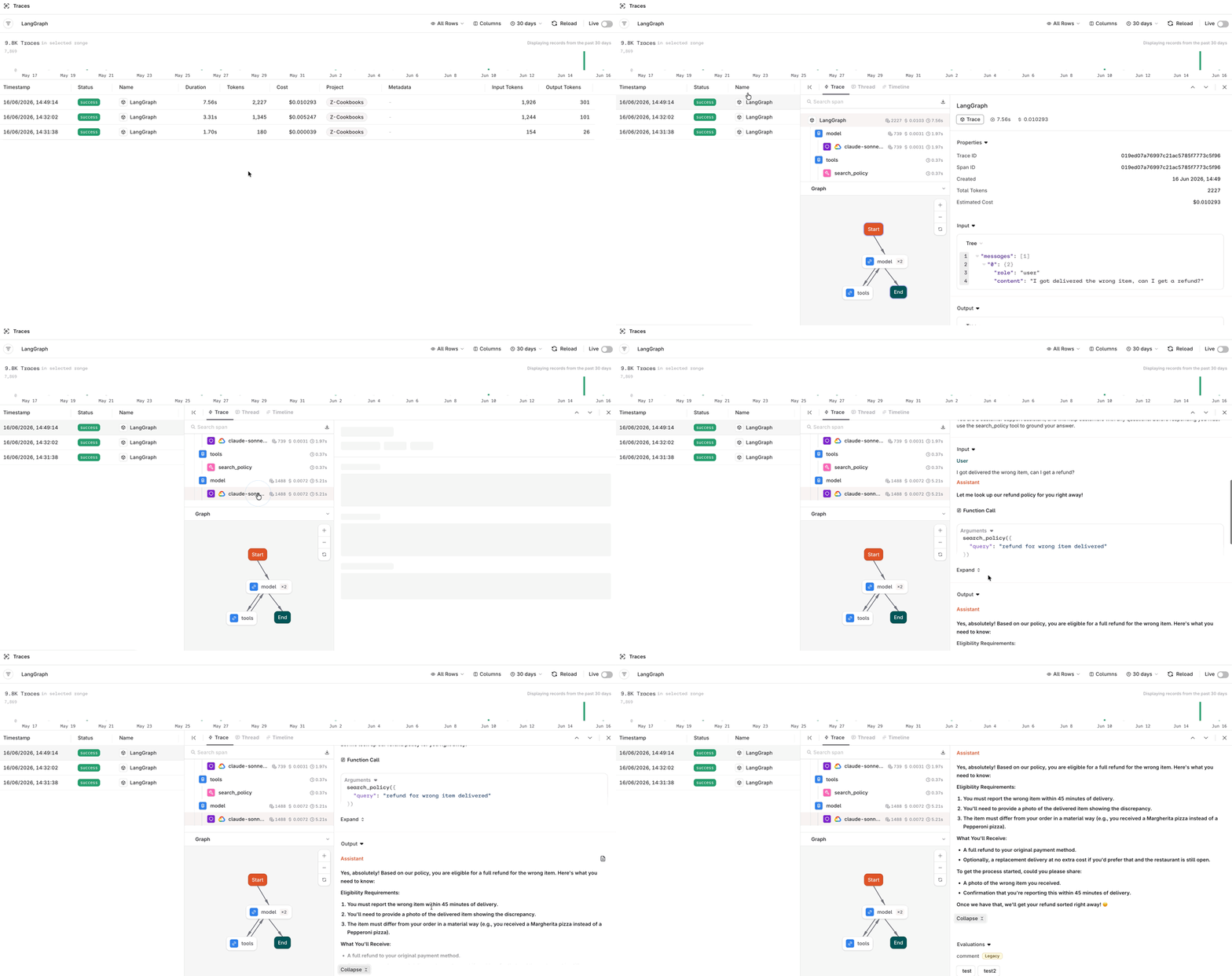
Open AI Studio > Observability > Traces to inspect any run: the user message, the tool calls, the retrieved chunks, the model responses, and the timings. The setup from Step 2 already captures all of it, with nothing else to add.
The LangGraph agent now runs on Orq.ai for routing, retrieval, and observability. Swap the model, the Knowledge Base, or the prompt without rewriting the agent loop.