Orq MCP is live: Use natural language to interrogate traces, spot regressions, and experiment your way to optimal AI configurations. Available in Claude Desktop, Claude Code, Cursor, and more. Start now →
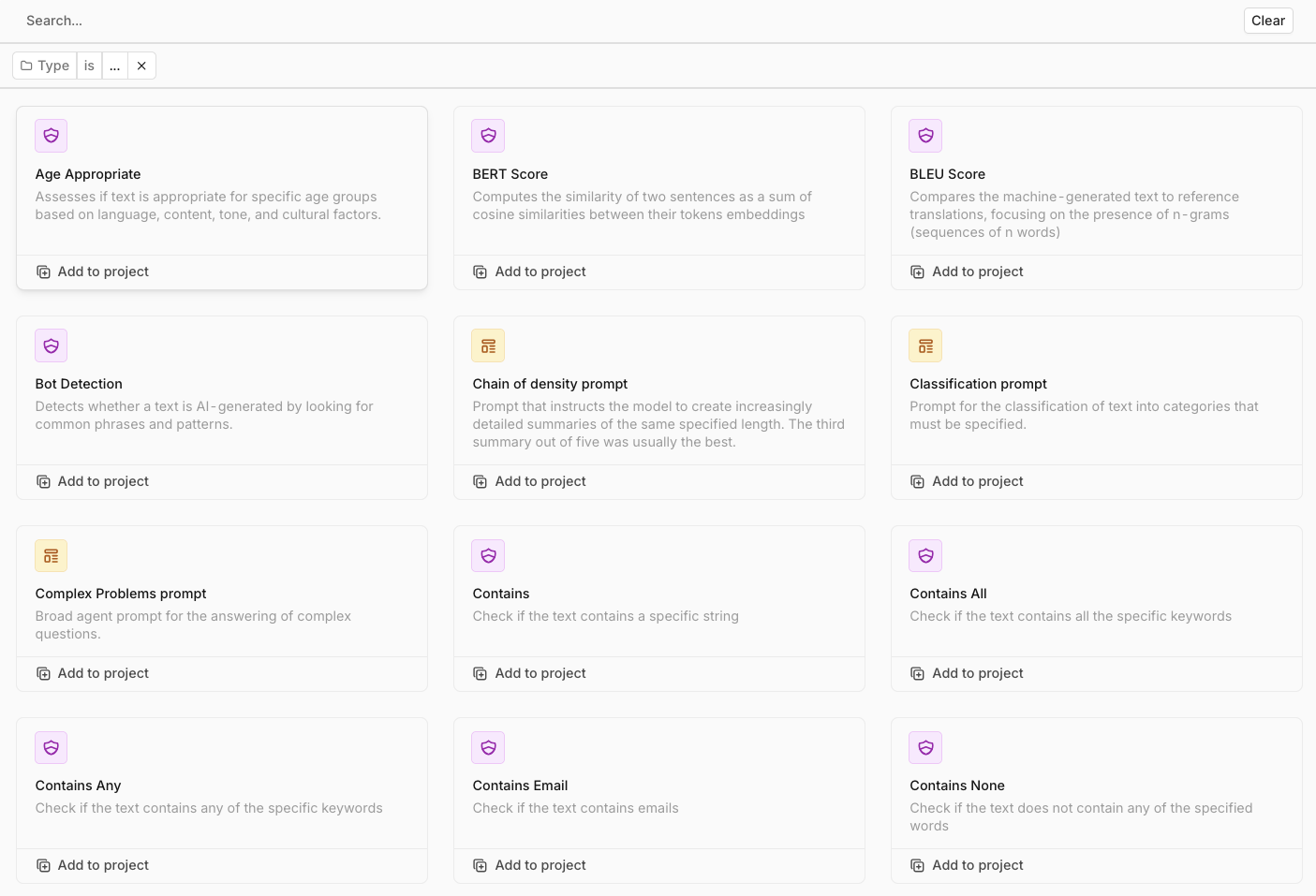
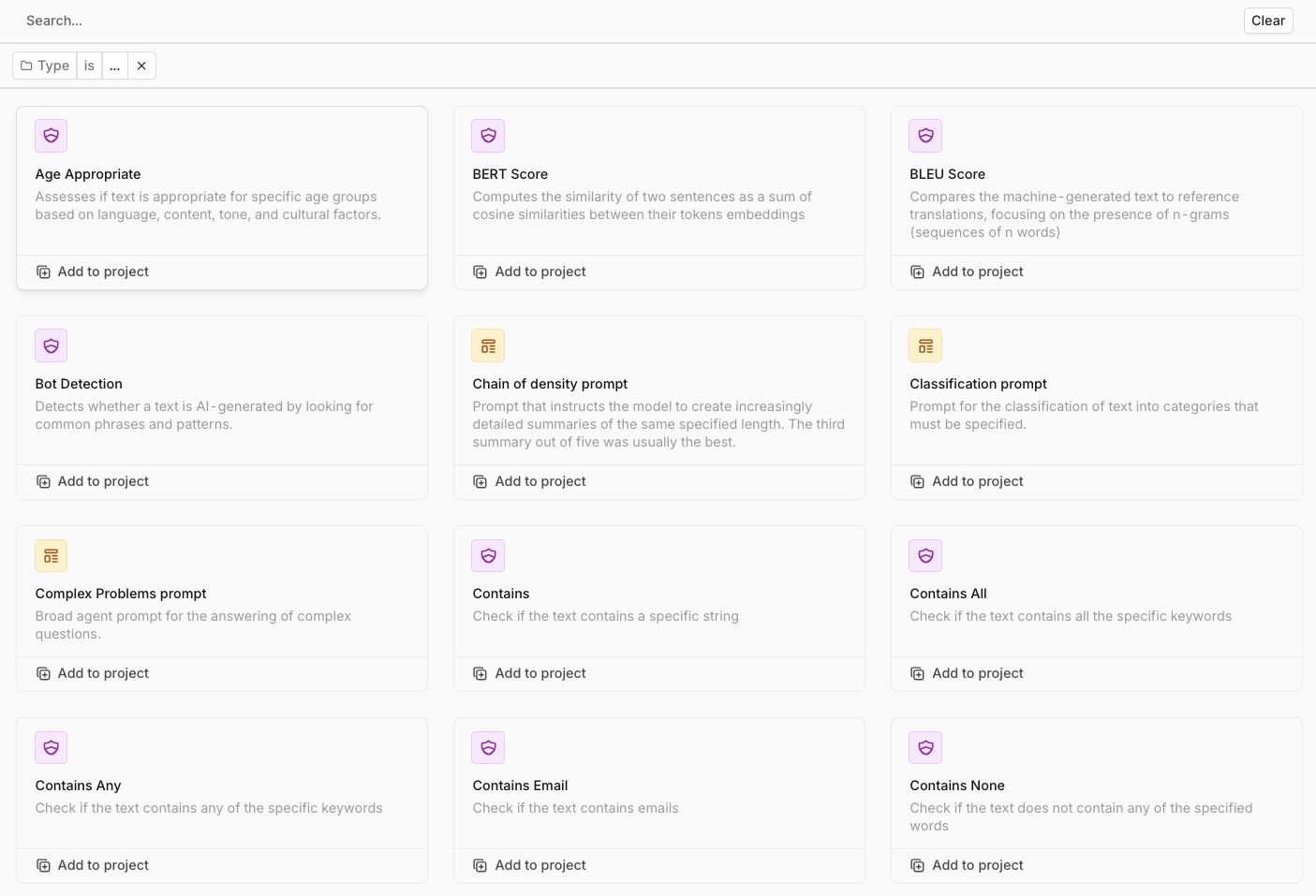
Browse and import pre-built evaluators from the Orq.ai Hub. Add them to your projects and use them in Experiments, Deployments, and Agents.
Browse through all available Prompts and Evaluators.
You can add any Prompt or Evaluator from the Hub to any project using the Add to project button.A modal will open to choose a Project and folder to import the entity in, it will then be accessible to use within Playgrounds, Experiments, Deployments, and Agents.
Function Evaluators are ideal when you need clear, binary outcomes: verifying that a response includes a required phrase, adheres to a length limit, or contains valid links. Use them to ensure compliance, automate simple text validations, and establish robust guardrails for text generation.
BERT Score
DescriptionBERT Score checks how similar the text is to the reference answer by analyzing the meaning of each word in context, rather than just matching exact words. It uses embeddings from the BERT model to understand deeper meaning, allowing it to identify similarities even when wording differs. This makes BERT Score particularly useful for tasks like summarization, paraphrasing, and question answering, where capturing the intended meaning matters more than exact wording.ExampleImagine an AI answers a question about a return policy with, “You can return items within 30 days.” BERT Score compares this to a reference like “Our return window is 30 days,” focusing on the meaning of words like “return” and “30 days.” This gives a high score since the sentences convey similar meanings, even though the wording is different.
BLEU Score
DescriptionBLEU is a popular metric for evaluating the quality of machine-translated text by comparing it to one or more reference translations. It assesses precision, focusing on how many n-grams (short sequences of words) in the AI-generated translation match those in the reference text. BLEU also applies a brevity penalty to avoid high scores for overly short translations that may technically match but lack meaningful content.ExampleImagine the AI translates “Je suis fatigué” as “I am tired.” BLEU compares this output to reference translations, such as “I’m tired,” and calculates the overlap in n-grams, like “I am” and “am tired.” With a strong overlap, BLEU would assign a high score, reflecting close alignment with the reference translation.
Contains
DescriptionThe Contains evaluator checks if a specific word or phrase appears within a text. It doesn’t analyze context or meaning; it only confirms the presence of specific terms. Ideal for binary tasks like keyword validation, content filtering, or ensuring compliance with required phrases.ExampleIf an AI response needs to include the phrase “return policy,” the Contains evaluator scans for this exact term. If the response says, “Our return policy allows…,” it passes since “return policy” is detected.
Contains All
DescriptionThe Contains All evaluator checks if a text includes all required words or phrases, ensuring that each specified term is present. Ideal for verifying multiple key terms, like ensuring all necessary points are mentioned in a response.ExampleSuppose a response must include both “return policy” and “30 days.” If the response says, “Our return policy allows returns within 30 days,” it passes because both phrases are present.
Contains Any
DescriptionThe Contains Any evaluator checks if a text includes at least one word or phrase from a specified list. Useful for detecting mentions of a topic or validating partial information.ExampleSuppose a response needs to mention at least one of “refund,” “return policy,” or “exchange.” If the response reads, “Our exchange policy allows…,” it passes because “exchange” is present.
Contains None
DescriptionThe Contains None evaluator ensures that a text does not contain any of the specified words or phrases. Often used in content moderation or quality control tasks where specific terms must be avoided.ExampleSuppose a platform wants to restrict terms like “refund” or “return policy” in user reviews. If a review contains “I asked for a refund,” it would be flagged since the term “refund” appears.
Contains Valid Link
DescriptionThe Contains Valid Link evaluator checks if a text includes a valid, correctly structured URL. Useful for confirming resource citations or verifying external references.ExampleIf a response says, “You can read more at http://example.com/resource,” it passes if the URL is correctly structured.
Cosine Similarity
DescriptionCosine Similarity measures the semantic similarity between generated and reference texts by comparing their vector embeddings. Higher scores indicate stronger alignment in meaning. Particularly useful for summarization, translation, and text generation tasks.ExampleCosine Similarity can evaluate whether “The cat sat on the mat” and “A feline rested on a rug” convey the same meaning, assigning a score from 0 to 1.
Ends With
DescriptionThe Ends With evaluator checks if a text concludes with a specified word or phrase. Useful for formatting tasks or validating that responses conclude with specific information.ExampleIf all email responses must end with “Thank you for your time,” the Ends With evaluator checks each response. If a response ends with something different, it is flagged.
Exact Match
DescriptionExact Match checks if the generated text matches the reference text exactly, character for character. Useful for highly structured or template-based tasks, or for simple fact-based responses where precise wording is required.ExampleIf a closing phrase must be “Thank you for your inquiry. We’ll get back to you within 24 hours,” and the response uses “a day” instead of “24 hours,” it fails the check.
Length Between
DescriptionThe Length Between evaluator checks if the text length falls within a specified range. Useful for tasks where a specific range of information density is required, such as summary limits or form responses.ExampleA customer review must be between 50 and 200 characters to be accepted. A review of 120 characters passes.
Length Greater Than
DescriptionThe Length Greater Than evaluator checks if the text length exceeds a specified minimum. Used to avoid overly brief responses in contexts where depth or detail is expected.ExampleAn AI-generated answer must be at least 100 characters long. An answer of 150 characters passes.
Length Less Than
DescriptionThe Length Less Than evaluator verifies that the text length is below a specified maximum. Helpful in contexts where brevity is important, such as social media posts or SMS messages.ExampleA notification message must be under 160 characters to fit in an SMS. A message of 140 characters passes.
Levenshtein Distance
DescriptionLevenshtein Distance calculates the number of single-character edits (insertions, deletions, or substitutions) needed to transform the text into a reference text. Ideal for error detection in tasks requiring precision, like spell-checking or structured data validation.ExampleIf the AI outputs “recieve” instead of “receive,” the Levenshtein distance is 1 (one character substitution), indicating a minor error.
METEOR Score
DescriptionMETEOR evaluates the quality of machine-translated text by comparing it to a reference translation, taking into account synonym matches, stemming, and word order. Highly effective for evaluating translation tasks that need to capture subtle linguistic variations.ExampleIf the AI translates “Je suis fatigué” as “I’m feeling tired,” METEOR would compare this with “I am tired” and recognize synonyms, resulting in a high score.
OpenAI Moderations API
DescriptionThe OpenAI Moderations API evaluates text to ensure it meets safety and appropriateness standards. It checks for content categories such as hate speech, violence, self-harm, and illegal activities.ExampleIf an AI-generated response includes language encouraging self-harm, the OpenAI Moderations tool detects it and flags the response as unsafe.
ROUGE-N
DescriptionROUGE-N measures the overlap of n-grams between a generated summary and a reference summary. Unlike BLEU, ROUGE emphasizes recall, assessing how well the generated summary captures important details.ExampleIf the reference summary includes “results were announced on Monday” and the AI summary includes “results were announced,” ROUGE-N calculates the n-gram overlap to assess how closely the summary matches.
Valid JSON
DescriptionThe Valid JSON evaluator checks if a text is in valid JSON format, ensuring it follows proper JSON syntax. Essential for applications that rely on structured data input.ExampleAn API endpoint requires input in JSON format. Malformed input is flagged as invalid JSON before it reaches the API.
LLM Evaluators use a language model to assess output quality. They are perfect for scenarios where nuance matters, such as tone alignment, sentiment analysis, or grammar checking. LLM 1 generates a response, and LLM 2 evaluates it.
Age-Appropriate
DescriptionDetermines whether the generated text is appropriate for a specified age group. Useful for content moderation, educational material review, or ensuring text is suitable for specific audiences.ExampleEvaluating a news summarization for children under 8, the evaluator checks if the language is simple, the tone is gentle, and complex or inappropriate themes are avoided. Returns 1 if appropriate, 0 if not.
Bot Detection
DescriptionDetermines whether the provided text was likely generated by an AI. Useful for content validation, academic integrity checks, or identifying automated text.ExampleIf text starts with “As an AI assistant” or shows repetitive patterns, it may be flagged as AI-generated. Returns 1 for AI-generated, 0 for human-written.
Fact Checking Knowledge Base
DescriptionAssesses the truthfulness of a statement by referencing an internal knowledge base and widely accepted facts. Assigns a score on the PolitiFact scale from 0 (pants on fire false) to 5 (true), or -1 if uncertain.ExampleVerifying “Lionel Messi has won more Ballon d’Or awards than any other footballer” against the knowledge base for sports records.
Grammar
DescriptionChecks whether the provided text is grammatically correct, focusing on grammar, punctuation, and overall clarity. Returns 1 if correct, 0 if errors are found, with a corrected version when needed.Example“The company are planning to expand their operations”: the evaluator identifies the subject-verb agreement error and returns 0.
Localization
DescriptionAssesses the quality of localized content: accuracy, grammar, cultural appropriateness, and user experience. Assigns a score from 1 to 10.Example“Join us for the Fourth of July sale” localized for a Japanese audience. The evaluator checks whether the cultural significance is appropriately conveyed.
PII
DescriptionChecks whether personally identifiable information (PII) has been correctly removed or anonymized in the output. Returns 1 if all PII is anonymized, 0 if any identifying information remains.ExampleIf “John Doe” and “123 Main Street” are replaced with “[NAME_1]” and “[STREET_1],” the evaluator confirms correct anonymization.
Sentiment Classification
DescriptionChecks if the sentiment of the provided text (positive, negative, or neutral) has been correctly classified. Returns 1 if the classification is correct, 0 if not.Example“The customer support team resolved my issue quickly” classified as “positive”: the evaluator confirms this classification is correct.
Summarization
DescriptionAssesses the accuracy, completeness, and conciseness of a summary in relation to the original text. Scores from 1 to 10.ExampleA summary of a smartphone launch that includes key features, launch date, and pricing is checked for accuracy and completeness against the original article.
Tone of Voice
DescriptionChecks whether the provided output aligns with the desired tone and writing style specified in the input. Returns 1 if the tone matches, 0 if it does not, with feedback for improvement.ExampleAn email about a delayed payment specified to use a professional and respectful tone. The evaluator confirms tone alignment.
Translation
DescriptionAssesses whether the provided translation accurately conveys the meaning, tone, and style of the original text, including cultural appropriateness. Scores from 1 to 10.Example“The early bird catches the worm” translated as “El pájaro temprano atrapa el gusano.” The evaluator checks whether a culturally relevant phrase would better convey the intended meaning.
RAGAS Evaluators are specialized tools for evaluating retrieval-augmented generation (RAG) workflows. They focus on metrics like context relevance, faithfulness, recall, and robustness, ensuring that outputs derived from external knowledge bases are accurate and reliable.
”What are the benefits of our premium insurance plan?”
Knowledge Base Retrievals
retrievals
Array of document chunks retrieved from your knowledge base
[“Premium plan includes 24/7 support…”, “Coverage extends to international travel…”]
Generated Response
output
The AI’s answer based on the retrieved context
”Our premium plan offers comprehensive coverage including…”
Reference Answer
reference
A high-quality answer to compare against
Human-written ideal response for the query
Model
model
The AI model used for evaluation
”openai/gpt-5.6-sol”
RAGAS evaluators return a number between 0 and 1. For most metrics, a value closer to 1 indicates higher quality. For Ragas Harmfulness and Ragas Maliciousness, a score closer to 1 indicates a more harmful or malicious response (lower quality).
Ragas Coherence
Required Parameters:query, output, modelOptional Parameters:referenceChecks if the generated response presents ideas in a logical, organized manner.ExampleGood: “First, log into your account. Then, navigate to settings. Finally, click ‘Change Password’.”Poor: “Click settings. Your account has security features. Navigate first to login. Change password option exists.”
Ragas Conciseness
Required Parameters:query, output, modelOptional Parameters:referenceEvaluates if the response conveys information clearly and efficiently, without unnecessary details.ExampleConcise: “The meeting is at 2 PM.”Verbose: “The meeting, which we scheduled earlier, is at 2 PM in the afternoon today.”
Ragas Context Entities Recall
Required Parameters:query, output, model, referenceOptional Parameters:retrievalsMeasures how well your retrieval system captures important entities (people, places, things) mentioned in the ideal answer.ExampleGround truth mentions “John Smith, Sarah Jones, New York office” but retrieved documents only mention “John Smith, Sarah Jones” = 67% recall.
Ragas Context Precision
Required Parameters:query, output, model, retrievalsOptional Parameters:referenceMeasures what proportion of retrieved documents are actually relevant to the user’s question.ExampleUser asks about “project deadlines” and 7 out of 10 retrieved documents discuss deadlines = 70% precision.
Ragas Context Recall
Required Parameters:model, reference, retrievalsOptional Parameters:query, outputMeasures if the retrieved documents contain all the information needed to answer the question properly.ExampleThe ideal answer has 4 key facts, but retrieved context only contains 3 of them = 75% recall.
Ragas Correctness
Required Parameters:query, output, modelOptional Parameters:referenceDirectly compares the AI’s answer against the known correct answer for factual accuracy.ExampleGenerated: “The deadline is Friday” vs. ground truth: “The deadline is Monday” = low correctness.
Ragas Faithfulness
Required Parameters:query, output, modelOptional Parameters:retrievalsEnsures the AI’s answer is factually consistent with the source documents it was given.ExampleContext: “Budget increased 10%” but answer: “Budget doubled” = low faithfulness.
Ragas Harmfulness
Required Parameters:query, output, modelOptional Parameters:retrievalsDetects if the response could potentially cause harm to individuals, groups, or society.ExampleA response containing discriminatory language or dangerous instructions would score high on harmfulness.
Ragas Maliciousness
Required Parameters:query, output, modelOptional Parameters:retrievalsIdentifies responses that might be trying to deceive, manipulate, or exploit users.ExampleA response trying to trick someone into sharing passwords or personal information.
Ragas Noise Sensitivity
Required Parameters:query, output, modelOptional Parameters:retrievalsTests if the AI can maintain accuracy even when retrieved documents contain irrelevant information.ExampleCorrectly answering “What time is the meeting?” even when documents also contain unrelated budget information.
Ragas Response Relevancy
Required Parameters:query, output, modelOptional Parameters:retrievalsAssesses how well the AI’s answer addresses the specific question asked.ExampleQuestion: “How do I reset my password?” A relevant answer gives reset steps; an irrelevant answer discusses email settings.
Ragas Summarization
Required Parameters:query, output, modelOptional Parameters:reference, retrievalsEvaluates how well a summary captures the important information from the source documents.ExampleSummarizing a 20-page report by including all main points vs. missing key conclusions or adding irrelevant details.
Was this page helpful?
⌘I
Assistant
Responses are generated using AI and may contain mistakes.